


Airops MCP connector
API KeyAIMarketingAnalyticsConnect to AirOps MCP. Manage brand kits, run AI-powered analytics, track AEO citations, and automate content workflows from your AI agents.
Airops MCP connector
-
Install the SDK
Section titled “Install the SDK”Terminal window npm install @scalekit-sdk/nodeTerminal window pip install scalekit -
Set your credentials
Section titled “Set your credentials”Add your Scalekit credentials to your
.envfile. Find values in app.scalekit.com > Developers > API Credentials..env SCALEKIT_ENVIRONMENT_URL=<your-environment-url>SCALEKIT_CLIENT_ID=<your-client-id>SCALEKIT_CLIENT_SECRET=<your-client-secret> -
Set up the connector
Section titled “Set up the connector”Register your Airops MCP credentials with Scalekit so it can authenticate requests on your behalf. You do this once per environment.
Dashboard setup steps
Register your Scalekit environment with the AirOps connector so Scalekit can proxy API requests and inject your API key automatically. There is no redirect URI or OAuth flow — authentication uses your AirOps API key.
-
Get your AirOps API key
- Sign in to AirOps and click Settings in the bottom-left sidebar.
- Select Workspace from the settings menu.
- Under API Key, click the copy icon to copy your key. To rotate the key, click Regenerate.
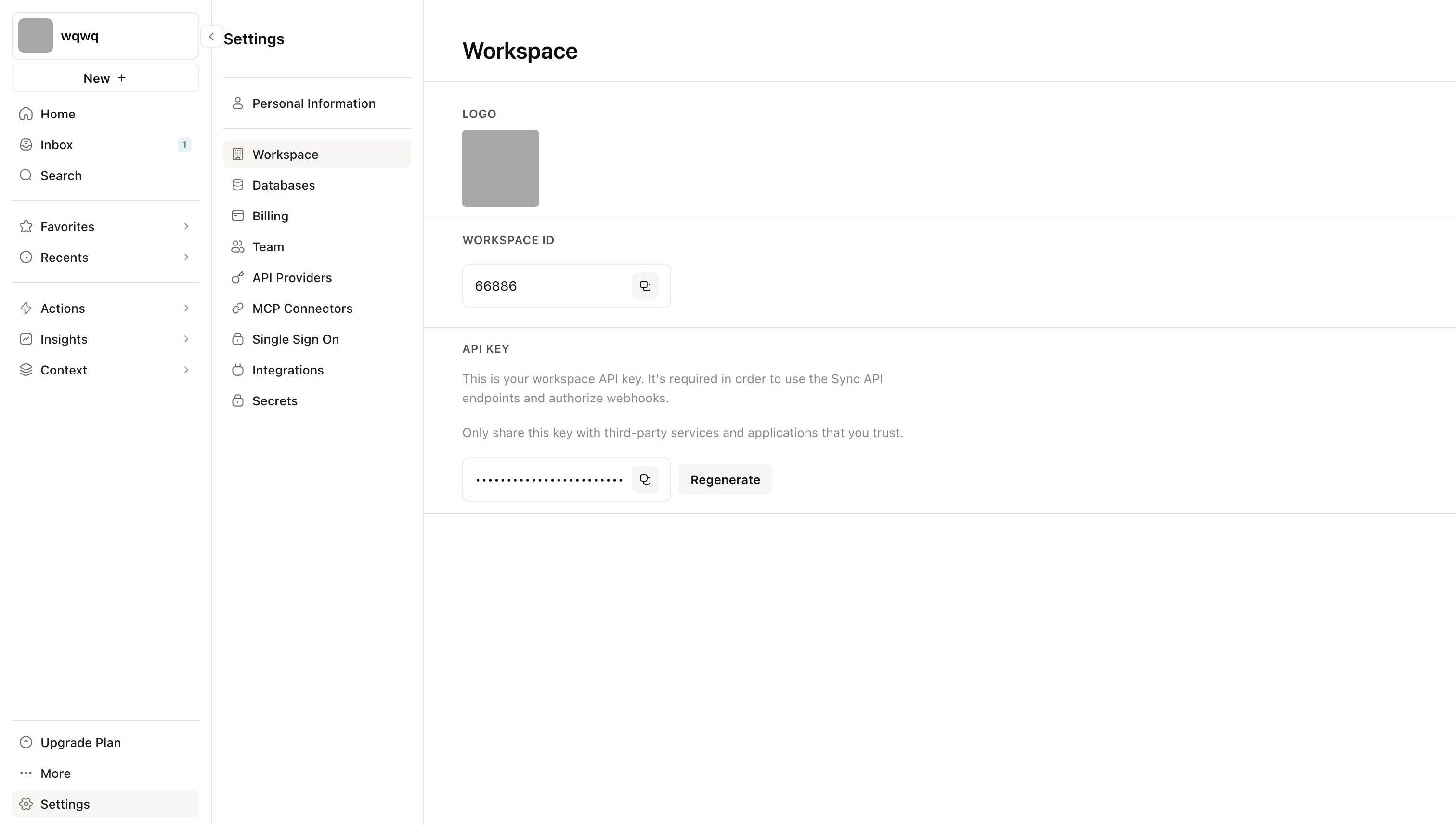
-
Create a connection in Scalekit
- In Scalekit dashboard, go to AgentKit > Connections > Create Connection. Find AirOps and click Create.
- Note the Connection name — use this as
connection_namein your code (e.g.,airopsmcp). - Click Save.
-
Add a connected account
Connected accounts link a user identifier in your system to an AirOps API key.
Via dashboard (for testing)
- Open the connection and click the Connected Accounts tab → Add account.
- Fill in:
- Your User’s ID — a unique identifier for this user in your system (e.g.,
user_123) - API Key — the AirOps API key you copied in step 1
- Your User’s ID — a unique identifier for this user in your system (e.g.,
- Click Save.
Via API (for production)
// Never hard-code API keys — read from secure storage or user inputconst airopsApiKey = getUserAiropsKey(); // retrieve from your secure storeawait scalekit.actions.upsertConnectedAccount({connectionName: 'airopsmcp',identifier: 'user_123',credentials: { api_key: airopsApiKey },});# Never hard-code API keys — read from secure storage or user inputairops_api_key = get_user_airops_key() # retrieve from your secure storescalekit_client.actions.upsert_connected_account(connection_name="airopsmcp",identifier="user_123",credentials={"api_key": airops_api_key})
-
-
Make your first call
Section titled “Make your first call”quickstart.ts import { ScalekitClient } from '@scalekit-sdk/node'import 'dotenv/config'const scalekit = new ScalekitClient(process.env.SCALEKIT_ENV_URL,process.env.SCALEKIT_CLIENT_ID,process.env.SCALEKIT_CLIENT_SECRET,)const actions = scalekit.actionsconst connector = 'airopsmcp'const identifier = 'user_123'// Make your first callconst result = await actions.executeTool({connector,identifier,toolName: 'airopsmcp_list_aeo_page_content_updates',toolInput: {},})console.log(result)quickstart.py import osfrom scalekit.client import ScalekitClientfrom dotenv import load_dotenvload_dotenv()scalekit_client = ScalekitClient(env_url=os.getenv("SCALEKIT_ENV_URL"),client_id=os.getenv("SCALEKIT_CLIENT_ID"),client_secret=os.getenv("SCALEKIT_CLIENT_SECRET"),)actions = scalekit_client.actionsconnection_name = "airopsmcp"identifier = "user_123"# Make your first callresult = actions.execute_tool(tool_input={},tool_name="airopsmcp_list_aeo_page_content_updates",connection_name=connection_name,identifier=identifier,)print(result)
What you can do
Section titled “What you can do”Connect this agent connector to let your agent:
- Grid write — Create or update rows in a grid table
- Update brand kit, track aeo page content — Update a Brand Kit’s base fields
- Edits suggest brand kit — Suggest edits to a Brand Kit’s fields without applying them
- Search knowledge base — Search a Knowledge Base for relevant content using semantic similarity
- Run grid rows — Trigger execution of one or more grid rows
- Read grid — Read rows from a grid table
Tool list
Section titled “Tool list”Use the exact tool names from the Tool list below when you call execute_tool. If you’re not sure which name to use, list the tools available for the current user first.
airopsmcp_add_grid_column#Add a new column to a grid table. Use this before write_grid when you need to write to a column that does not exist yet.5 params
Add a new column to a grid table. Use this before write_grid when you need to write to a column that does not exist yet.
data_typestringrequiredThe data type for the column.grid_idintegerrequiredThe ID of the grid.grid_table_idintegerrequiredThe ID of the grid table (sheet).titlestringrequiredThe column title.positionintegeroptionalOptional column position. If omitted, appended at the end.airopsmcp_analytics_chart#Query analytics data and display it as an interactive chart. Returns data with a UI reference for visualization.14 params
Query analytics data and display it as an interactive chart. Returns data with a UI reference for visualization.
brand_kit_idintegerrequiredThe Brand Kit ID to query analytics formetricsarrayrequiredMetrics to calculate and display (e.g., citation_rate, mention_rate, share_of_voice).chart_typestringoptionalType of chart to render. Line for time series, bar for comparisons, pie for proportions, area for comparison and visualizing totals with filled area under the curve. Default: line.countriesarrayoptionalFilter by country codes (ISO 3166-1 alpha-2)dimensionsarrayoptionalDimensions to group by (max 3).end_datestringoptionalEnd date (YYYY-MM-DD). Defaults to yesterday. Must be before today because today's data may still be processing and is incomplete — yesterday is used to ensure robust, complete data. Leave blank unless a specific date is requested.grainstringoptionalTime granularity for aggregation. Default: totalpersonasarrayoptionalFilter by persona IDsprovidersarrayoptionalFilter by AI providersstart_datestringoptionalStart date (YYYY-MM-DD). Default: 7 days agotagsarrayoptionalFilter by tag IDs. Returns data only for prompts tagged with any of the given tags.themesarrayoptionalFilter sentiment data by theme IDs. Only applies to sentiment_score metric.titlestringoptionalOptional chart title. If not provided, a title will be auto-generated.topicsarrayoptionalFilter by topic IDsairopsmcp_create_aeo_prompt#Create a new AEO prompt for a Brand Kit. Prompts are questions that can be asked about a brand to AI search engines, used to track AI visibility and citations.6 params
Create a new AEO prompt for a Brand Kit. Prompts are questions that can be asked about a brand to AI search engines, used to track AI visibility and citations.
brand_kit_idintegerrequiredThe Brand Kit ID to add the prompt totextstringrequiredThe prompt text (max 512 characters). Must be unique within the Brand Kit.topic_idintegerrequiredTopic ID to associate with the prompt. Must belong to the same Brand Kit. Use `list_topics` to discover available topics and either suggest one or ask the user to choose.countriesarrayoptionalISO alpha-2 country codes to assign (e.g., ["US", "GB"]). Must be configured on the Brand Kit.persona_idsarrayoptionalPersona IDs to assign. Must belong to the same Brand Kit. Use `list_personas` to discover available personas.platformsarrayoptionalPlatforms to assign. Valid values: chat_gpt, gemini, perplexity, google_ai_mode, google_ai_overview.airopsmcp_create_brand_kit_direct_upload#Initiate a direct file upload for use with Brand Kit visual tools.5 params
Initiate a direct file upload for use with Brand Kit visual tools.
brand_kit_idintegerrequiredThe Brand Kit ID this file is intended forbyte_sizeintegerrequiredSize of the file in byteschecksumstringrequiredBase64-encoded MD5 digest of the file contentscontent_typestringrequiredMIME type of the filefilenamestringrequiredThe filename including extension, e.g. "logo.png" or "brand-font.woff2"airopsmcp_create_grid#Create a new empty, general-purpose grid with the given name. The grid is created with a single empty sheet (zero rows, zero columns).2 params
Create a new empty, general-purpose grid with the given name. The grid is created with a single empty sheet (zero rows, zero columns).
namestringrequiredThe name for the new grid.workspace_idintegeroptionalOptional workspace ID. Defaults to the user's only workspace when unambiguous.airopsmcp_create_grid_sheet#Create a new sheet (grid table) within an existing grid. The sheet is created with zero rows and zero columns.2 params
Create a new sheet (grid table) within an existing grid. The sheet is created with zero rows and zero columns.
grid_idintegerrequiredThe ID of the grid to add the sheet to.namestringrequiredThe name for the new sheet.airopsmcp_create_report#Create a new analytics report for a Brand Kit. Reports contain one or more modules that visualize metrics like citation_rate, mention_rate, share_of_voice, etc.3 params
Create a new analytics report for a Brand Kit. Reports contain one or more modules that visualize metrics like citation_rate, mention_rate, share_of_voice, etc.
brand_kit_idintegerrequiredThe Brand Kit IDmodulesarrayrequiredArray of module configurationsnamestringrequiredReport name (must be unique per brand kit)airopsmcp_get_aeo_citation#Get prompts citing a specific URL. The 'id' parameter is the URL to look up.9 params
Get prompts citing a specific URL. The 'id' parameter is the URL to look up.
brand_kit_idintegerrequiredThe ID of the Brand KitidstringrequiredResource IDcountriesarrayoptionalFilter metrics by country codesend_datestringoptionalEnd date for metrics (ISO 8601). Defaults to today.fieldsarrayoptionalSpecify which fields to return in the response, as a list of field names.filtersarrayoptionalFilter results by column values. Each filter requires column_id, operator, and value.personasarrayoptionalFilter metrics by persona IDsprovidersarrayoptionalFilter metrics by AI providersstart_datestringoptionalStart date for metrics (ISO 8601). Defaults to 1 month ago.airopsmcp_get_aeo_page_content_update#Get a specific page content update by ID. Track content updates.6 params
Get a specific page content update by ID. Track content updates.
idintegerrequiredResource IDbrand_kit_idintegeroptionalOptional Brand Kit ID to filter content updates byfieldsarrayoptionalSpecify which fields to return in the response, as a list of field names.filtersarrayoptionalFilter results by column values. Each filter requires column_id, operator, and value.includesarrayoptionalRelated resources to include in the response, as a list of relationship names.workspace_idintegeroptionalID of the workspace to retrieve results from. If not provided, returns results from all workspaces the user belongs to.airopsmcp_get_answer#Get a specific AI answer by ID with full text content.3 params
Get a specific AI answer by ID with full text content.
idintegerrequiredResource IDfieldsarrayoptionalSpecify which fields to return in the response, as a list of field names.includesarrayoptionalRelated resources to include in the response, as a list of relationship names.airopsmcp_get_brand_kit#Fetch a Brand Kit's brand identity (writing_tone, writing_persona) and associated entities (product lines, audiences, content types, regions, writing rules, cus...6 params
Fetch a Brand Kit's brand identity (writing_tone, writing_persona) and associated entities (product lines, audiences, content types, regions, writing rules, cus...
idintegerrequiredResource IDfieldsarrayoptionalSpecify which fields to return in the response, as a list of field names.filtersarrayoptionalFilter results by column values. Each filter requires column_id, operator, and value.includesarrayoptionalRelated resources to include in the response, as a list of relationship names.versionstringoptionalBrand Kit version to read from (`active` or `draft`). Defaults to `active`.workspace_idintegeroptionalID of the workspace to retrieve brand kits from. If not provided, returns brand kits from all workspaces the user belongs to.airopsmcp_get_grid_row_execution_status#Check the status of grid row executions. Returns the overall status and per-column detail for each execution.2 params
Check the status of grid row executions. Returns the overall status and per-column detail for each execution.
grid_idintegerrequiredThe ID of the grid containing the executions.row_execution_idsarrayrequiredIDs of the row executions to check (max 50).airopsmcp_get_insights_settings#Get AEO insights configuration for a Brand Kit, this includes the relevant information to use any AEO and analytics tools.3 params
Get AEO insights configuration for a Brand Kit, this includes the relevant information to use any AEO and analytics tools.
idintegerrequiredResource IDfieldsarrayoptionalSpecify which fields to return in the response, as a list of field names.workspace_idintegeroptionalID of the workspace to retrieve results from. If not provided, returns results from all workspaces the user belongs to.airopsmcp_get_page_details#Get AEO metrics for a specific web page. Page details include citation share, citation rate, unique cited questions count, and Google Search Console metrics (cl...4 params
Get AEO metrics for a specific web page. Page details include citation share, citation rate, unique cited questions count, and Google Search Console metrics (cl...
idintegerrequiredResource IDend_datestringoptionalEnd date for metrics period (YYYY-MM-DD format). Defaults to current date.fieldsarrayoptionalSpecify which fields to return in the response, as a list of field names.start_datestringoptionalStart date for metrics period (YYYY-MM-DD format). Defaults to 1 month ago.airopsmcp_get_page_prompts#Get prompts citing a specific web page. Returns AI prompts that cite the page along with citation metrics (citation_rate, mention_rate) and trends.13 params
Get prompts citing a specific web page. Returns AI prompts that cite the page along with citation metrics (citation_rate, mention_rate) and trends.
brand_kit_idintegerrequiredID of the brand kitweb_page_idintegerrequiredID of the web page to get citing prompts forcountriesarrayoptionalCountry codes to filter by (ISO 3166-1 alpha-2 format).end_datestringoptionalEnd date for analysis period (ISO 8601 format, defaults to today)fieldsarrayoptionalSpecify which fields to return in the response, as a list of field names.filtersarrayoptionalFilter results by column values. Each filter requires column_id, operator, and value.includesarrayoptionalRelated resources to include in the response, as a list of relationship names.pageintegeroptionalPage numberper_pageintegeroptionalItems per pagepersonasarrayoptionalFilter by persona IDsprovidersarrayoptionalFilter by AI providers (e.g., chat_gpt, gemini, perplexity, google_ai_mode, google_ai_overview, claude, grok, microsoft_copilot)start_datestringoptionalStart date for analysis period (ISO 8601 format, defaults to 1 month ago)topic_idsarrayoptionalFilter by topic IDsairopsmcp_get_prompt_answers#Get AI answers for a specific prompt/question. Prompt answers are the AI answers for a specific question/prompt asked to multiple AI providers and the answers a...10 params
Get AI answers for a specific prompt/question. Prompt answers are the AI answers for a specific question/prompt asked to multiple AI providers and the answers a...
prompt_idintegerrequiredID of the question/prompt to get answers forcountriesstringoptionalCountry codes to filter by (ISO 3166-1 alpha-2 format).end_datestringoptionalEnd date for analysis period (ISO 8601 format, defaults to today)fieldsarrayoptionalSpecify which fields to return in the response, as a list of field names.includesarrayoptionalRelated resources to include in the response, as a list of relationship names.pageintegeroptionalPage numberper_pageintegeroptionalItems per pagepersonasstringoptionalComma-separated persona IDs to filter by.Use "default" for the default persona.sortstringoptionalSort field. Prefix with - for descending.start_datestringoptionalStart date for analysis period (ISO 8601 format, defaults to 1 month ago)airopsmcp_get_report#Get a specific report by ID with its module configurations. Reports are saved analytics views for a Brand Kit.5 params
Get a specific report by ID with its module configurations. Reports are saved analytics views for a Brand Kit.
brand_kit_idintegerrequiredThe ID of the Brand KitidintegerrequiredResource IDfieldsarrayoptionalSpecify which fields to return in the response, as a list of field names.filtersarrayoptionalFilter results by column values. Each filter requires column_id, operator, and value.includesarrayoptionalRelated resources to include in the response, as a list of relationship names.airopsmcp_get_sentiment_theme_answers#Get individual AI answers with sentiment details for a specific theme. Returns answer text, sentiment (positive/neutral/negative), confidence score, and provide...10 params
Get individual AI answers with sentiment details for a specific theme. Returns answer text, sentiment (positive/neutral/negative), confidence score, and provide...
brand_kit_idintegerrequiredThe Brand Kit IDsentiment_theme_idintegerrequiredThe sentiment theme ID to drill into. Use query_analytics with dimensions=[theme] to discover available theme IDs first.countriesarrayoptionalFilter by country codes (ISO 3166-1 alpha-2)end_datestringoptionalEnd date (YYYY-MM-DD). Defaults to yesterday. Must be before today.pageintegeroptionalPage number. Default: 1per_pageintegeroptionalResults per page (1-50). Default: 10personasarrayoptionalFilter by persona IDsprovidersarrayoptionalFilter by AI providersstart_datestringoptionalStart date (YYYY-MM-DD). Default: 30 days agotopicsarrayoptionalFilter by topic IDsairopsmcp_list_aeo_citations#List citations (URLs) with metrics for a Brand Kit.11 params
List citations (URLs) with metrics for a Brand Kit.
brand_kit_idintegerrequiredThe ID of the Brand KitcountriesarrayoptionalFilter metrics by country codesend_datestringoptionalEnd date for metrics (ISO 8601). Defaults to today.fieldsarrayoptionalSpecify which fields to return in the response, as a list of field names.filtersarrayoptionalFilter results by column values. Each filter requires column_id, operator, and value.pageintegeroptionalPage numberper_pageintegeroptionalItems per pagepersonasarrayoptionalFilter metrics by persona IDsprovidersarrayoptionalFilter metrics by AI providerssortstringoptionalSort field. Prefix with - for descending.start_datestringoptionalStart date for metrics (ISO 8601). Defaults to 1 month ago.airopsmcp_list_aeo_domains#List domains cited in AI answers for a Brand Kit. Cited domains aggregated by domain with citation metrics.11 params
List domains cited in AI answers for a Brand Kit. Cited domains aggregated by domain with citation metrics.
brand_kit_idintegerrequiredThe ID of the Brand KitcountriesarrayoptionalFilter metrics by country codesend_datestringoptionalEnd date for metrics (ISO 8601). Defaults to today.fieldsarrayoptionalSpecify which fields to return in the response, as a list of field names.filtersarrayoptionalFilter results by column values. Each filter requires column_id, operator, and value.pageintegeroptionalPage numberper_pageintegeroptionalItems per pagepersonasarrayoptionalFilter metrics by persona IDsprovidersarrayoptionalFilter metrics by AI providerssortstringoptionalSort field. Prefix with - for descending.start_datestringoptionalStart date for metrics (ISO 8601). Defaults to 1 month ago.airopsmcp_list_aeo_page_content_updates#List page content updates for a workspace. Track content updates.8 params
List page content updates for a workspace. Track content updates.
brand_kit_idintegeroptionalOptional Brand Kit ID to filter content updates byfieldsarrayoptionalSpecify which fields to return in the response, as a list of field names.filtersarrayoptionalFilter results by column values. Each filter requires column_id, operator, and value.includesarrayoptionalRelated resources to include in the response, as a list of relationship names.pageintegeroptionalPage numberper_pageintegeroptionalItems per pagesortstringoptionalSort field. Prefix with - for descending.workspace_idintegeroptionalID of the workspace to retrieve results from. If not provided, returns results from all workspaces the user belongs to.airopsmcp_list_aeo_prompts#List AEO prompts for a specific Brand Kit. Questions are the AI prompts that can be asked about a brand.12 params
List AEO prompts for a specific Brand Kit. Questions are the AI prompts that can be asked about a brand.
brand_kit_idintegerrequiredThe ID of the Brand KitcountriesarrayoptionalFilter metrics by country codesend_datestringoptionalEnd date for metrics (ISO 8601). Defaults to today.fieldsarrayoptionalSpecify which fields to return in the response, as a list of field names.filtersarrayoptionalFilter results by column values. Each filter requires column_id, operator, and value.includesarrayoptionalRelated resources to include in the response, as a list of relationship names.pageintegeroptionalPage numberper_pageintegeroptionalItems per pagepersonasarrayoptionalFilter metrics by persona IDsprovidersarrayoptionalFilter metrics by AI providerssortstringoptionalSort field. Prefix with - for descending.start_datestringoptionalStart date for metrics (ISO 8601). Defaults to 1 month ago.airopsmcp_list_brand_kits#List all Brand Kits the user has access to. Returns `brand_management_enabled` and `aeo_enabled` flags for each brand kit.7 params
List all Brand Kits the user has access to. Returns `brand_management_enabled` and `aeo_enabled` flags for each brand kit.
fieldsarrayoptionalSpecify which fields to return in the response, as a list of field names.filtersarrayoptionalFilter results by column values. Each filter requires column_id, operator, and value.pageintegeroptionalPage numberper_pageintegeroptionalItems per pagesortstringoptionalSort field. Prefix with - for descending.versionstringoptionalBrand Kit version to read from (`active` or `draft`). Defaults to `active`.workspace_idintegeroptionalID of the workspace to retrieve results from. If not provided, returns results from all workspaces the user belongs to.airopsmcp_list_grids#List grids the authenticated user has access to. Use includes=[\"grid_tables.grid_columns\"] to get table and column structure needed for read_grid and write_gr...6 params
List grids the authenticated user has access to. Use includes=[\"grid_tables.grid_columns\"] to get table and column structure needed for read_grid and write_gr...
fieldsarrayoptionalSpecify which fields to return in the response, as a list of field names.filtersarrayoptionalFilter results by column values. Each filter requires column_id, operator, and value.includesarrayoptionalRelated resources to include in the response, as a list of relationship names.pageintegeroptionalPage numberper_pageintegeroptionalItems per pagesortstringoptionalSort field. Prefix with - for descending.airopsmcp_list_knowledge_bases#List all Knowledge Bases the authenticated user has access to. Knowledge Bases store documents for semantic search.5 params
List all Knowledge Bases the authenticated user has access to. Knowledge Bases store documents for semantic search.
fieldsarrayoptionalSpecify which fields to return in the response, as a list of field names.filtersarrayoptionalFilter results by column values. Each filter requires column_id, operator, and value.pageintegeroptionalPage numberper_pageintegeroptionalItems per pagesortstringoptionalSort field. Prefix with - for descending.airopsmcp_list_pages#List web pages with daily metrics (AEO citations, GSC clicks/impressions, GA4 traffic) for a brand kit.9 params
List web pages with daily metrics (AEO citations, GSC clicks/impressions, GA4 traffic) for a brand kit.
brand_kit_idintegerrequiredID of the brand kit to retrieve web page metrics forend_datestringoptionalEnd date for analysis period (ISO 8601 format, defaults to today)fieldsarrayoptionalSpecify which fields to return in the response, as a list of field names.filtersarrayoptionalFilter results by column values. Each filter requires column_id, operator, and value.pageintegeroptionalPage numberper_pageintegeroptionalItems per pagesmart_filterstringoptionalApply a predefined filter preset.sortstringoptionalSort field. Prefix with - for descending.start_datestringoptionalStart date for analysis period (ISO 8601 format, defaults to 1 month ago)airopsmcp_list_personas#List personas for a specific Brand Kit. Personas are the characters that can be used to ask questions about a brand.6 params
List personas for a specific Brand Kit. Personas are the characters that can be used to ask questions about a brand.
brand_kit_idintegerrequiredThe ID of the Brand KitfieldsarrayoptionalSpecify which fields to return in the response, as a list of field names.filtersarrayoptionalFilter results by column values. Each filter requires column_id, operator, and value.pageintegeroptionalPage numberper_pageintegeroptionalItems per pagesortstringoptionalSort field. Prefix with - for descending.airopsmcp_list_reports#List saved analytics reports for a specific Brand Kit.7 params
List saved analytics reports for a specific Brand Kit.
brand_kit_idintegerrequiredThe ID of the Brand KitfieldsarrayoptionalSpecify which fields to return in the response, as a list of field names.filtersarrayoptionalFilter results by column values. Each filter requires column_id, operator, and value.includesarrayoptionalRelated resources to include in the response, as a list of relationship names.pageintegeroptionalPage numberper_pageintegeroptionalItems per pagesortstringoptionalSort field. Prefix with - for descending.airopsmcp_list_tags#List tags for a specific Brand Kit. Tags are user-defined labels applied to prompts within a Brand Kit.6 params
List tags for a specific Brand Kit. Tags are user-defined labels applied to prompts within a Brand Kit.
brand_kit_idintegerrequiredThe ID of the Brand KitfieldsarrayoptionalSpecify which fields to return in the response, as a list of field names.filtersarrayoptionalFilter results by column values. Each filter requires column_id, operator, and value.pageintegeroptionalPage numberper_pageintegeroptionalItems per pagesortstringoptionalSort field. Prefix with - for descending.airopsmcp_list_topics#List topics for a specific Brand Kit. Topics are the categories of questions that can be asked about a Brand Kit.6 params
List topics for a specific Brand Kit. Topics are the categories of questions that can be asked about a Brand Kit.
brand_kit_idintegerrequiredThe ID of the Brand KitfieldsarrayoptionalSpecify which fields to return in the response, as a list of field names.filtersarrayoptionalFilter results by column values. Each filter requires column_id, operator, and value.pageintegeroptionalPage numberper_pageintegeroptionalItems per pagesortstringoptionalSort field. Prefix with - for descending.airopsmcp_list_workspaces#List all workspaces the authenticated user has access to. Workspaces are the top-level container for all resources in the AirOps platform.5 params
List all workspaces the authenticated user has access to. Workspaces are the top-level container for all resources in the AirOps platform.
fieldsarrayoptionalSpecify which fields to return in the response, as a list of field names.filtersarrayoptionalFilter results by column values. Each filter requires column_id, operator, and value.pageintegeroptionalPage numberper_pageintegeroptionalItems per pagesortstringoptionalSort field. Prefix with - for descending.airopsmcp_manage_brand_kit_audience#Create or update an audience for a Brand Kit draft. Omit `id` to create a new audience; provide `id` to update an existing one.4 params
Create or update an audience for a Brand Kit draft. Omit `id` to create a new audience; provide `id` to update an existing one.
brand_kit_idintegerrequiredThe Brand Kit IDdescriptionstringoptionalAudience descriptionidintegeroptionalAudience ID (omit to create new)namestringoptionalAudience name (required on create)airopsmcp_manage_brand_kit_competitor#Create or update a competitor for a Brand Kit. Omit `id` to create a new competitor; provide `id` to update an existing one.5 params
Create or update a competitor for a Brand Kit. Omit `id` to create a new competitor; provide `id` to update an existing one.
brand_kit_idintegerrequiredThe Brand Kit IDdomainstringoptionalCompetitor domain (e.g. "example.com")idintegeroptionalCompetitor ID (omit to create new)namestringoptionalCompetitor name (required on create)product_line_idsarrayoptionalProduct line IDs to associate (must belong to this brand kit, at least one required)airopsmcp_manage_brand_kit_content_sample#Create or update a content sample for a Brand Kit. Omit `id` to create a new content sample; provide `id` to update an existing one.7 params
Create or update a content sample for a Brand Kit. Omit `id` to create a new content sample; provide `id` to update an existing one.
brand_kit_idintegerrequiredThe Brand Kit IDaudience_idsarrayoptionalAudience IDs to associate (must belong to this brand kit). Pass [] to clear.contentstringoptionalPlain text content for the sample. On create, provide either content or url (not both).content_type_idintegeroptionalContent type ID (required on create, must belong to this brand kit)idintegeroptionalContent sample ID (omit to create new)region_idsarrayoptionalRegion IDs to associate (must belong to this brand kit). Pass [] to clear.urlstringoptionalURL of the content sample. On create, provide either url or content (not both).airopsmcp_manage_brand_kit_content_type#Create or update a content type for a Brand Kit. Omit `id` to create a new content type; provide `id` to update an existing one.9 params
Create or update a content type for a Brand Kit. Omit `id` to create a new content type; provide `id` to update an existing one.
brand_kit_idintegerrequiredThe Brand Kit IDcta_textstringoptionalCall-to-action textcta_urlstringoptionalCall-to-action URLheader_casestringoptionalHeader case styleheader_case_custom_valuestringoptionalCustom header case rules (when header_case is custom)idintegeroptionalContent type ID (omit to create new)namestringoptionalContent type name (required on create)sample_urlstringoptionalURL of a content sample (only used on create)template_outlinestringoptionalTemplate outlineairopsmcp_manage_brand_kit_custom_variable#Before creating a custom variable, you MUST analyze the user's intent and suggest the appropriate Brand Kit dimension instead.4 params
Before creating a custom variable, you MUST analyze the user's intent and suggest the appropriate Brand Kit dimension instead.
brand_kit_idintegerrequiredThe Brand Kit IDidintegeroptionalCustom variable ID (omit to create new)namestringoptionalCustom variable name (required on create)valuestringoptionalCustom variable value (required on create, editable on update)airopsmcp_manage_brand_kit_font#Create or update a font for a Brand Kit. Omit `id` to create a new font; provide `id` to update an existing one.7 params
Create or update a font for a Brand Kit. Omit `id` to create a new font; provide `id` to update an existing one.
brand_kit_idintegerrequiredThe Brand Kit IDfile_urlstringoptionalPublicly accessible URL to a font file (TTF, OTF, WOFF, WOFF2, or EOT). Use signed_id instead if the file was uploaded via create_brand_kit_direct_upload. Pass null or empty to leave the existing file unchanged.google_font_linkstringoptionalGoogle Fonts URL for this font (e.g. https://fonts.google.com/specimen/Inter). Pass null or empty string to clear.idintegeroptionalFont ID (omit to create new)namestringoptionalFont name, e.g. "Inter" or "Brand Heading Font" (required on create)signed_idstringoptionalSigned blob ID returned by create_brand_kit_direct_upload after a direct upload. Preferred over file_url when the user has a local file. Pass null to leave the existing file unchanged.usage_instructionsstringoptionalInstructions for agents on when and how to use this font. Pass null or empty string to clear.airopsmcp_manage_brand_kit_logo_size#Create or update a logo size for a Brand Kit. Omit `id` to create a new logo size; provide `id` to update an existing one.6 params
Create or update a logo size for a Brand Kit. Omit `id` to create a new logo size; provide `id` to update an existing one.
brand_kit_idintegerrequiredThe Brand Kit IDheightintegeroptionalHeight in pixels. Pass null to clear.idintegeroptionalLogo size ID (omit to create new)namestringoptionalLogo size name, e.g. "Web Banner" or "Social Media Square" (required on create)usage_instructionsstringoptionalInstructions for agents on when and how to use this logo size. Pass null to clear.widthintegeroptionalWidth in pixels. Pass null to clear.airopsmcp_manage_brand_kit_logo_variant#Create or update a logo variant for a Brand Kit. Omit `id` to create a new logo variant; provide `id` to update an existing one.7 params
Create or update a logo variant for a Brand Kit. Omit `id` to create a new logo variant; provide `id` to update an existing one.
brand_kit_idintegerrequiredThe Brand Kit IDbackground_colorstringoptionalBackground color as a hex value (e.g. #ffffff). Pass null to clear.file_urlstringoptionalPublicly accessible URL to a PNG or SVG image. Use signed_id instead if the file was uploaded via create_brand_kit_direct_upload. Pass null to leave the existing file unchanged.idintegeroptionalLogo variant ID (omit to create new)namestringoptionalLogo variant name, e.g. "Primary Logo" or "Dark Background Logo" (required on create)signed_idstringoptionalSigned blob ID returned by create_brand_kit_direct_upload after a direct upload. Preferred over file_url when the user has a local file. Pass null to leave the existing file unchanged.usage_instructionsstringoptionalInstructions for agents on when and how to use this logo, e.g. "Use on dark backgrounds only". Pass null to clear.airopsmcp_manage_brand_kit_palette#Create or update a color palette for a Brand Kit. Omit `id` to create a new palette; provide `id` to update an existing one.3 params
Create or update a color palette for a Brand Kit. Omit `id` to create a new palette; provide `id` to update an existing one.
brand_kit_idintegerrequiredThe Brand Kit IDidintegeroptionalPalette ID (omit to create new)namestringoptionalThe palette name, e.g. "Primary" (required on create)airopsmcp_manage_brand_kit_palette_color#Create or update a color within a Brand Kit palette. Omit `id` to create a new color; provide `id` to update an existing one.6 params
Create or update a color within a Brand Kit palette. Omit `id` to create a new color; provide `id` to update an existing one.
brand_kit_idintegerrequiredThe Brand Kit IDidintegeroptionalColor ID (omit to create new)namestringoptionalColor name, e.g. "Brand Blue" (required on create)palette_idintegeroptionalThe palette ID (required on create)usage_instructionsstringoptionalInstructions for agents on when and how to use this colorvaluestringoptionalHex color value, e.g. "#0055ff" (required on create)airopsmcp_manage_brand_kit_product_line#Create or update a product line for a Brand Kit. Omit `id` to create a new product line; provide `id` to update an existing one.7 params
Create or update a product line for a Brand Kit. Omit `id` to create a new product line; provide `id` to update an existing one.
brand_kit_idintegerrequiredThe Brand Kit IDdetailsstringoptionalProduct line detailsidintegeroptionalProduct line ID (omit to create new)ideal_customer_profilestringoptionalIdeal customer profilenamestringoptionalProduct line name (required on create)positioningstringoptionalProduct positioningurlstringoptionalProduct line URLairopsmcp_manage_brand_kit_region#Create or update a region for a Brand Kit. Omit `id` to create a new region; provide `id` to update an existing one.5 params
Create or update a region for a Brand Kit. Omit `id` to create a new region; provide `id` to update an existing one.
brand_kit_idintegerrequiredThe Brand Kit IDdescriptionstringoptionalRegion descriptionicon_namestringoptionalFlag icon name (e.g. flag-us, flag-gb). Pass empty string or null to clear.idintegeroptionalRegion ID (omit to create new)namestringoptionalRegion name (required on create)airopsmcp_manage_brand_kit_type_size#Create or update a type size for a Brand Kit. Omit `id` to create a new type size; provide `id` to update an existing one.8 params
Create or update a type size for a Brand Kit. Omit `id` to create a new type size; provide `id` to update an existing one.
brand_kit_idintegerrequiredThe Brand Kit IDfont_idintegeroptionalID of the font this type size belongs toidintegeroptionalType size ID (omit to create new)line_heightnumberoptionalLine height as a decimal multiplier, e.g. 1.5.namestringoptionalType size name, e.g. "H1 Display" or "Body Regular" (required on create)sizeintegeroptionalFont size in pixels.usage_instructionsstringoptionalInstructions for agents on when and how to use this type size. Pass null or empty string to clear.weightintegeroptionalFont weight as an integer (100–900), e.g. 400 or 700.airopsmcp_manage_brand_kit_usage_rule#Create or update a usage rule for a Brand Kit. Omit `id` to create a new usage rule; provide `id` to update an existing one.4 params
Create or update a usage rule for a Brand Kit. Omit `id` to create a new usage rule; provide `id` to update an existing one.
brand_kit_idintegerrequiredThe Brand Kit IDapplies_tostringoptionalWhat this rule applies to. Required on create; ignored on update.idintegeroptionalUsage rule ID (omit to create new)namestringoptionalThe usage rule text, e.g. "Use only on white backgrounds" (required on create)airopsmcp_manage_brand_kit_visual_example#Create or update a visual example for a Brand Kit's Data Visualization section. Omit `id` to create a new visual example; provide `id` to update an existing one...7 params
Create or update a visual example for a Brand Kit's Data Visualization section. Omit `id` to create a new visual example; provide `id` to update an existing one...
brand_kit_idintegerrequiredThe Brand Kit IDfile_urlstringoptionalPublicly accessible URL to a PNG, JPG, SVG, GIF, or WebP image. Use signed_id instead if the file was uploaded via create_brand_kit_direct_upload. Pass null to leave the existing file unchanged.idintegeroptionalVisual example ID (omit to create new)sample_urlstringoptionalOptional URL to a live sample. Pass null to clear.signed_idstringoptionalSigned blob ID returned by create_brand_kit_direct_upload after a direct upload. Preferred over file_url when the user has a local file. Pass null to leave the existing file unchanged.titlestringoptionalTitle of the visual example, e.g. "Dashboard Overview" (required on create)usage_instructionsstringoptionalInstructions for agents on when and how to use this visual example. Pass null to clear.airopsmcp_manage_brand_kit_writing_rule#Create or update a writing rule for a Brand Kit. Omit `id` to create a new rule; provide `id` to update an existing one.6 params
Create or update a writing rule for a Brand Kit. Omit `id` to create a new rule; provide `id` to update an existing one.
brand_kit_idintegerrequiredThe Brand Kit IDaudience_idintegeroptionalAudience ID to scope this rule to (mutually exclusive with content_type_id and region_id). Only on create.content_type_idintegeroptionalContent type ID to scope this rule to (mutually exclusive with audience_id and region_id). Only on create.idintegeroptionalWriting rule ID (omit to create new)region_idintegeroptionalRegion ID to scope this rule to (mutually exclusive with content_type_id and audience_id). Only on create.textstringoptionalWriting rule text (required on create)airopsmcp_publish_brand_kit#Publish a Brand Kit's current draft so changes become active. This promotes the current draft to active and creates a fresh draft from it.1 param
Publish a Brand Kit's current draft so changes become active. This promotes the current draft to active and creates a fresh draft from it.
brand_kit_idintegerrequiredThe Brand Kit ID to publishairopsmcp_query_analytics#Query analytics data for a Brand Kit with flexible metrics, dimensions, and filters.15 params
Query analytics data for a Brand Kit with flexible metrics, dimensions, and filters.
brand_kit_idintegerrequiredThe Brand Kit ID to query analytics formetricsarrayrequiredMetrics to calculate and display (e.g., citation_rate, mention_rate, share_of_voice).brand_mentionedstringoptionalFilter by prompt type. Options: category (generic prompts - recommended for accurate visibility metrics), brand (prompts mentioning the brand). Defaults to category if not specifiedcountriesarrayoptionalFilter by country codes (ISO 3166-1 alpha-2)dimensionsarrayoptionalDimensions to group by (max 3).end_datestringoptionalEnd date (YYYY-MM-DD). Defaults to yesterday. Must be before today because today's data may still be processing and is incomplete — yesterday is used to ensure robust, complete data. Leave blank unless a specific date is requested.grainstringoptionalTime granularity for aggregation. Default: totallimitintegeroptionalMaximum rows to return (1-1000). Default: 100order_bystringoptionalCustom sort order (e.g., "citation_count DESC")personasarrayoptionalFilter by persona IDsprovidersarrayoptionalFilter by AI providersstart_datestringoptionalStart date (YYYY-MM-DD). Default: 7 days agotagsarrayoptionalFilter by tag IDs. Returns data only for prompts tagged with any of the given tags.themesarrayoptionalFilter sentiment data by theme IDs. Only applies to sentiment_score metric.topicsarrayoptionalFilter by topic IDsairopsmcp_read_grid#Read rows from a grid table. Returns rows as objects with column titles as keys.7 params
Read rows from a grid table. Returns rows as objects with column titles as keys.
grid_idintegerrequiredThe ID of the grid to read from.grid_table_idintegerrequiredThe ID of the grid table (sheet) to read.column_idsarrayoptionalOptional list of column IDs to include. If omitted, all columns are returned.filtersarrayoptionalOptional filters to apply.limitintegeroptionalNumber of rows to return (1-100, default 50).offsetintegeroptionalRow offset for pagination (default: 0). Use with limit to page through results.truncateintegeroptionalMaximum number of characters per cell value. 0 means no truncation (default).airopsmcp_run_grid_rows#Trigger execution of one or more grid rows. This runs all workflow (app execution) columns for each specified row in dependency order.3 params
Trigger execution of one or more grid rows. This runs all workflow (app execution) columns for each specified row in dependency order.
grid_idintegerrequiredThe ID of the grid containing the rows to execute.grid_row_idsarrayrequiredIDs of the grid rows to execute (max 50).grid_table_idintegerrequiredThe ID of the grid table (sheet) containing the rows.airopsmcp_search_knowledge_base#Search a Knowledge Base for relevant content using semantic similarity. Use list_knowledge_bases() first to find available Knowledge Bases and their IDs.3 params
Search a Knowledge Base for relevant content using semantic similarity. Use list_knowledge_bases() first to find available Knowledge Bases and their IDs.
knowledge_base_idintegerrequiredThe ID of the Knowledge Base to search.querystringrequiredThe search query. Use natural language to describe what you are looking for.top_kintegeroptionalNumber of results to return (1-20, default 5).airopsmcp_suggest_brand_kit_edits#Suggest edits to a Brand Kit's fields without applying them. Returns a comparison of current vs suggested values for user review.5 params
Suggest edits to a Brand Kit's fields without applying them. Returns a comparison of current vs suggested values for user review.
brand_kit_idintegerrequiredThe Brand Kit IDsuggestionsobjectrequiredField name to suggested value pairs. Valid fields depend on entity_type. Use arrays for multi_select fields (e.g. product_line_ids).entity_typestringoptionalWhich entity to suggest edits for. Defaults to brand_kit.idintegeroptionalRecord ID of the existing record to update. Omit to suggest creating a new record.titlestringoptionalOptional heading to display in the review UIairopsmcp_track_aeo_page_content_update#Track a page content update (publish/refresh) to correlate future analytics with content changes.3 params
Track a page content update (publish/refresh) to correlate future analytics with content changes.
typestringrequiredThe type of content update to trackurlstringrequiredThe page URL to track (max 512 characters). The URL must belong to a brand_url or domain configured in one of the workspace's Brand Kits (use get_insights_settings to see domains). For example, if the Brand Kit domain is "example.com", URLs like "https://example.com/blog/post" will match.workspace_idintegerrequiredThe workspace ID to create the content update inairopsmcp_update_brand_kit#Update a Brand Kit's base fields. Only provided fields are changed.6 params
Update a Brand Kit's base fields. Only provided fields are changed.
brand_kit_idintegerrequiredThe Brand Kit ID to updatebrand_aboutstringoptionalDescription/overview of the brandbrand_namestringoptionalName of the brandbrand_urlstringoptionalURL of the brand websitewriting_personastringoptionalThe persona/voice used in brand writingwriting_tonestringoptionalThe tone of voice for brand contentairopsmcp_write_grid#Create or update rows in a grid table. When mode is 'create', rows are added as new rows with column titles as keys.4 params
Create or update rows in a grid table. When mode is 'create', rows are added as new rows with column titles as keys.
grid_idintegerrequiredThe ID of the grid to write to.grid_table_idintegerrequiredThe ID of the grid table (sheet) to write to.modestringrequired'create' to add new rows, 'update' to modify existing rows (requires __id in each row).rowsarrayrequiredArray of row objects. Keys are column titles, values are cell values. For update mode, include __id with the row ID.