


Zendesk connector
API KEYCustomer SupportCommunicationConnect to Zendesk. Manage customer support tickets, users, organizations, and help desk operations
Zendesk connector
-
Install the SDK
Section titled “Install the SDK”Terminal window npm install @scalekit-sdk/nodeTerminal window pip install scalekit -
Set your credentials
Section titled “Set your credentials”Add your Scalekit credentials to your
.envfile. Find values in app.scalekit.com > Developers > API Credentials..env SCALEKIT_ENVIRONMENT_URL=<your-environment-url>SCALEKIT_CLIENT_ID=<your-client-id>SCALEKIT_CLIENT_SECRET=<your-client-secret> -
Set up the connector
Section titled “Set up the connector”Register your Zendesk credentials with Scalekit so it can authenticate requests on your behalf. You do this once per environment.
Dashboard setup steps
Register your Zendesk API credentials with Scalekit so it can authenticate requests on your behalf. You’ll need your Zendesk subdomain, email address, and an API token from your Zendesk Admin Center.
-
Generate an API token
-
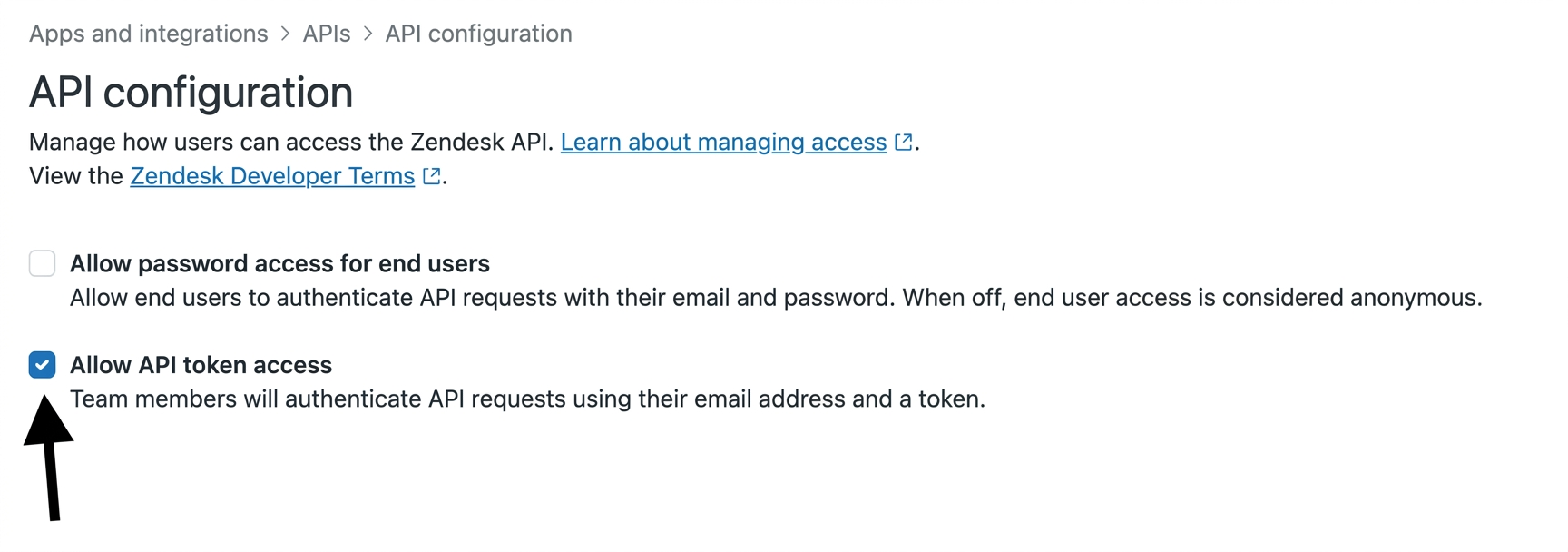
In your Zendesk Admin Center, go to Apps and integrations → APIs → Zendesk API.
-
Under Settings, enable Token access.
-
Click Add API token, enter a description, and click Create.
-
Copy the token — it is only shown once.
-
-
Create a connection
In Scalekit dashboard, go to AgentKit > Connections > Create Connection. Find Zendesk and click Create.
-
Create a connected account
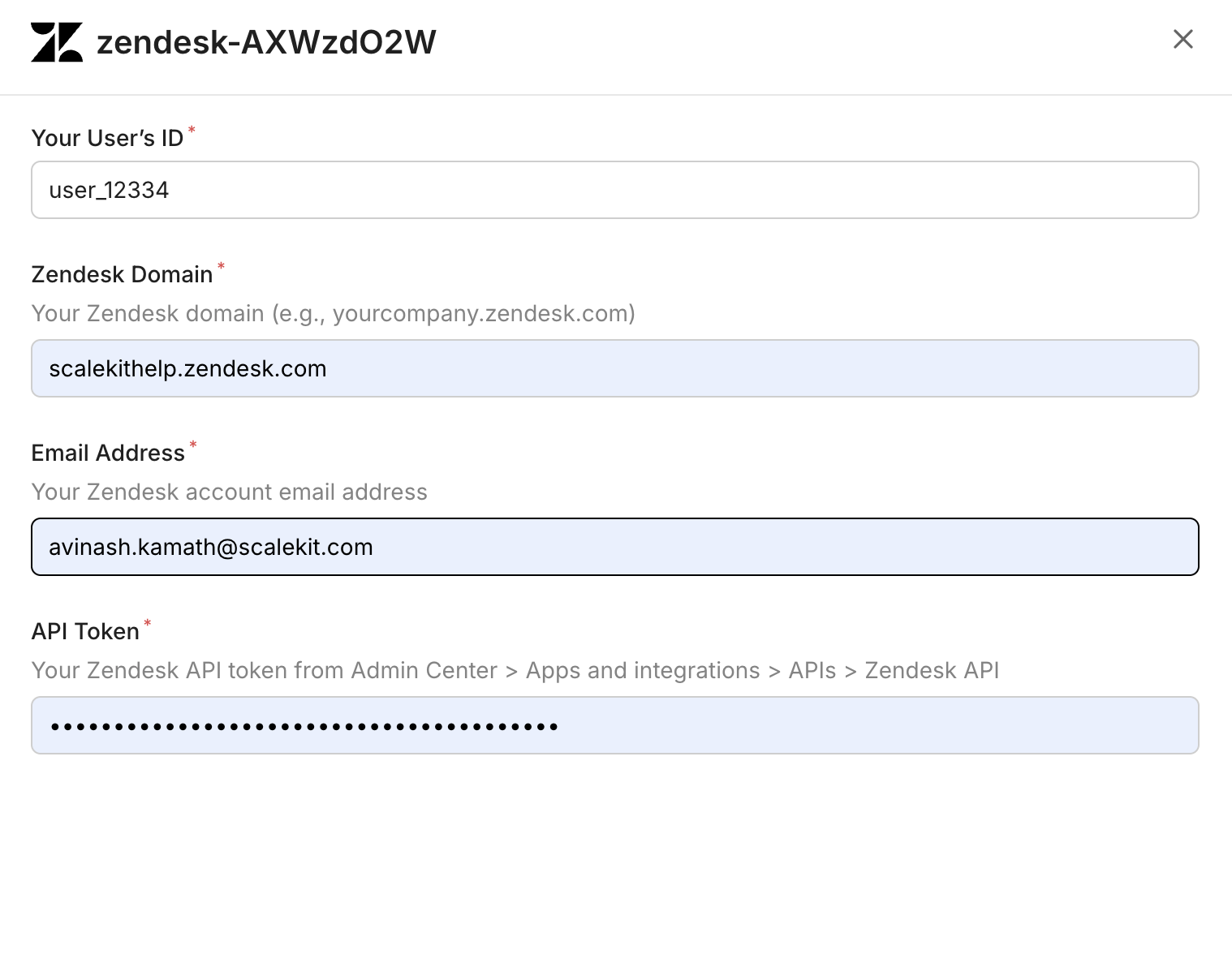
Go to Connected Accounts for your Zendesk connection and click Add account. Fill in the required fields:
-
Your User’s ID — a unique identifier for the user in your system
-
Zendesk Domain — your full Zendesk domain (e.g.,
yourcompany.zendesk.com) -
Email Address — the Zendesk account email address
-
API Token — the token you copied in step 1
-
Click Save.
-
-
What you can do
Section titled “What you can do”Connect this agent connector to let your agent:
- List ticket metrics, ticket audits, sla policies — List ticket metrics for all tickets in the Zendesk account
- Get ticket metrics, ticket audits, help center section — Retrieve ticket metrics for a specific ticket including reply time, resolution time, wait times, reopen count, and assignee/group station counts
- Events ticket metric — Incrementally export ticket metric events (reply times, agent work times, requester wait times) for time-series analysis
- Create help center section, help center article, help center article comment — Create a section under a Help Center category
- Update help center article translation, help center article, ticket — Update a Help Center article translation’s title, body, draft status, or outdated flag for a given locale
- Search guide, help center articles, tickets — Search across Help Center articles, community posts, and external records in a single query
Common workflows
Section titled “Common workflows”Proxy API call
Don’t worry about your Zendesk domain in the path. Scalekit automatically resolves {{domain}} from the connected account’s configuration. For example, a request with path="/v2/users/me" will be sent to https://mycompany.zendesk.com/api/v2/users/me automatically.
const result = await actions.request({ connectionName: 'zendesk', identifier: 'user_123', path: '/v2/users/me', method: 'GET',});console.log(result);result = actions.request( connection_name='zendesk', identifier='user_123', path="/v2/users/me", method="GET")print(result)Execute a tool
const result = await actions.executeTool({ connector: 'zendesk', identifier: 'user_123', toolName: 'zendesk_groups_list', toolInput: {},});console.log(result);result = actions.execute_tool( tool_input={}, tool_name='zendesk_groups_list', connection_name='zendesk', identifier='user_123',)print(result)Tool list
Section titled “Tool list”Use the exact tool names from the Tool list below when you call execute_tool. If you’re not sure which name to use, list the tools available for the current user first.
zendesk_groups_list#List all groups in Zendesk. Groups are used to organize agents and route tickets.2 params
List all groups in Zendesk. Groups are used to organize agents and route tickets.
pagenumberoptionalPage number for paginationper_pagenumberoptionalNumber of groups per page (max 100)zendesk_guide_search#Search across Help Center articles, community posts, and external records in a single query. Requires authentication. The filter[locales] parameter is mandatory.10 params
Search across Help Center articles, community posts, and external records in a single query. Requires authentication. The filter[locales] parameter is mandatory.
filter_localesstringrequiredComma-separated locales to scope the search. At least one valid locale is required.filter_brand_idsstringoptionalComma-separated brand IDs to limit search scope. Returns results across all brands if omitted.filter_category_idsstringoptionalComma-separated category IDs to limit search to specific Help Center categories.filter_content_typesstringoptionalComma-separated content types to limit results to: ARTICLE or POST. External records cannot be specified here; use filter_external_source_ids instead.filter_external_source_idsstringoptionalComma-separated external source IDs to scope results to specific external sources.filter_section_idsstringoptionalComma-separated section IDs to limit search to specific Help Center sections.filter_topic_idsstringoptionalComma-separated topic IDs to limit search to specific community topics.page_afterstringoptionalCursor string from the previous response to fetch the next page.page_sizeintegeroptionalMaximum number of results per page. Default is 10, maximum is 50.querystringoptionalThe search text to match. If omitted, results are sorted by internal ordering instead of relevance.zendesk_help_center_article_archive#Archive (delete) a Help Center article by ID. The article can be restored from the Zendesk Help Center UI.1 param
Archive (delete) a Help Center article by ID. The article can be restored from the Zendesk Help Center UI.
article_idnumberrequiredThe ID of the article to archive.zendesk_help_center_article_comment_create#Add a comment to a Help Center article. Requires article ID, comment body, and locale.5 params
Add a comment to a Help Center article. Requires article ID, comment body, and locale.
article_idnumberrequiredThe ID of the article to comment on.bodystringrequiredHTML body of the comment.localestringrequiredLocale for the comment (e.g., en-us).author_idnumberoptionalUser ID of the comment author (Help Center managers only).notify_subscribersbooleanoptionalWhether to notify article subscribers of the new comment. Default: true.zendesk_help_center_article_comments_list#List all comments on a Help Center article.5 params
List all comments on a Help Center article.
article_idnumberrequiredThe ID of the article whose comments to list.includestringoptionalComma-separated sideloads: users (authors), articles.pageintegeroptionalPage number for offset pagination.per_pageintegeroptionalNumber of results per page (max 100).sort_orderstringoptionalSort direction: asc or desc. Default: desc.zendesk_help_center_article_create#Create a new Help Center article in a section. Requires a title, locale, and section ID.12 params
Create a new Help Center article in a section. Requires a title, locale, and section ID.
localestringrequiredLocale for the article (e.g., en-us).section_idnumberrequiredThe ID of the section to create the article in.titlestringrequiredThe title of the article.author_idnumberoptionalUser ID of the article author.bodystringoptionalHTML body content of the article.comments_disabledbooleanoptionalWhether to disable comments on this article.content_tag_idsarrayoptionalIDs of existing content tags to attach to the article.draftbooleanoptionalIf true, the article is saved as a draft and not published.notify_subscribersbooleanoptionalSet to false to suppress email notifications to article subscribers on creation. Default: true.permission_group_idnumberoptionalThe permission group that determines who can view this article.promotedbooleanoptionalWhether to pin this article to the top of its section.user_segment_idnumberoptionalThe user segment that can view this article. Omit for a public article.zendesk_help_center_article_get#Retrieve a single Help Center article by its ID.2 params
Retrieve a single Help Center article by its ID.
article_idnumberrequiredThe ID of the article to retrieve.includestringoptionalComma-separated sideloads: users, sections, categories, translations.zendesk_help_center_article_labels_list#List all labels attached to a specific Help Center article.3 params
List all labels attached to a specific Help Center article.
article_idstringrequiredThe ID of the article to retrieve labels for.pageintegeroptionalPage number for offset pagination.per_pageintegeroptionalNumber of results per page (max 100).zendesk_help_center_article_translation_update#Update a Help Center article translation's title, body, draft status, or outdated flag for a given locale. This is the only way to edit article content — the article-level update endpoint does not accept title or body.6 params
Update a Help Center article translation's title, body, draft status, or outdated flag for a given locale. This is the only way to edit article content — the article-level update endpoint does not accept title or body.
article_idnumberrequiredThe unique ID of the article whose translation to update.localestringrequiredThe locale of the translation to update.bodystringoptionalNew HTML body content for the translation.draftbooleanoptionalIf true, saves the translation as a draft and unpublishes it.outdatedbooleanoptionalIf true, marks the translation as outdated.titlestringoptionalNew title for the translation.zendesk_help_center_article_update#Update article-level metadata: promoted status, position, comments setting, labels, and content tags. Does not update title or body — use the Translations API for those.6 params
Update article-level metadata: promoted status, position, comments setting, labels, and content tags. Does not update title or body — use the Translations API for those.
article_idnumberrequiredThe ID of the article to update.comments_disabledbooleanoptionalWhether to disable comments on this article.content_tag_idsarrayoptionalIDs of content tags to attach to the article.label_namesarrayoptionalLabels to assign to the article.positionintegeroptionalPosition of the article within its section.promotedbooleanoptionalWhether to pin this article to the top of its section.zendesk_help_center_articles_list#List Help Center articles. Filter by section or category, sort, and paginate results.7 params
List Help Center articles. Filter by section or category, sort, and paginate results.
includestringoptionalComma-separated sideloads: users, sections, categories, translations.label_namesstringoptionalComma-separated list of labels to filter articles by.pageintegeroptionalPage number for offset pagination.per_pageintegeroptionalNumber of results per page (max 100).sort_bystringoptionalField to sort by: position, title, created_at, updated_at, or edited_at.sort_orderstringoptionalSort direction: asc or desc.start_timeintegeroptionalUnix epoch timestamp to fetch only articles updated after this time (for incremental sync).zendesk_help_center_articles_search#Search Help Center articles by keyword. Filter by category, section, locale, labels, and date range.17 params
Search Help Center articles by keyword. Filter by category, section, locale, labels, and date range.
brand_idintegeroptionalScope the search to a specific brand ID.categorynumberoptionalFilter results to a specific category ID.created_afterstringoptionalLimit results to articles created after this date (YYYY-MM-DD).created_atstringoptionalLimit results to articles created on this date (YYYY-MM-DD).created_beforestringoptionalLimit results to articles created before this date (YYYY-MM-DD).label_namesstringoptionalComma-separated list of labels to filter by.localestringoptionalFilter results to a specific locale.multibrandbooleanoptionalSearch across all brands when true. Defaults to false.pageintegeroptionalPage number for offset pagination.per_pageintegeroptionalNumber of results per page (max 100).querystringoptionalFull-text search query.sectionnumberoptionalFilter results to a specific section ID.sort_bystringoptionalSort by relevance, created_at, or updated_at.sort_orderstringoptionalSort direction: asc or desc.updated_afterstringoptionalLimit results to articles updated after this date (YYYY-MM-DD).updated_atstringoptionalLimit results to articles updated on this date (YYYY-MM-DD).updated_beforestringoptionalLimit results to articles updated before this date (YYYY-MM-DD).zendesk_help_center_categories_list#List all Help Center categories in your Zendesk account. Returns categories with IDs, names, and positions.5 params
List all Help Center categories in your Zendesk account. Returns categories with IDs, names, and positions.
includestringoptionalSideload related data. Use 'translations' to include category translations.pageintegeroptionalPage number for offset pagination.per_pageintegeroptionalNumber of results per page (max 100).sort_bystringoptionalField to sort by: position, created_at, or updated_at.sort_orderstringoptionalSort direction: asc or desc.zendesk_help_center_category_get#Retrieve a single Help Center category by its ID.2 params
Retrieve a single Help Center category by its ID.
category_idnumberrequiredThe ID of the category to retrieve.includestringoptionalSideload related data. Use 'translations' to include category translations.zendesk_help_center_labels_list#List all Help Center labels in the account. Returns label names and article counts. Supports pagination.2 params
List all Help Center labels in the account. Returns label names and article counts. Supports pagination.
pageintegeroptionalPage number for offset pagination.per_pageintegeroptionalNumber of results per page (max 100).zendesk_help_center_section_create#Create a section under a Help Center category. Supply name and locale for a single-locale section, or a translations array for multi-locale (the two patterns are mutually exclusive). Nesting under parent_section_id requires a Guide plan that supports nested sections.11 params
Create a section under a Help Center category. Supply name and locale for a single-locale section, or a translations array for multi-locale (the two patterns are mutually exclusive). Nesting under parent_section_id requires a Guide plan that supports nested sections.
category_idnumberrequiredThe unique ID of the category to create the section in.descriptionstringoptionalAn optional description of the section.localestringoptionalThe locale for the section. Required when not using translations.manageable_bystringoptionalWho can manage this section.namestringoptionalThe name of the section. Required when not using translations.parent_section_idnumberoptionalID of a parent section to nest this section under. Requires a Guide plan that supports nested sections.positionintegeroptionalPosition of the section within its category for manual ordering.sortingstringoptionalSort order for articles within this section.theme_templatestringoptionalThe template this section uses in the Help Center theme.translationsarrayoptionalAdditional locale translations for the section. Each item must have a locale, title, and optional body.user_segment_idnumberoptionalThe user segment that can view this section. Omit for a public section.zendesk_help_center_section_get#Retrieve a single Help Center section by its ID.2 params
Retrieve a single Help Center section by its ID.
section_idnumberrequiredThe ID of the section to retrieve.includestringoptionalComma-separated sideloads: 'categories' to include the parent category, 'translations' to include translations.zendesk_help_center_sections_list#List all Help Center sections. Filter by category to narrow results.5 params
List all Help Center sections. Filter by category to narrow results.
includestringoptionalComma-separated sideloads: 'categories' to include the parent category, 'translations' to include translations.pageintegeroptionalPage number for offset pagination.per_pageintegeroptionalNumber of results per page (max 100).sort_bystringoptionalField to sort by: position, created_at, or updated_at.sort_orderstringoptionalSort direction: asc or desc.zendesk_organization_get#Retrieve details of a specific Zendesk organization by ID. Returns organization name, domain names, tags, notes, shared ticket settings, and custom fields.2 params
Retrieve details of a specific Zendesk organization by ID. Returns organization name, domain names, tags, notes, shared ticket settings, and custom fields.
organization_idnumberrequiredThe ID of the organization to retrieveincludestringoptionalAdditional related data to include (e.g., lookup_relationship_fields)zendesk_organizations_list#List all organizations in Zendesk with pagination support.2 params
List all organizations in Zendesk with pagination support.
pagenumberoptionalPage number for paginationper_pagenumberoptionalNumber of organizations per page (max 100)zendesk_satisfaction_ratings_list#List CSAT satisfaction ratings with optional filters. Returns score (good/bad), comment, reason, ticket ID, and timestamps for each rating.7 params
List CSAT satisfaction ratings with optional filters. Returns score (good/bad), comment, reason, ticket ID, and timestamps for each rating.
end_timenumberoptionalUnix timestamp to filter ratings created before this timepagenumberoptionalPage number for paginationper_pagenumberoptionalNumber of results per pageschema_versionstringoptionalVersion of the tool schemascorestringoptionalFilter by satisfaction scorestart_timenumberoptionalUnix timestamp to filter ratings created after this timetool_versionstringoptionalVersion of the toolzendesk_satisfaction_reasons_list#List all satisfaction reasons configured for negative (bad) CSAT ratings. Used to analyze why customers rate support interactions poorly.2 params
List all satisfaction reasons configured for negative (bad) CSAT ratings. Used to analyze why customers rate support interactions poorly.
schema_versionstringoptionalVersion of the tool schematool_versionstringoptionalVersion of the toolzendesk_search_tickets#Search Zendesk tickets using a query string. Supports Zendesk's search syntax (e.g., 'type:ticket status:open'). Zendesk limits search results to 1,000 total — the maximum valid page is floor(1000 / per_page) (e.g., per_page=100 → max page 10, per_page=25 → max page 40). Stop paginating when next_page is null or you reach the max page; requesting beyond the limit returns a 400 error.6 params
Search Zendesk tickets using a query string. Supports Zendesk's search syntax (e.g., 'type:ticket status:open'). Zendesk limits search results to 1,000 total — the maximum valid page is floor(1000 / per_page) (e.g., per_page=100 → max page 10, per_page=25 → max page 40). Stop paginating when next_page is null or you reach the max page; requesting beyond the limit returns a 400 error.
querystringrequiredSearch query string using Zendesk search syntax (e.g., 'type:ticket status:open assignee:me')includestringoptionalComma-separated list of additional data to sideload with results. Supported values: users, groups, organizations, tickets.pagenumberoptionalPage number for pagination. Max valid page = floor(1000 / per_page). Do not exceed this — Zendesk returns a 400 error beyond the 1,000 result limit.per_pagenumberoptionalNumber of results per page (max 100). Determines the max page ceiling: floor(1000 / per_page). Higher values mean fewer pages but a lower max page number.sort_bystringoptionalField to sort results by (updated_at, created_at, priority, status, ticket_type)sort_orderstringoptionalSort direction: asc or desc (default: desc)zendesk_side_conversation_get#Retrieve a specific side conversation on a Zendesk ticket by its ID. Returns the side conversation's state, subject, participants, preview text, and timestamps. Requires the Collaboration add-on.3 params
Retrieve a specific side conversation on a Zendesk ticket by its ID. Returns the side conversation's state, subject, participants, preview text, and timestamps. Requires the Collaboration add-on.
side_conversation_idstringrequiredThe ID of the side conversation to retrieveticket_idnumberrequiredThe ID of the parent ticketincludestringoptionalSideloads to include alongside the response. Use 'side_conversation_events' to include the full event history of the side conversation.zendesk_side_conversations_list#List all side conversations on a Zendesk ticket. Returns side conversations including their state, subject, participants, and preview text. Requires the Collaboration add-on.2 params
List all side conversations on a Zendesk ticket. Returns side conversations including their state, subject, participants, and preview text. Requires the Collaboration add-on.
ticket_idnumberrequiredThe ID of the ticket whose side conversations to listincludestringoptionalSideloads to include alongside the response. Use 'side_conversation_events' to include the full event history for each side conversation.zendesk_sla_policies_list#List all SLA policy definitions including policy name, conditions, and filter criteria. Requires Professional or Enterprise plan.2 params
List all SLA policy definitions including policy name, conditions, and filter criteria. Requires Professional or Enterprise plan.
schema_versionstringoptionalVersion of the tool schematool_versionstringoptionalVersion of the toolzendesk_ticket_audits_get#Retrieve the full audit trail for a specific ticket including all field changes, status transitions, comments, and timestamps.6 params
Retrieve the full audit trail for a specific ticket including all field changes, status transitions, comments, and timestamps.
ticket_idnumberrequiredThe ID of the ticket to retrieve audits forpage_afterstringoptionalCursor for next page.page_sizeintegeroptionalNumber of records per page. Maximum 100.schema_versionstringoptionalVersion of the tool schemasort_orderstringoptionalSort order for audit events.tool_versionstringoptionalVersion of the toolzendesk_ticket_audits_list#List audit trail events across all tickets including field changes, status transitions, assignment changes, and timestamps. Useful for tracking time-in-status and escalation paths.5 params
List audit trail events across all tickets including field changes, status transitions, assignment changes, and timestamps. Useful for tracking time-in-status and escalation paths.
page_afterstringoptionalCursor for next page (cursor-based pagination).page_beforestringoptionalCursor for previous page (cursor-based pagination).page_sizeintegeroptionalNumber of records per page. Maximum 100.schema_versionstringoptionalVersion of the tool schematool_versionstringoptionalVersion of the toolzendesk_ticket_comments_list#Retrieve all comments (public replies and internal notes) for a specific Zendesk ticket. Returns comment body, author, timestamps, and attachments.4 params
Retrieve all comments (public replies and internal notes) for a specific Zendesk ticket. Returns comment body, author, timestamps, and attachments.
ticket_idnumberrequiredThe ID of the ticket whose comments to listincludestringoptionalSideloads to include. Accepts 'users' to list email CCs.include_inline_imagesbooleanoptionalWhen true, inline images are listed as attachments (default: false)sort_orderstringoptionalSort direction for comments: asc or desc (default: asc)zendesk_ticket_create#Create a new support ticket in Zendesk. Requires a comment/description and optionally a subject, priority, assignee, and tags.7 params
Create a new support ticket in Zendesk. Requires a comment/description and optionally a subject, priority, assignee, and tags.
comment_bodystringrequiredThe description or first comment of the ticketassignee_emailstringoptionalEmail of the agent to assign the ticket toprioritystringoptionalTicket priority: urgent, high, normal, or lowstatusstringoptionalTicket status: new, open, pending, hold, solved, or closedsubjectstringoptionalThe subject/title of the tickettagsarrayoptionalList of tags to apply to the tickettypestringoptionalTicket type: problem, incident, question, or taskzendesk_ticket_get#Retrieve details of a specific Zendesk ticket by ID. Returns ticket properties including status, priority, subject, requester, assignee, and timestamps.2 params
Retrieve details of a specific Zendesk ticket by ID. Returns ticket properties including status, priority, subject, requester, assignee, and timestamps.
ticket_idnumberrequiredThe ID of the ticket to retrieveincludestringoptionalComma-separated list of sideloads to include (e.g., users, groups, organizations)zendesk_ticket_metric_events#Incrementally export ticket metric events (reply times, agent work times, requester wait times) for time-series analysis. Returns event-level granularity for SLA compliance tracking.6 params
Incrementally export ticket metric events (reply times, agent work times, requester wait times) for time-series analysis. Returns event-level granularity for SLA compliance tracking.
start_timenumberrequiredUnix timestamp to start incremental export fromexclude_deletedbooleanoptionalWhen true, removes metric events tied to deleted tickets.include_changesbooleanoptionalWhen true, includes additional change data for more accurate incremental results.per_pagenumberoptionalNumber of results per pageschema_versionstringoptionalVersion of the tool schematool_versionstringoptionalVersion of the toolzendesk_ticket_metrics_get#Retrieve ticket metrics for a specific ticket including reply time, resolution time, wait times, reopen count, and assignee/group station counts.3 params
Retrieve ticket metrics for a specific ticket including reply time, resolution time, wait times, reopen count, and assignee/group station counts.
ticket_idnumberrequiredThe ID of the ticket to retrieve metrics forschema_versionstringoptionalVersion of the tool schematool_versionstringoptionalVersion of the toolzendesk_ticket_metrics_list#List ticket metrics for all tickets in the Zendesk account. Returns first reply time, resolution time, agent wait time, requester wait time, reply count, and reopen count.4 params
List ticket metrics for all tickets in the Zendesk account. Returns first reply time, resolution time, agent wait time, requester wait time, reply count, and reopen count.
pagenumberoptionalPage number for paginationper_pagenumberoptionalNumber of results per pageschema_versionstringoptionalVersion of the tool schematool_versionstringoptionalVersion of the toolzendesk_ticket_reply#Add a public reply or internal note to a Zendesk ticket. Set public to false for internal notes visible only to agents.3 params
Add a public reply or internal note to a Zendesk ticket. Set public to false for internal notes visible only to agents.
bodystringrequiredThe reply message content (plain text, markdown supported)ticket_idnumberrequiredThe ID of the ticket to reply topublicbooleanoptionalWhether the comment is public (true) or an internal note (false). Defaults to true.zendesk_ticket_update#Update an existing Zendesk ticket. Change status, priority, assignee, subject, tags, or any other writable ticket field.9 params
Update an existing Zendesk ticket. Change status, priority, assignee, subject, tags, or any other writable ticket field.
ticket_idnumberrequiredThe ID of the ticket to updateassignee_emailstringoptionalEmail of the agent to assign the ticket toassignee_idnumberoptionalID of the agent to assign the ticket togroup_idnumberoptionalID of the group to assign the ticket toprioritystringoptionalTicket priority: urgent, high, normal, or lowstatusstringoptionalTicket status: new, open, pending, hold, solved, or closedsubjectstringoptionalNew subject/title for the tickettagsarrayoptionalList of tags to set on the ticket (replaces existing tags)typestringoptionalTicket type: problem, incident, question, or taskzendesk_tickets_list#List tickets in Zendesk with sorting and pagination. Returns tickets for the authenticated agent's account.4 params
List tickets in Zendesk with sorting and pagination. Returns tickets for the authenticated agent's account.
pagenumberoptionalPage number for paginationper_pagenumberoptionalNumber of tickets per page (max 100)sort_bystringoptionalField to sort by: created_at, updated_at, priority, status, ticket_typesort_orderstringoptionalSort direction: asc or desc (default: desc)zendesk_user_create#Create a new user in Zendesk. Can create end-users (customers), agents, or admins. Email is required for end-users.6 params
Create a new user in Zendesk. Can create end-users (customers), agents, or admins. Email is required for end-users.
namestringrequiredFull name of the useremailstringoptionalPrimary email address of the userorganization_idnumberoptionalID of the organization to associate the user withphonestringoptionalPrimary phone number (E.164 format, e.g. +15551234567)rolestringoptionalUser role: end-user, agent, or admin. Defaults to end-user.verifiedbooleanoptionalWhether the user's identity is verified. Defaults to false.zendesk_user_get#Retrieve details of a specific Zendesk user by ID. Returns user profile including name, email, role, organization, and account status.2 params
Retrieve details of a specific Zendesk user by ID. Returns user profile including name, email, role, organization, and account status.
user_idnumberrequiredThe ID of the user to retrieveincludestringoptionalComma-separated list of sideloads to includezendesk_users_list#List users in Zendesk. Filter by role (end-user, agent, admin) with pagination support.4 params
List users in Zendesk. Filter by role (end-user, agent, admin) with pagination support.
pagenumberoptionalPage number for paginationper_pagenumberoptionalNumber of users per page (max 100)rolestringoptionalFilter by role: end-user, agent, or adminsortstringoptionalField to sort by. Prefix with - for descending (e.g. -created_at)zendesk_views_list#List ticket views in Zendesk. Views are saved filters for organizing tickets by status, assignee, tags, and more.5 params
List ticket views in Zendesk. Views are saved filters for organizing tickets by status, assignee, tags, and more.
accessstringoptionalFilter by access level: personal, shared, or accountpagenumberoptionalPage number for paginationper_pagenumberoptionalNumber of views per page (max 100)sort_bystringoptionalField to sort by: title, updated_at, created_at, or positionsort_orderstringoptionalSort direction: asc or desc