


Gainsight connector
API KeyCRM & SalesCustomer SupportAnalyticsConnect to Gainsight Customer Success to manage companies, contacts, calls to action, success plans, timeline activities, and custom objects. Power...
Gainsight connector
-
Install the SDK
Section titled “Install the SDK”Terminal window npm install @scalekit-sdk/nodeTerminal window pip install scalekit -
Set your credentials
Section titled “Set your credentials”Add your Scalekit credentials to your
.envfile. Find values in app.scalekit.com > Developers > API Credentials..env SCALEKIT_ENVIRONMENT_URL=<your-environment-url>SCALEKIT_CLIENT_ID=<your-client-id>SCALEKIT_CLIENT_SECRET=<your-client-secret> -
Set up the connector
Section titled “Set up the connector”Register your Gainsight credentials with Scalekit so it can authenticate requests on your behalf. You do this once per environment.
Dashboard setup steps
Register your Scalekit environment with the Gainsight connector so Scalekit can proxy API requests using your Gainsight access key. There is no redirect URI or OAuth flow.
-
Generate a Gainsight access key
- Sign in to Gainsight and go to Administration → Connectors 2.0 → Connections.
- Click + Create Connection.
- Select Gainsight API as the connector type, enter a connection name, and choose Access Key as the authentication type.
- Click Generate Access Key.
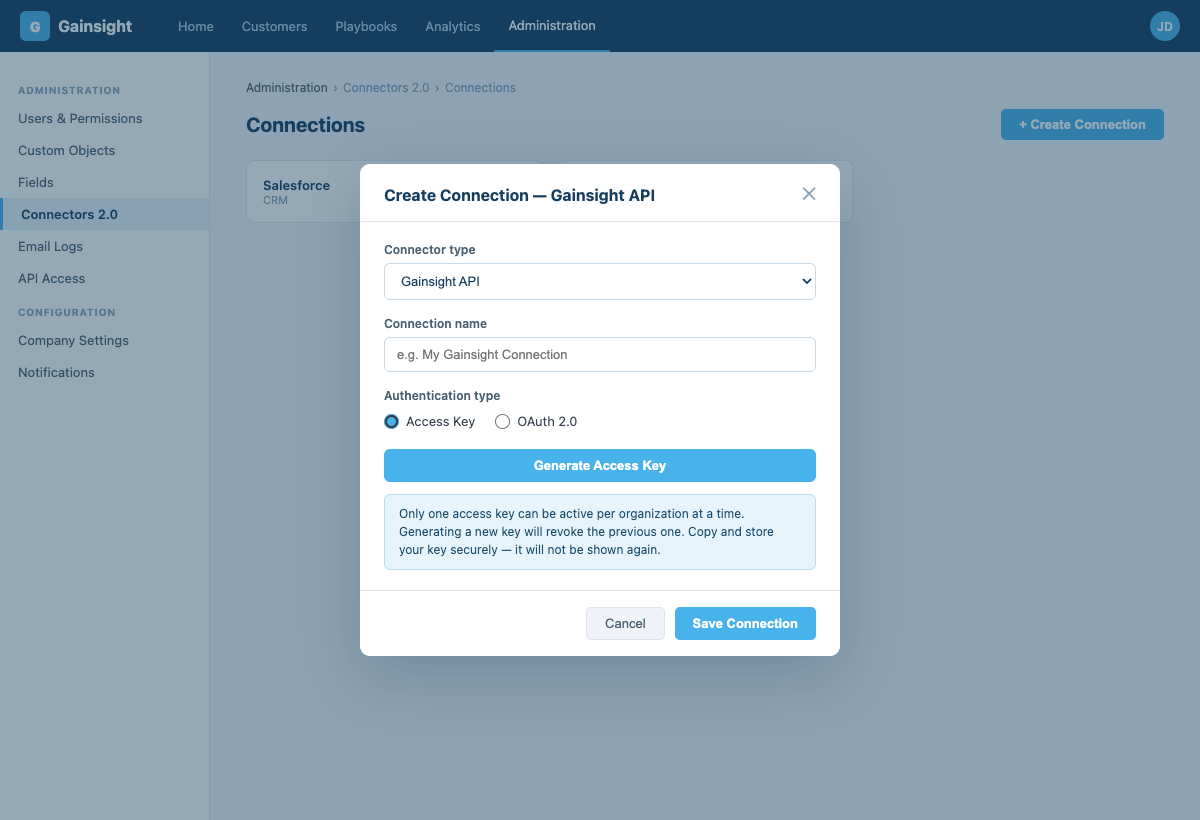
-
Create a connection in Scalekit
- In Scalekit dashboard, go to AgentKit > Connections > Create Connection. Find Gainsight and click Create.
- Note the Connection name — use this as
connection_namein your code (e.g.,gainsight). - Click Save.
-
Add a connected account
Via dashboard (for testing)
- Open the connection and click the Connected Accounts tab → Add account.
- Fill in:
- Your User’s ID — a unique identifier for this user in your system (e.g.,
user_123) - Tenant Domain — your Gainsight hostname without
https://(e.g.,mycompany.gainsightcloud.com) - Access Key — the key you generated in step 1
- Your User’s ID — a unique identifier for this user in your system (e.g.,
- Click Save.
Via API (for production)
// Never hard-code API keys — read from secure storage or user inputconst gainsightKey = getUserGainsightKey(); // retrieve from your secure storeawait scalekit.actions.upsertConnectedAccount({connectionName: 'gainsight',identifier: 'user_123',credentials: {domain: 'mycompany.gainsightcloud.com',api_key: gainsightKey,},});# Never hard-code API keys — read from secure storage or user inputgainsight_key = get_user_gainsight_key() # retrieve from your secure storescalekit_client.actions.upsert_connected_account(connection_name="gainsight",identifier="user_123",credentials={"domain": "mycompany.gainsightcloud.com","api_key": gainsight_key,})
-
-
Make your first call
Section titled “Make your first call”quickstart.ts import { ScalekitClient } from '@scalekit-sdk/node'import 'dotenv/config'const scalekit = new ScalekitClient(process.env.SCALEKIT_ENV_URL,process.env.SCALEKIT_CLIENT_ID,process.env.SCALEKIT_CLIENT_SECRET,)const actions = scalekit.actionsconst connector = 'gainsight'const identifier = 'user_123'// Make your first callconst result = await actions.executeTool({connector,identifier,toolName: 'gainsight_company_query',toolInput: {},})console.log(result)quickstart.py import osfrom scalekit.client import ScalekitClientfrom dotenv import load_dotenvload_dotenv()scalekit_client = ScalekitClient(env_url=os.getenv("SCALEKIT_ENV_URL"),client_id=os.getenv("SCALEKIT_CLIENT_ID"),client_secret=os.getenv("SCALEKIT_CLIENT_SECRET"),)actions = scalekit_client.actionsconnection_name = "gainsight"identifier = "user_123"# Make your first callresult = actions.execute_tool(tool_input={},tool_name="gainsight_company_query",connection_name=connection_name,identifier=identifier,)print(result)
What you can do
Section titled “What you can do”Connect this agent connector to let your agent:
- Update timeline, success plan, cta — Update one or more fields on an existing Timeline activity
- Query timeline, scorecard, relationships — Search and filter Gainsight Timeline activity records by any field
- Create timeline, task, cta — Log a new Timeline activity linked to a company in Gainsight
- List task, success plan, object — List all tasks for a given CTA
- User resolve — Look up Gainsight users by email or filter
- Describe object — Return the full field schema for any Gainsight MDA object, including field names, types, and picklist values
Tool list
Section titled “Tool list”Use the exact tool names from the Tool list below when you call execute_tool. If you’re not sure which name to use, list the tools available for the current user first.
gainsight_company_query#Search and filter Gainsight company records by any field. Returns up to 5000 records per call.5 params
Search and filter Gainsight company records by any field. Returns up to 5000 records per call.
limitintegeroptionalMaximum number of records to return per call (1–5000). Default: 100.offsetintegeroptionalNumber of records to skip, used for pagination. Default: 0.orderByobjectoptionalSort specification as an object with field names as keys and 'asc' or 'desc' as values. Custom fields use '__gc' suffix; lookup fields use '__gr'.selectarrayoptionalField names to return. Omit to get standard fields (Name, Gsid, Status, Stage, ARR, etc.).whereobjectoptionalFilter object with conditions array and expression string. Each condition uses name (field name), alias, value array, and operator.gainsight_cta_create#Create a Call to Action in Gainsight Cockpit linked to a company. Type, reason, status, and priority must match values configured in your Gainsight instance.11 params
Create a Call to Action in Gainsight Cockpit linked to a company. Type, reason, status, and priority must match values configured in your Gainsight instance.
company_gsidstringrequiredGSID of the company to link this record to. Retrieve it from gainsight_company_query.cta_typestringrequiredCTA type as configured in your Gainsight instance, e.g. Risk, Expansion, Renewal. Check your Gainsight admin settings for valid values.namestringrequiredDisplay name for this CTA, shown in the Gainsight Cockpit.owner_emailstringrequiredEmail address of the Gainsight user to assign as owner. Resolved to an internal user ID automatically.reference_idstringrequiredYour external identifier for this record, returned in error responses so you can match failures back to your source data.commentsstringoptionalFree-text notes or context to attach to this CTA.due_datestringoptionalDue date in YYYY-MM-DD format.playbookstringoptionalName of the playbook to apply. Must match a playbook configured in your Gainsight instance.prioritystringoptionalPriority level for this record. Accepted values: High, Medium, Low.reasonstringoptionalReason name as configured in your Gainsight instance. Check your Gainsight admin settings for valid values.statusstringoptionalStatus value as configured in your Gainsight instance. Check your Gainsight admin settings for valid values.gainsight_cta_list#Search and filter CTAs in Gainsight Cockpit with field selection and pagination. Returns up to 1000 CTAs per request.5 params
Search and filter CTAs in Gainsight Cockpit with field selection and pagination. Returns up to 1000 CTAs per request.
linkedObjectbooleanoptionalSet to true to include linked object data in the associatedRecords field of each CTA response.pageNumberintegeroptionalPage number to fetch, starting from 1. Default: 1.pageSizeintegeroptionalNumber of records per page (1–1000). Default: 50.selectarrayoptionalField names to return. Custom fields must be appended with '__gc'; lookup fields with '__gr'. Omit to get standard CTA fields.whereobjectoptionalFilter object with conditions array and expression string. Each condition uses either fieldName (regular fields) or associatedRecord: true (linked object filter).gainsight_cta_update#Update one or more fields on an existing CTA. Only the fields you include are changed — all other fields remain untouched.10 params
Update one or more fields on an existing CTA. Only the fields you include are changed — all other fields remain untouched.
gsidstringrequiredGainsight internal ID (GSID) of the CTA to update. Retrieve it from gainsight_cta_list.reference_idstringrequiredYour external identifier for this record, returned in error responses so you can match failures back to your source data.commentsstringoptionalFree-text notes or context to attach to this CTA.due_datestringoptionalDue date in YYYY-MM-DD format.is_closedbooleanoptionalSet to true to mark this CTA as closed.namestringoptionalNew display name for this CTA.owner_emailstringoptionalEmail address of the Gainsight user to assign as owner. Resolved to an internal user ID automatically.prioritystringoptionalPriority level for this record. Accepted values: High, Medium, Low.reasonstringoptionalReason name as configured in your Gainsight instance. Check your Gainsight admin settings for valid values.statusstringoptionalStatus value as configured in your Gainsight instance. Check your Gainsight admin settings for valid values.gainsight_object_describe#Return the full field schema for any Gainsight MDA object, including field names, types, and picklist values. Use gainsight_object_list to find valid object names.5 params
Return the full field schema for any Gainsight MDA object, including field names, types, and picklist values. Use gainsight_object_list to find valid object names.
object_namestringrequiredGainsight MDA object name. Use exact names: Company, call_to_action, activity_timeline, or custom objects ending in __gc (e.g. MyObj__gc).children_levelintegeroptionalDepth of child levels to include.include_childrenbooleanoptionalInclude child objects in the response.include_hidden_columnsbooleanoptionalInclude hidden columns in the response.include_picklist_detailsbooleanoptionalInclude picklist field details in the response.gainsight_object_list#List all standard and custom objects available in Gainsight MDA. Use this to discover object names before calling gainsight_object_query or gainsight_object_describe.2 params
List all standard and custom objects available in Gainsight MDA. Use this to discover object names before calling gainsight_object_query or gainsight_object_describe.
embooleanoptionalExclude object mappings from the response.postringoptionalFilter by parent object name.gainsight_object_query#Query any standard or custom Gainsight MDA object by name. Custom objects use the __gc suffix (e.g. MyObject__gc). Use gainsight_object_list to discover available object names.6 params
Query any standard or custom Gainsight MDA object by name. Custom objects use the __gc suffix (e.g. MyObject__gc). Use gainsight_object_list to discover available object names.
object_namestringrequiredGainsight MDA object name, e.g. Company, activity_timeline, call_to_action, or a custom object like MyObj__gc.limitintegeroptionalMaximum number of records to return per call (1–5000). Default: 100.offsetintegeroptionalNumber of records to skip, used for pagination. Default: 0.orderByobjectoptionalSort specification as an object with field names as keys and 'asc' or 'desc' as values.selectarrayoptionalField names to return. Custom fields end with '__gc'; lookup traversals use '__gr'. Omit for all fields.whereobjectoptionalFilter object with conditions array and expression string. Each condition uses name, alias, value array, and operator.gainsight_query_company_person#Query contact-to-company associations in Gainsight. Each record links a person to a company with their role, title, and primary company designation.5 params
Query contact-to-company associations in Gainsight. Each record links a person to a company with their role, title, and primary company designation.
limitintegeroptionalMaximum number of records to return per call (1–5000). Default: 100.offsetintegeroptionalNumber of records to skip, used for pagination. Default: 0.orderByobjectoptionalSort specification as an object with field names as keys and 'asc' or 'desc' as values.selectarrayoptionalField names to return. Key fields: Gsid, Person_ID, Company_ID, Active, IsPrimaryCompany, Role, Title, SfdcContactId, SfdcAccountId. Omit for standard fields.whereobjectoptionalFilter object with conditions array and expression string. Each condition uses name, alias, value array, and operator.gainsight_query_relationships#Search and filter Gainsight relationship records by any field. Returns up to 5000 records per call.5 params
Search and filter Gainsight relationship records by any field. Returns up to 5000 records per call.
limitintegeroptionalMaximum number of records to return per call (1–5000). Default: 100.offsetintegeroptionalNumber of records to skip, used for pagination. Default: 0.orderByobjectoptionalSort specification as an object with field names as keys and 'asc' or 'desc' as values.selectarrayoptionalField names to return, e.g. Name, Arr, Mrr. Omit for standard relationship fields.whereobjectoptionalFilter object with conditions array and expression string. Each condition uses name, alias, value array, and operator.gainsight_query_scorecard#Query a Gainsight scorecard object for health score data. Pass the object name from your Gainsight configuration, e.g. cs_scorecard_master.5 params
Query a Gainsight scorecard object for health score data. Pass the object name from your Gainsight configuration, e.g. cs_scorecard_master.
scorecard_objectstringrequiredName of the scorecard object to query, e.g. cs_scorecard_master. Use gainsight_object_list to discover the exact name in your instance.limitintegeroptionalMaximum number of records to return per call (1–5000). Default: 100.offsetintegeroptionalNumber of records to skip, used for pagination. Default: 0.selectarrayoptionalField names to return. Use gainsight_object_describe with the scorecard object name to discover available fields.whereobjectoptionalFilter object with conditions array and expression string.gainsight_resolve_user#Look up Gainsight users by email or filter. Use this to find a user's GSID before assigning them as a CTA or success plan owner.6 params
Look up Gainsight users by email or filter. Use this to find a user's GSID before assigning them as a CTA or success plan owner.
email_searchstringoptionalSubstring to match against user email addresses, case-insensitive. Useful for finding a user by partial email.limitintegeroptionalMaximum number of records to return per call (1–5000). Default: 50.offsetintegeroptionalNumber of records to skip, used for pagination. Default: 0.orderByobjectoptionalSort specification as an object with field names as keys and 'asc' or 'desc' as values.selectarrayoptionalField names to return. Key fields: Gsid, Name, Email, IsActive, Username, ExternalId. Omit for standard fields.whereobjectoptionalFilter object with conditions array and expression string. Each condition uses name, alias, value array, and operator.gainsight_success_plan_list#Search and filter Success Plans in Gainsight with field selection and pagination. Returns up to 1000 records per request.4 params
Search and filter Success Plans in Gainsight with field selection and pagination. Returns up to 1000 records per request.
pageNumberintegeroptionalPage number to fetch, starting from 1. Default: 1.pageSizeintegeroptionalNumber of records per page (1–1000). Default: 50.selectarrayoptionalField names to return. Custom fields use '__gc' suffix; lookup fields use '__gr'. Omit to get standard Success Plan fields.whereobjectoptionalFilter object with conditions array and expression string. Each condition uses fieldName, alias, value array, and operator.gainsight_success_plan_update#Update one or more fields on an existing success plan. Only the fields you include are changed — all other fields remain untouched.7 params
Update one or more fields on an existing success plan. Only the fields you include are changed — all other fields remain untouched.
plan_gsidstringrequiredGSID of the success plan to update. Retrieve it from gainsight_success_plan_list.reference_idstringrequiredYour external identifier for this record, returned in error responses so you can match failures back to your source data.due_datestringoptionalDue date in YYYY-MM-DD format.namestringoptionalNew display name for this success plan.owner_emailstringoptionalEmail address of the Gainsight user to assign as owner. Resolved to an internal user ID automatically.statusstringoptionalStatus value as configured in your Gainsight instance. Check your Gainsight admin settings for valid values.templatesarrayoptionalNames of templates to append to this success plan. Must match template names configured in your Gainsight instance.gainsight_task_create#Create a task under an existing CTA in Gainsight Cockpit. The parent CTA must already exist — use gainsight_cta_list to get its GSID.8 params
Create a task under an existing CTA in Gainsight Cockpit. The parent CTA must already exist — use gainsight_cta_list to get its GSID.
cta_gsidstringrequiredGSID of the parent CTA this record belongs to. Retrieve it from gainsight_cta_list.due_datestringrequiredDue date in YYYY-MM-DD format.namestringrequiredDisplay name for this task, shown in Gainsight Cockpit.owner_emailstringrequiredEmail address of the Gainsight user to assign as owner. Resolved to an internal user ID automatically.reference_idstringrequiredYour external identifier for this record, returned in error responses so you can match failures back to your source data.descriptionstringoptionalOptional free-text description providing additional context for this task.prioritystringoptionalPriority level for this record. Accepted values: High, Medium, Low.statusstringoptionalStatus value as configured in your Gainsight instance. Check your Gainsight admin settings for valid values.gainsight_task_list#List all tasks for a given CTA. Returns up to 1000 tasks per page. Use gainsight_cta_list to get the CTA's GSID.4 params
List all tasks for a given CTA. Returns up to 1000 tasks per page. Use gainsight_cta_list to get the CTA's GSID.
cta_gsidstringrequiredGSID of the parent CTA this record belongs to. Retrieve it from gainsight_cta_list.includesstringoptionalComma-separated custom field API names to include beyond the default fields, e.g. DT_Date__gc,DT_DateTime__gc.pnintegeroptionalPage number to fetch, starting from 1. Default: 1.psintegeroptionalNumber of tasks per page (max 1000). Default: 1000.gainsight_timeline_create#Log a new Timeline activity linked to a company in Gainsight. The external_id acts as an idempotency key — re-submitting the same value will not create a duplicate.10 params
Log a new Timeline activity linked to a company in Gainsight. The external_id acts as an idempotency key — re-submitting the same value will not create a duplicate.
activity_datestringrequiredDate and time of the activity in ISO 8601 format, e.g. 2024-01-15T10:30:00.000+0000.authorstringrequiredEmail address of the Gainsight user authoring this activity. Must exist as an active user in your Gainsight instance.company_gsidstringrequiredGSID of the company to link this record to. Retrieve it from gainsight_company_query.external_idstringrequiredUnique ID from your system used as an idempotency key. Re-submitting the same ID will not create a duplicate activity.notesstringrequiredBody text of the activity. Accepts plain text or HTML.subjectstringrequiredTitle of the activity shown in the Timeline feed. Maximum 255 characters.type_namestringrequiredActivity type as configured in your Gainsight instance, e.g. Meeting, Email, Phone Call.context_namestringoptionalThe entity type this activity is attached to. Accepted values: Company, Relationship, CTA, SuccessPlan. Defaults to Company.duration_minsintegeroptionalDuration of the activity in minutes.internal_attendeesarrayoptionalList of internal Gainsight user emails attending this activity.gainsight_timeline_query#Search and filter Gainsight Timeline activity records by any field. Returns up to 5000 records per call, sorted by creation date descending by default.5 params
Search and filter Gainsight Timeline activity records by any field. Returns up to 5000 records per call, sorted by creation date descending by default.
limitintegeroptionalMaximum number of records to return per call (1–5000). Default: 50.offsetintegeroptionalNumber of records to skip, used for pagination. Default: 0.orderByobjectoptionalSort specification as an object with field names as keys and 'asc' or 'desc' as values.selectarrayoptionalField names to return. Custom fields use the format 'Prefix__FieldName__c'. Omit to get standard timeline fields.whereobjectoptionalFilter object with conditions array and expression string. Each condition uses name, alias, value array, and operator.gainsight_timeline_update#Update one or more fields on an existing Timeline activity. Both activity_gsid and activity_type_id are required to identify the record.7 params
Update one or more fields on an existing Timeline activity. Both activity_gsid and activity_type_id are required to identify the record.
activity_gsidstringrequiredGSID of the Timeline activity to update. Returned as activityId in the gainsight_timeline_create response.notesstringrequiredBody text of the activity. Accepts plain text or HTML.subjectstringrequiredTitle of the activity shown in the Timeline feed. Maximum 255 characters.activity_datestringoptionalDate and time of the activity in ISO 8601 format, e.g. 2024-01-15T10:30:00.000+0000.activity_type_idstringoptionalGSID of the activity type. Required to identify the record type on update. Find it via gainsight_object_describe on the activity_timeline object.company_namestringoptionalCompany name to re-link this activity to. Resolved to GsCompanyId automatically via lookup.internal_attendeesarrayoptionalUpdated list of internal Gainsight user names attending this activity.