


QuickBooks connector
OAuth 2.0Accounting & FinanceConnect to QuickBooks Online. Manage customers, vendors, invoices, bills, payments, and financial reports.
QuickBooks connector
-
Install the SDK
Section titled “Install the SDK”Terminal window npm install @scalekit-sdk/nodeTerminal window pip install scalekit -
Set your credentials
Section titled “Set your credentials”Add your Scalekit credentials to your
.envfile. Find values in app.scalekit.com > Developers > API Credentials..env SCALEKIT_ENVIRONMENT_URL=<your-environment-url>SCALEKIT_CLIENT_ID=<your-client-id>SCALEKIT_CLIENT_SECRET=<your-client-secret> -
Set up the connector
Section titled “Set up the connector”Register your QuickBooks credentials with Scalekit so it handles the token lifecycle. You do this once per environment.
Dashboard setup steps
Register your Scalekit environment with the QuickBooks connector so Scalekit handles the authentication flow and token lifecycle for you. The connection name you create will be used to identify and invoke the connection programmatically. Then complete the configuration in your application as follows:
-
Create a QuickBooks app
-
Sign in to the Intuit Developer Portal and go to Dashboard → + Create an app → select QuickBooks Online and Payments.
-
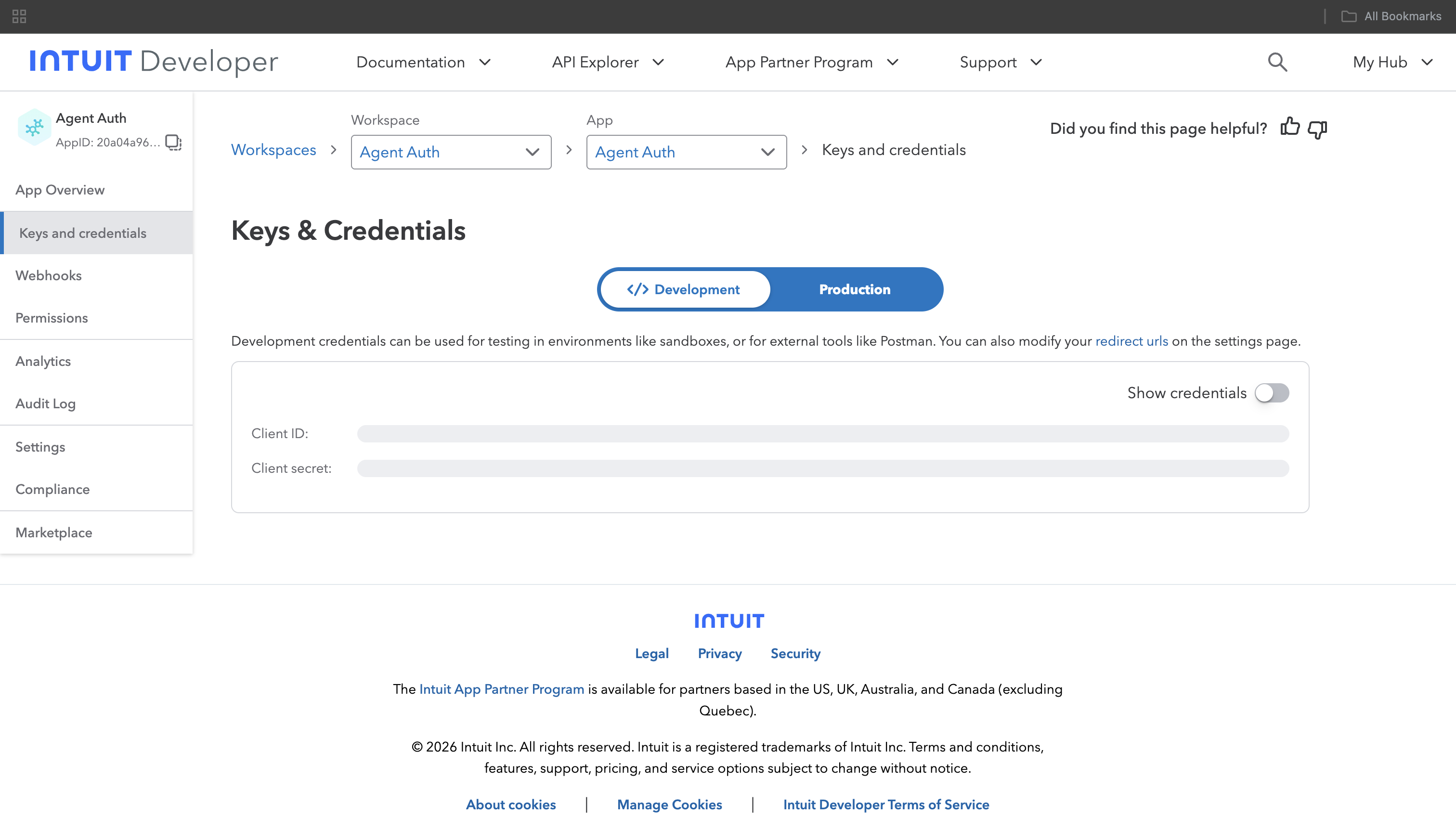
Under Keys & credentials, select the Production tab, then copy the Client ID and Client Secret. Use the Development tab credentials only for testing against the QuickBooks sandbox.
-
-
Set up auth redirects
- In Scalekit dashboard, go to AgentKit > Connections > Create Connection. Find QuickBooks and click Create. Copy the redirect URI. It looks like
https://<SCALEKIT_ENVIRONMENT_URL>/sso/v1/oauth/<CONNECTION_ID>/callback.
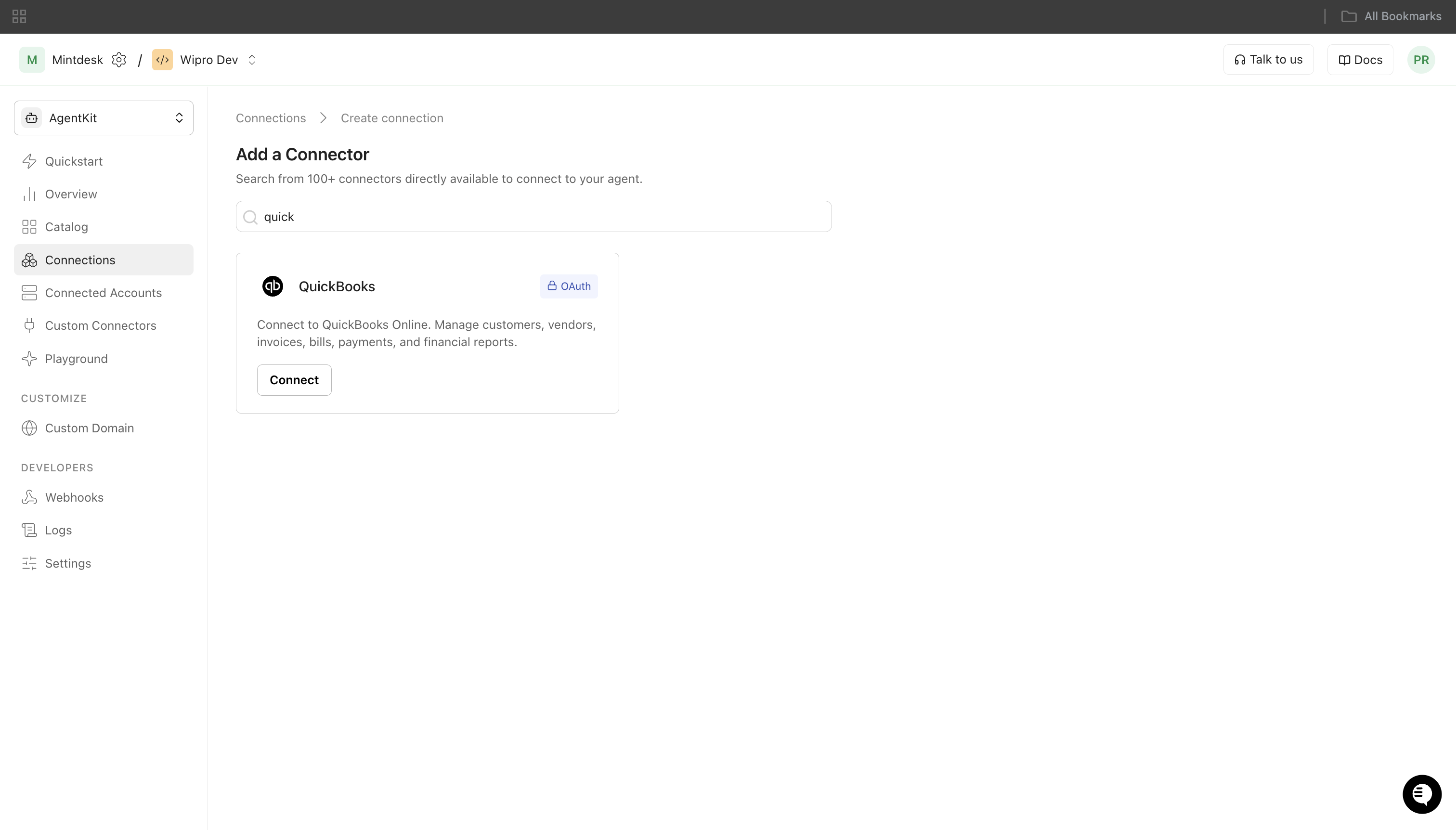
- Back in the Intuit Developer Portal, go to your app’s Keys & credentials settings and add the Scalekit redirect URI under Redirect URIs.
- In Scalekit dashboard, go to AgentKit > Connections > Create Connection. Find QuickBooks and click Create. Copy the redirect URI. It looks like
-
Add credentials in Scalekit
-
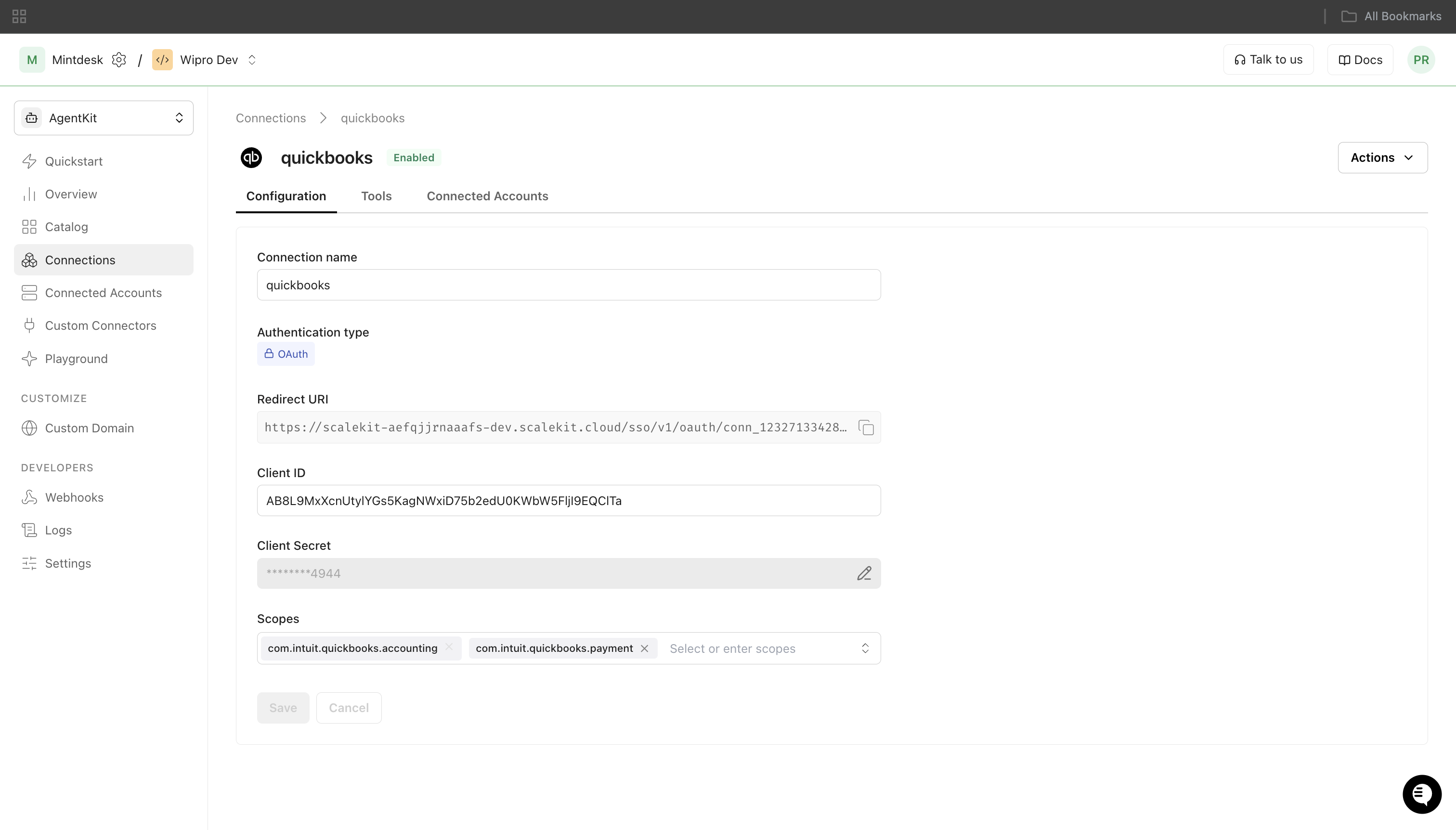
In Scalekit dashboard, go to AgentKit > Connections and open the connection you created.
-
Enter your credentials:
- Client ID (from your QuickBooks app)
- Client Secret (from your QuickBooks app)
- Permissions (OAuth scope strings):
com.intuit.quickbooks.accounting offline_access
-
Click Save.
-
-
-
Authorize and make your first call
Section titled “Authorize and make your first call”quickstart.ts import { ScalekitClient } from '@scalekit-sdk/node'import 'dotenv/config'const scalekit = new ScalekitClient(process.env.SCALEKIT_ENV_URL,process.env.SCALEKIT_CLIENT_ID,process.env.SCALEKIT_CLIENT_SECRET,)const actions = scalekit.actionsconst connector = 'quickbooks'const identifier = 'user_123'// Generate an authorization link for the userconst { link } = await actions.getAuthorizationLink({ connectionName: connector, identifier })console.log('Authorize QuickBooks:', link)process.stdout.write('Press Enter after authorizing...')await new Promise(r => process.stdin.once('data', r))// Make your first callconst result = await actions.executeTool({connector,identifier,toolName: 'quickbooks_company_info_get',toolInput: {},})console.log(result)quickstart.py import osfrom scalekit.client import ScalekitClientfrom dotenv import load_dotenvload_dotenv()scalekit_client = ScalekitClient(env_url=os.getenv("SCALEKIT_ENV_URL"),client_id=os.getenv("SCALEKIT_CLIENT_ID"),client_secret=os.getenv("SCALEKIT_CLIENT_SECRET"),)actions = scalekit_client.actionsconnection_name = "quickbooks"identifier = "user_123"# Generate an authorization link for the userlink_response = actions.get_authorization_link(connection_name=connection_name,identifier=identifier,)print("Authorize QuickBooks:", link_response.link)input("Press Enter after authorizing...")# Make your first callresult = actions.execute_tool(tool_input={},tool_name="quickbooks_company_info_get",connection_name=connection_name,identifier=identifier,)print(result)
What you can do
Section titled “What you can do”Connect this agent connector to let your agent:
- List vendors, vendor credits, transfers — List vendors from QuickBooks Online with optional filtering and pagination
- Update vendor, payment, item — Update an existing vendor in QuickBooks Online
- Get vendor, vendor credit, transfer — Retrieve a single QuickBooks Online vendor by ID
- Create vendor credit, vendor, transfer — Create a new vendor credit in QuickBooks Online
- Delete sales receipt, purchase order, payment — Delete a sales receipt in QuickBooks Online
- Balance report trial — Retrieve a Trial Balance report from QuickBooks Online
Common workflows
Section titled “Common workflows”Proxy API call
const result = await actions.request({ connectionName: 'quickbooks', identifier: 'user_123', path: '/v3/company/{{realm_id}}/query?query=SELECT * FROM Customer MAXRESULTS 10 STARTPOSITION 1', method: 'GET',});console.log(result);result = actions.request( connection_name='quickbooks', identifier='user_123', path="/v3/company/{{realm_id}}/query?query=SELECT * FROM Customer MAXRESULTS 10 STARTPOSITION 1", method="GET")print(result)List customers
const customers = await actions.executeTool({ connector: 'quickbooks', identifier: 'user_123', toolName: 'quickbooks_customers_list', toolInput: { max_results: 10, start_position: 1, },});console.log('Customers:', customers);customers = actions.execute_tool( connection_name='quickbooks', identifier='user_123', tool_name="quickbooks_customers_list", tool_input={ "max_results": 10, "start_position": 1, },)print("Customers:", customers)Create an invoice
const invoice = await actions.executeTool({ connector: 'quickbooks', identifier: 'user_123', toolName: 'quickbooks_invoice_create', toolInput: { CustomerRef: JSON.stringify({ value: '1' }), Line: JSON.stringify([ { Amount: 150.00, DetailType: 'SalesItemLineDetail', SalesItemLineDetail: { ItemRef: { value: '1', name: 'Services' }, Qty: 1, UnitPrice: 150.00, }, }, ]), DueDate: '2025-06-30', DocNumber: 'INV-001', },});console.log('Created invoice ID:', invoice.Invoice?.Id);import json
invoice = actions.execute_tool( connection_name='quickbooks', identifier='user_123', tool_name="quickbooks_invoice_create", tool_input={ "CustomerRef": json.dumps({"value": "1"}), "Line": json.dumps([ { "Amount": 150.00, "DetailType": "SalesItemLineDetail", "SalesItemLineDetail": { "ItemRef": {"value": "1", "name": "Services"}, "Qty": 1, "UnitPrice": 150.00, }, } ]), "DueDate": "2025-06-30", "DocNumber": "INV-001", },)print("Created invoice ID:", invoice.get("Invoice", {}).get("Id"))Tool list
Section titled “Tool list”Use the exact tool names from the Tool list below when you call execute_tool. If you’re not sure which name to use, list the tools available for the current user first.
quickbooks_account_create#Create a new account in QuickBooks Online.6 params
Create a new account in QuickBooks Online.
AccountTypestringrequiredAccount type (e.g. Bank, Expense, Income, Liability).NamestringrequiredName of the account.AccountSubTypestringoptionalAccount sub-type.ActivebooleanoptionalWhether the account is active.CurrencyRefstringoptionalCurrency reference as JSON, e.g. {"value":"USD"}.DescriptionstringoptionalDescription of the account.quickbooks_account_get#Retrieve a single QuickBooks Online account by its ID.1 param
Retrieve a single QuickBooks Online account by its ID.
account_idstringrequiredThe ID of the account to retrieve.quickbooks_account_update#Update an existing account in QuickBooks Online. Requires SyncToken from account_get.6 params
Update an existing account in QuickBooks Online. Requires SyncToken from account_get.
AccountTypestringrequiredAccount type.IdstringrequiredThe ID of the account to update.NamestringrequiredName of the account.SyncTokenstringrequiredSyncToken from the account_get response (optimistic locking).ActivebooleanoptionalWhether the account is active.DescriptionstringoptionalDescription.quickbooks_accounts_list#List accounts from QuickBooks Online. Use where_clause to filter (e.g. "AccountType = 'Bank'").3 params
List accounts from QuickBooks Online. Use where_clause to filter (e.g. "AccountType = 'Bank'").
max_resultsintegerrequiredMaximum number of records to return.start_positionintegerrequiredStarting position for pagination (1-based).where_clausestringoptionalOptional WHERE clause to filter accounts, e.g. "AccountType = 'Bank'"quickbooks_bill_create#Create a new bill in QuickBooks Online.5 params
Create a new bill in QuickBooks Online.
LinestringrequiredLine items as JSON array.VendorRefstringrequiredVendor reference as JSON, e.g. {"value":"123"}.DocNumberstringoptionalBill number.DueDatestringoptionalDue date YYYY-MM-DD.PrivateNotestringoptionalInternal memo.quickbooks_bill_delete#Delete a bill in QuickBooks Online.2 params
Delete a bill in QuickBooks Online.
IdstringrequiredBill ID.SyncTokenstringrequiredSyncToken from bill_get.quickbooks_bill_get#Retrieve a single QuickBooks Online bill by ID.1 param
Retrieve a single QuickBooks Online bill by ID.
bill_idstringrequiredThe ID of the bill.quickbooks_bill_payment_create#Create a new bill payment in QuickBooks Online.8 params
Create a new bill payment in QuickBooks Online.
LinestringrequiredLinked transactions as JSON array with LinkedTxn.PayTypestringrequiredPayment type: Check or CreditCard.TotalAmtstringrequiredTotal amount as number string, e.g. "200.00".VendorRefstringrequiredVendor reference as JSON, e.g. {"value":"123"}.CheckPaymentstringoptionalCheck payment details as JSON, required when PayType is Check. e.g. {"BankAccountRef":{"value":"35"}}.CreditCardPaymentstringoptionalCredit card payment details as JSON, required when PayType is CreditCard. e.g. {"CCAccountRef":{"value":"41"}}.DocNumberstringoptionalDocument/check number.PrivateNotestringoptionalInternal memo.quickbooks_bill_payment_delete#Delete a bill payment in QuickBooks Online.2 params
Delete a bill payment in QuickBooks Online.
IdstringrequiredBill Payment ID.SyncTokenstringrequiredSyncToken from bill_payment_get.quickbooks_bill_payment_get#Retrieve a single QuickBooks Online bill payment by ID.1 param
Retrieve a single QuickBooks Online bill payment by ID.
bill_payment_idstringrequiredThe ID of the bill payment.quickbooks_bill_payments_list#List bill payments from QuickBooks Online.3 params
List bill payments from QuickBooks Online.
max_resultsintegerrequiredMaximum number of records to return.start_positionintegerrequiredStarting position for pagination (1-based).where_clausestringoptionalOptional WHERE clause.quickbooks_bill_update#Update an existing bill in QuickBooks Online.6 params
Update an existing bill in QuickBooks Online.
IdstringrequiredBill ID.LinestringrequiredLine items as JSON array.SyncTokenstringrequiredSyncToken from bill_get.VendorRefstringrequiredVendor reference as JSON.DueDatestringoptionalDue date YYYY-MM-DD.PrivateNotestringoptionalInternal memo.quickbooks_bills_list#List bills from QuickBooks Online with optional filtering and pagination.3 params
List bills from QuickBooks Online with optional filtering and pagination.
max_resultsintegerrequiredMaximum number of records to return.start_positionintegerrequiredStarting position for pagination (1-based).where_clausestringoptionalOptional WHERE clause.quickbooks_class_create#Create a new class in QuickBooks Online.3 params
Create a new class in QuickBooks Online.
NamestringrequiredName of the class.ActivebooleanoptionalWhether the class is active.ParentRefstringoptionalParent class reference as JSON.quickbooks_class_get#Retrieve a single QuickBooks Online class by ID.1 param
Retrieve a single QuickBooks Online class by ID.
class_idstringrequiredThe ID of the class.quickbooks_classes_list#List classes from QuickBooks Online.2 params
List classes from QuickBooks Online.
max_resultsintegerrequiredMaximum number of records to return.start_positionintegerrequiredStarting position for pagination (1-based).quickbooks_company_info_get#Retrieve company information for the connected QuickBooks Online account.0 params
Retrieve company information for the connected QuickBooks Online account.
quickbooks_credit_memo_create#Create a new credit memo in QuickBooks Online.4 params
Create a new credit memo in QuickBooks Online.
CustomerRefstringrequiredCustomer reference as JSON.LinestringrequiredLine items as JSON array.DocNumberstringoptionalCredit memo number.PrivateNotestringoptionalInternal memo.quickbooks_credit_memo_delete#Delete a credit memo in QuickBooks Online.2 params
Delete a credit memo in QuickBooks Online.
IdstringrequiredCredit Memo ID.SyncTokenstringrequiredSyncToken from credit_memo_get.quickbooks_credit_memo_get#Retrieve a single QuickBooks Online credit memo by ID.1 param
Retrieve a single QuickBooks Online credit memo by ID.
credit_memo_idstringrequiredThe ID of the credit memo.quickbooks_credit_memos_list#List credit memos from QuickBooks Online.3 params
List credit memos from QuickBooks Online.
max_resultsintegerrequiredMaximum number of records to return.start_positionintegerrequiredStarting position for pagination (1-based).where_clausestringoptionalOptional WHERE clause.quickbooks_customer_create#Create a new customer in QuickBooks Online.8 params
Create a new customer in QuickBooks Online.
DisplayNamestringrequiredDisplay name for the customer.ActivebooleanoptionalWhether the customer is active.BillAddrstringoptionalBilling address as JSON object.CompanyNamestringoptionalCompany name.FamilyNamestringoptionalLast name.GivenNamestringoptionalFirst name.PrimaryEmailAddrstringoptionalEmail as JSON, e.g. {"Address":"john@example.com"}.PrimaryPhonestringoptionalPhone as JSON, e.g. {"FreeFormNumber":"555-1234"}.quickbooks_customer_delete#Mark a customer as inactive in QuickBooks Online (customers cannot be permanently deleted).2 params
Mark a customer as inactive in QuickBooks Online (customers cannot be permanently deleted).
IdstringrequiredCustomer ID.SyncTokenstringrequiredSyncToken from customer_get.quickbooks_customer_get#Retrieve a single QuickBooks Online customer by ID.1 param
Retrieve a single QuickBooks Online customer by ID.
customer_idstringrequiredThe ID of the customer.quickbooks_customer_update#Update an existing customer in QuickBooks Online. Requires SyncToken from customer_get.8 params
Update an existing customer in QuickBooks Online. Requires SyncToken from customer_get.
DisplayNamestringrequiredDisplay name.IdstringrequiredCustomer ID.SyncTokenstringrequiredSyncToken from customer_get.ActivebooleanoptionalWhether the customer is active.CompanyNamestringoptionalCompany name.FamilyNamestringoptionalLast name.GivenNamestringoptionalFirst name.PrimaryEmailAddrstringoptionalEmail as JSON.quickbooks_customers_list#List customers from QuickBooks Online with optional filtering and pagination.3 params
List customers from QuickBooks Online with optional filtering and pagination.
max_resultsintegerrequiredMaximum number of records to return.start_positionintegerrequiredStarting position for pagination (1-based).where_clausestringoptionalOptional WHERE clause, e.g. "Active = true"quickbooks_department_create#Create a new department in QuickBooks Online.3 params
Create a new department in QuickBooks Online.
NamestringrequiredName of the department.ActivebooleanoptionalWhether the department is active.ParentRefstringoptionalParent department reference as JSON.quickbooks_department_get#Retrieve a single QuickBooks Online department by ID.1 param
Retrieve a single QuickBooks Online department by ID.
department_idstringrequiredThe ID of the department.quickbooks_departments_list#List departments from QuickBooks Online.2 params
List departments from QuickBooks Online.
max_resultsintegerrequiredMaximum number of records to return.start_positionintegerrequiredStarting position for pagination (1-based).quickbooks_deposit_create#Create a new deposit in QuickBooks Online.4 params
Create a new deposit in QuickBooks Online.
DepositToAccountRefstringrequiredAccount to deposit into as JSON.LinestringrequiredDeposit lines as JSON array.PrivateNotestringoptionalInternal memo.TxnDatestringoptionalTransaction date YYYY-MM-DD.quickbooks_deposit_delete#Delete a deposit in QuickBooks Online.2 params
Delete a deposit in QuickBooks Online.
IdstringrequiredDeposit ID.SyncTokenstringrequiredSyncToken from deposit_get.quickbooks_deposit_get#Retrieve a single QuickBooks Online deposit by ID.1 param
Retrieve a single QuickBooks Online deposit by ID.
deposit_idstringrequiredThe ID of the deposit.quickbooks_deposits_list#List deposits from QuickBooks Online.2 params
List deposits from QuickBooks Online.
max_resultsintegerrequiredMaximum number of records to return.start_positionintegerrequiredStarting position for pagination (1-based).quickbooks_employee_create#Create a new employee in QuickBooks Online.6 params
Create a new employee in QuickBooks Online.
FamilyNamestringrequiredEmployee last name.GivenNamestringrequiredEmployee first name.ActivebooleanoptionalWhether the employee is active.DisplayNamestringoptionalDisplay name.PrimaryEmailAddrstringoptionalEmail as JSON.PrimaryPhonestringoptionalPhone as JSON.quickbooks_employee_get#Retrieve a single QuickBooks Online employee by ID.1 param
Retrieve a single QuickBooks Online employee by ID.
employee_idstringrequiredThe ID of the employee.quickbooks_employees_list#List employees from QuickBooks Online.3 params
List employees from QuickBooks Online.
max_resultsintegerrequiredMaximum number of records to return.start_positionintegerrequiredStarting position for pagination (1-based).where_clausestringoptionalOptional WHERE clause.quickbooks_estimate_create#Create a new estimate (quote) in QuickBooks Online.5 params
Create a new estimate (quote) in QuickBooks Online.
CustomerRefstringrequiredCustomer reference as JSON.LinestringrequiredLine items as JSON array.DocNumberstringoptionalEstimate number.ExpirationDatestringoptionalExpiration date YYYY-MM-DD.PrivateNotestringoptionalInternal memo.quickbooks_estimate_delete#Delete an estimate in QuickBooks Online.2 params
Delete an estimate in QuickBooks Online.
IdstringrequiredEstimate ID.SyncTokenstringrequiredSyncToken from estimate_get.quickbooks_estimate_get#Retrieve a single QuickBooks Online estimate by ID.1 param
Retrieve a single QuickBooks Online estimate by ID.
estimate_idstringrequiredThe ID of the estimate.quickbooks_estimates_list#List estimates from QuickBooks Online with optional filtering and pagination.3 params
List estimates from QuickBooks Online with optional filtering and pagination.
max_resultsintegerrequiredMaximum number of records to return.start_positionintegerrequiredStarting position for pagination (1-based).where_clausestringoptionalOptional WHERE clause.quickbooks_invoice_create#Create a new invoice in QuickBooks Online.7 params
Create a new invoice in QuickBooks Online.
CustomerRefstringrequiredCustomer reference as JSON, e.g. {"value":"123"}.LinestringrequiredLine items as JSON array.BillEmailstringoptionalBilling email as JSON, e.g. {"Address":"customer@example.com"}.DocNumberstringoptionalInvoice number.DueDatestringoptionalDue date in YYYY-MM-DD format.EmailStatusstringoptionalEmail status: EmailSent or NotSet.PrivateNotestringoptionalInternal memo.quickbooks_invoice_delete#Delete an invoice in QuickBooks Online.2 params
Delete an invoice in QuickBooks Online.
IdstringrequiredInvoice ID.SyncTokenstringrequiredSyncToken from invoice_get.quickbooks_invoice_get#Retrieve a single QuickBooks Online invoice by ID.1 param
Retrieve a single QuickBooks Online invoice by ID.
invoice_idstringrequiredThe ID of the invoice.quickbooks_invoice_send#Send an invoice by email in QuickBooks Online.2 params
Send an invoice by email in QuickBooks Online.
invoice_idstringrequiredThe ID of the invoice to send.send_tostringrequiredEmail address to send the invoice to.quickbooks_invoice_update#Update an existing invoice in QuickBooks Online.8 params
Update an existing invoice in QuickBooks Online.
CustomerRefstringrequiredCustomer reference as JSON.IdstringrequiredInvoice ID.LinestringrequiredLine items as JSON array.SyncTokenstringrequiredSyncToken from invoice_get.DocNumberstringoptionalInvoice number.DueDatestringoptionalDue date YYYY-MM-DD.EmailStatusstringoptionalEmail status.PrivateNotestringoptionalInternal memo.quickbooks_invoice_void#Void an invoice in QuickBooks Online.2 params
Void an invoice in QuickBooks Online.
IdstringrequiredInvoice ID.SyncTokenstringrequiredSyncToken from invoice_get.quickbooks_invoices_list#List invoices from QuickBooks Online with optional filtering and pagination.3 params
List invoices from QuickBooks Online with optional filtering and pagination.
max_resultsintegerrequiredMaximum number of records to return.start_positionintegerrequiredStarting position for pagination (1-based).where_clausestringoptionalOptional WHERE clause, e.g. "TxnDate > '2024-01-01'"quickbooks_item_create#Create a new item (product or service) in QuickBooks Online.6 params
Create a new item (product or service) in QuickBooks Online.
NamestringrequiredName of the item.TypestringrequiredItem type: Service, NonInventory, or Inventory.ActivebooleanoptionalWhether the item is active.DescriptionstringoptionalDescription of the item.IncomeAccountRefstringoptionalIncome account reference as JSON, e.g. {"value":"1","name":"Services"}.UnitPricestringoptionalUnit price as a number string, e.g. "150.00".quickbooks_item_delete#Mark an item as inactive in QuickBooks Online (items cannot be permanently deleted).2 params
Mark an item as inactive in QuickBooks Online (items cannot be permanently deleted).
IdstringrequiredItem ID.SyncTokenstringrequiredSyncToken from item_get.quickbooks_item_get#Retrieve a single QuickBooks Online item by ID.1 param
Retrieve a single QuickBooks Online item by ID.
item_idstringrequiredThe ID of the item.quickbooks_item_update#Update an existing item in QuickBooks Online.7 params
Update an existing item in QuickBooks Online.
IdstringrequiredItem ID.NamestringrequiredName of the item.SyncTokenstringrequiredSyncToken from item_get.TypestringrequiredItem type.ActivebooleanoptionalWhether the item is active.DescriptionstringoptionalDescription.UnitPricestringoptionalUnit price as number string.quickbooks_items_list#List items (products and services) from QuickBooks Online.3 params
List items (products and services) from QuickBooks Online.
max_resultsintegerrequiredMaximum number of records to return.start_positionintegerrequiredStarting position for pagination (1-based).where_clausestringoptionalOptional WHERE clause, e.g. "Type = 'Service'"quickbooks_journal_entries_list#List journal entries from QuickBooks Online.3 params
List journal entries from QuickBooks Online.
max_resultsintegerrequiredMaximum number of records to return.start_positionintegerrequiredStarting position for pagination (1-based).where_clausestringoptionalOptional WHERE clause.quickbooks_journal_entry_create#Create a new journal entry in QuickBooks Online.4 params
Create a new journal entry in QuickBooks Online.
LinestringrequiredJournal entry lines as JSON array with debit/credit amounts.DocNumberstringoptionalJournal entry number.PrivateNotestringoptionalInternal memo.TxnDatestringoptionalTransaction date YYYY-MM-DD.quickbooks_journal_entry_delete#Delete a journal entry in QuickBooks Online.2 params
Delete a journal entry in QuickBooks Online.
IdstringrequiredJournal Entry ID.SyncTokenstringrequiredSyncToken from journal_entry_get.quickbooks_journal_entry_get#Retrieve a single QuickBooks Online journal entry by ID.1 param
Retrieve a single QuickBooks Online journal entry by ID.
journal_entry_idstringrequiredThe ID of the journal entry.quickbooks_payment_create#Create a new customer payment in QuickBooks Online.4 params
Create a new customer payment in QuickBooks Online.
CustomerRefstringrequiredCustomer reference as JSON, e.g. {"value":"123"}.TotalAmtstringrequiredTotal payment amount as number string, e.g. "500.00".LinestringoptionalLinked transactions as JSON array.PaymentRefNumstringoptionalPayment reference number (check number, etc.).quickbooks_payment_delete#Delete a payment in QuickBooks Online.2 params
Delete a payment in QuickBooks Online.
IdstringrequiredPayment ID.SyncTokenstringrequiredSyncToken from payment_get.quickbooks_payment_get#Retrieve a single QuickBooks Online payment by ID.1 param
Retrieve a single QuickBooks Online payment by ID.
payment_idstringrequiredThe ID of the payment.quickbooks_payment_update#Update an existing payment in QuickBooks Online.5 params
Update an existing payment in QuickBooks Online.
CustomerRefstringrequiredCustomer reference as JSON.IdstringrequiredPayment ID.SyncTokenstringrequiredSyncToken from payment_get.TotalAmtstringrequiredTotal payment amount as number string.PaymentRefNumstringoptionalPayment reference number.quickbooks_payments_list#List payments from QuickBooks Online with optional filtering and pagination.3 params
List payments from QuickBooks Online with optional filtering and pagination.
max_resultsintegerrequiredMaximum number of records to return.start_positionintegerrequiredStarting position for pagination (1-based).where_clausestringoptionalOptional WHERE clause.quickbooks_purchase_order_create#Create a new purchase order in QuickBooks Online.5 params
Create a new purchase order in QuickBooks Online.
LinestringrequiredLine items as JSON array.VendorRefstringrequiredVendor reference as JSON.DocNumberstringoptionalPurchase order number.DueDatestringoptionalDue date YYYY-MM-DD.PrivateNotestringoptionalInternal memo.quickbooks_purchase_order_delete#Delete a purchase order in QuickBooks Online.2 params
Delete a purchase order in QuickBooks Online.
IdstringrequiredPurchase Order ID.SyncTokenstringrequiredSyncToken from purchase_order_get.quickbooks_purchase_order_get#Retrieve a single QuickBooks Online purchase order by ID.1 param
Retrieve a single QuickBooks Online purchase order by ID.
purchase_order_idstringrequiredThe ID of the purchase order.quickbooks_purchase_orders_list#List purchase orders from QuickBooks Online.3 params
List purchase orders from QuickBooks Online.
max_resultsintegerrequiredMaximum number of records to return.start_positionintegerrequiredStarting position for pagination (1-based).where_clausestringoptionalOptional WHERE clause.quickbooks_refund_receipt_create#Create a new refund receipt in QuickBooks Online.6 params
Create a new refund receipt in QuickBooks Online.
CustomerRefstringrequiredCustomer reference as JSON.DepositToAccountRefstringrequiredAccount to deposit the refund into as JSON, e.g. {"value":"35"} for Checking.LinestringrequiredLine items as JSON array.DocNumberstringoptionalRefund receipt number.PaymentRefNumstringoptionalPayment reference number.PrivateNotestringoptionalInternal memo.quickbooks_refund_receipt_get#Retrieve a single QuickBooks Online refund receipt by ID.1 param
Retrieve a single QuickBooks Online refund receipt by ID.
refund_receipt_idstringrequiredThe ID of the refund receipt.quickbooks_refund_receipts_list#List refund receipts from QuickBooks Online.2 params
List refund receipts from QuickBooks Online.
max_resultsintegerrequiredMaximum number of records to return.start_positionintegerrequiredStarting position for pagination (1-based).quickbooks_report_aged_payables#Retrieve an Aged Payable Detail report from QuickBooks Online.2 params
Retrieve an Aged Payable Detail report from QuickBooks Online.
due_datestringoptionalDue date filter in YYYY-MM-DD format.report_datestringoptionalReport date in YYYY-MM-DD format.quickbooks_report_aged_receivables#Retrieve an Aged Receivable Detail report from QuickBooks Online.2 params
Retrieve an Aged Receivable Detail report from QuickBooks Online.
due_datestringoptionalDue date filter in YYYY-MM-DD format.report_datestringoptionalReport date in YYYY-MM-DD format.quickbooks_report_balance_sheet#Retrieve a Balance Sheet report from QuickBooks Online.3 params
Retrieve a Balance Sheet report from QuickBooks Online.
accounting_methodstringoptionalAccounting method: Accrual or Cash.end_datestringoptionalReport end date in YYYY-MM-DD format.start_datestringoptionalReport start date in YYYY-MM-DD format.quickbooks_report_cash_flow#Retrieve a Cash Flow report from QuickBooks Online.2 params
Retrieve a Cash Flow report from QuickBooks Online.
end_datestringoptionalReport end date in YYYY-MM-DD format.start_datestringoptionalReport start date in YYYY-MM-DD format.quickbooks_report_general_ledger#Retrieve a General Ledger report from QuickBooks Online.3 params
Retrieve a General Ledger report from QuickBooks Online.
accounting_methodstringoptionalAccounting method: Accrual or Cash.end_datestringoptionalReport end date in YYYY-MM-DD format.start_datestringoptionalReport start date in YYYY-MM-DD format.quickbooks_report_profit_and_loss#Retrieve a Profit and Loss report from QuickBooks Online.3 params
Retrieve a Profit and Loss report from QuickBooks Online.
accounting_methodstringoptionalAccounting method: Accrual or Cash.end_datestringoptionalReport end date in YYYY-MM-DD format.start_datestringoptionalReport start date in YYYY-MM-DD format.quickbooks_report_trial_balance#Retrieve a Trial Balance report from QuickBooks Online.3 params
Retrieve a Trial Balance report from QuickBooks Online.
accounting_methodstringoptionalAccounting method: Accrual or Cash.end_datestringoptionalReport end date in YYYY-MM-DD format.start_datestringoptionalReport start date in YYYY-MM-DD format.quickbooks_sales_receipt_create#Create a new sales receipt in QuickBooks Online.5 params
Create a new sales receipt in QuickBooks Online.
CustomerRefstringrequiredCustomer reference as JSON.LinestringrequiredLine items as JSON array.DocNumberstringoptionalReceipt number.PaymentRefNumstringoptionalPayment reference number.PrivateNotestringoptionalInternal memo.quickbooks_sales_receipt_delete#Delete a sales receipt in QuickBooks Online.2 params
Delete a sales receipt in QuickBooks Online.
IdstringrequiredSales Receipt ID.SyncTokenstringrequiredSyncToken from sales_receipt_get.quickbooks_sales_receipt_get#Retrieve a single QuickBooks Online sales receipt by ID.1 param
Retrieve a single QuickBooks Online sales receipt by ID.
sales_receipt_idstringrequiredThe ID of the sales receipt.quickbooks_sales_receipts_list#List sales receipts from QuickBooks Online.3 params
List sales receipts from QuickBooks Online.
max_resultsintegerrequiredMaximum number of records to return.start_positionintegerrequiredStarting position for pagination (1-based).where_clausestringoptionalOptional WHERE clause.quickbooks_tax_code_get#Retrieve a single QuickBooks Online tax code by ID.1 param
Retrieve a single QuickBooks Online tax code by ID.
tax_code_idstringrequiredThe ID of the tax code.quickbooks_tax_codes_list#List tax codes from QuickBooks Online.2 params
List tax codes from QuickBooks Online.
max_resultsintegerrequiredMaximum number of records to return.start_positionintegerrequiredStarting position for pagination (1-based).quickbooks_transfer_create#Create a new fund transfer between accounts in QuickBooks Online.5 params
Create a new fund transfer between accounts in QuickBooks Online.
AmountstringrequiredTransfer amount as number string.FromAccountRefstringrequiredSource account reference as JSON.ToAccountRefstringrequiredDestination account reference as JSON.PrivateNotestringoptionalInternal memo.TxnDatestringoptionalTransaction date YYYY-MM-DD.quickbooks_transfer_get#Retrieve a single QuickBooks Online transfer by ID.1 param
Retrieve a single QuickBooks Online transfer by ID.
transfer_idstringrequiredThe ID of the transfer.quickbooks_transfers_list#List transfers from QuickBooks Online.2 params
List transfers from QuickBooks Online.
max_resultsintegerrequiredMaximum number of records to return.start_positionintegerrequiredStarting position for pagination (1-based).quickbooks_vendor_create#Create a new vendor in QuickBooks Online.7 params
Create a new vendor in QuickBooks Online.
DisplayNamestringrequiredDisplay name for the vendor.ActivebooleanoptionalWhether the vendor is active.CompanyNamestringoptionalCompany name.FamilyNamestringoptionalLast name.GivenNamestringoptionalFirst name.PrimaryEmailAddrstringoptionalEmail as JSON.PrimaryPhonestringoptionalPhone as JSON.quickbooks_vendor_credit_create#Create a new vendor credit in QuickBooks Online.4 params
Create a new vendor credit in QuickBooks Online.
LinestringrequiredLine items as JSON array.VendorRefstringrequiredVendor reference as JSON.DocNumberstringoptionalVendor credit number.PrivateNotestringoptionalInternal memo.quickbooks_vendor_credit_get#Retrieve a single QuickBooks Online vendor credit by ID.1 param
Retrieve a single QuickBooks Online vendor credit by ID.
vendor_credit_idstringrequiredThe ID of the vendor credit.quickbooks_vendor_credits_list#List vendor credits from QuickBooks Online.2 params
List vendor credits from QuickBooks Online.
max_resultsintegerrequiredMaximum number of records to return.start_positionintegerrequiredStarting position for pagination (1-based).quickbooks_vendor_get#Retrieve a single QuickBooks Online vendor by ID.1 param
Retrieve a single QuickBooks Online vendor by ID.
vendor_idstringrequiredThe ID of the vendor.quickbooks_vendor_update#Update an existing vendor in QuickBooks Online.6 params
Update an existing vendor in QuickBooks Online.
DisplayNamestringrequiredDisplay name.IdstringrequiredVendor ID.SyncTokenstringrequiredSyncToken from vendor_get.ActivebooleanoptionalWhether the vendor is active.CompanyNamestringoptionalCompany name.PrimaryEmailAddrstringoptionalEmail as JSON.quickbooks_vendors_list#List vendors from QuickBooks Online with optional filtering and pagination.3 params
List vendors from QuickBooks Online with optional filtering and pagination.
max_resultsintegerrequiredMaximum number of records to return.start_positionintegerrequiredStarting position for pagination (1-based).where_clausestringoptionalOptional WHERE clause.