


Jiminny connector
Bearer TokenCRM & SalesAIAutomationTranscriptionConnect with Jiminny to access call recordings, transcripts, coaching insights, and conversation intelligence data.
Jiminny connector
-
Install the SDK
Section titled “Install the SDK”Terminal window npm install @scalekit-sdk/nodeTerminal window pip install scalekit -
Set your credentials
Section titled “Set your credentials”Add your Scalekit credentials to your
.envfile. Find values in app.scalekit.com > Developers > API Credentials..env SCALEKIT_ENVIRONMENT_URL=<your-environment-url>SCALEKIT_CLIENT_ID=<your-client-id>SCALEKIT_CLIENT_SECRET=<your-client-secret> -
Set up the connector
Section titled “Set up the connector”Register your Jiminny credentials with Scalekit so it can authenticate requests on your behalf. You do this once per environment.
Dashboard setup steps
Register your Jiminny API key with Scalekit so it can authenticate requests to Jiminny’s conversation intelligence API on your behalf. You’ll need an API key from your Jiminny organisation settings.
-
Generate an API key in Jiminny
-
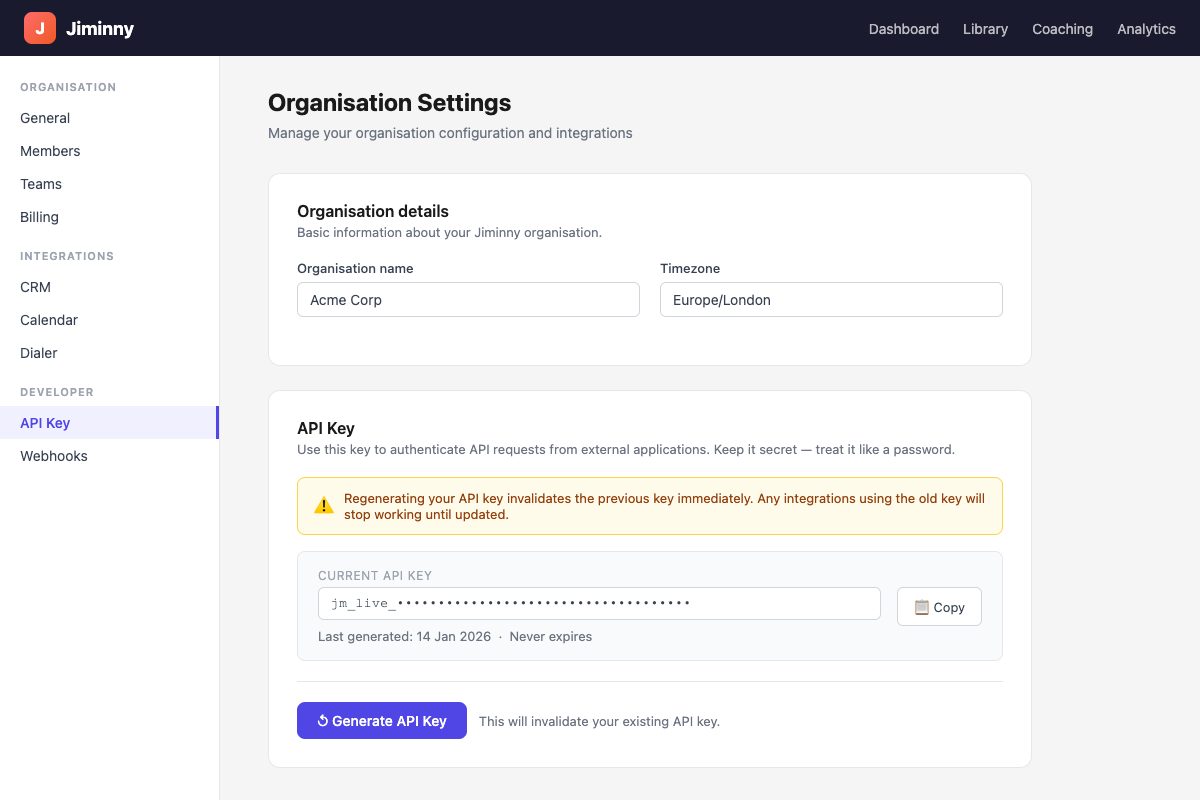
Sign in to Jiminny and navigate to Organisation Settings → General.
-
Scroll to the API Key section and click Generate API Key.
-
Click Copy to copy the key to your clipboard. Store it securely — you can regenerate it later, but doing so invalidates the previous key and breaks existing integrations.
-
-
Create a connection in Scalekit
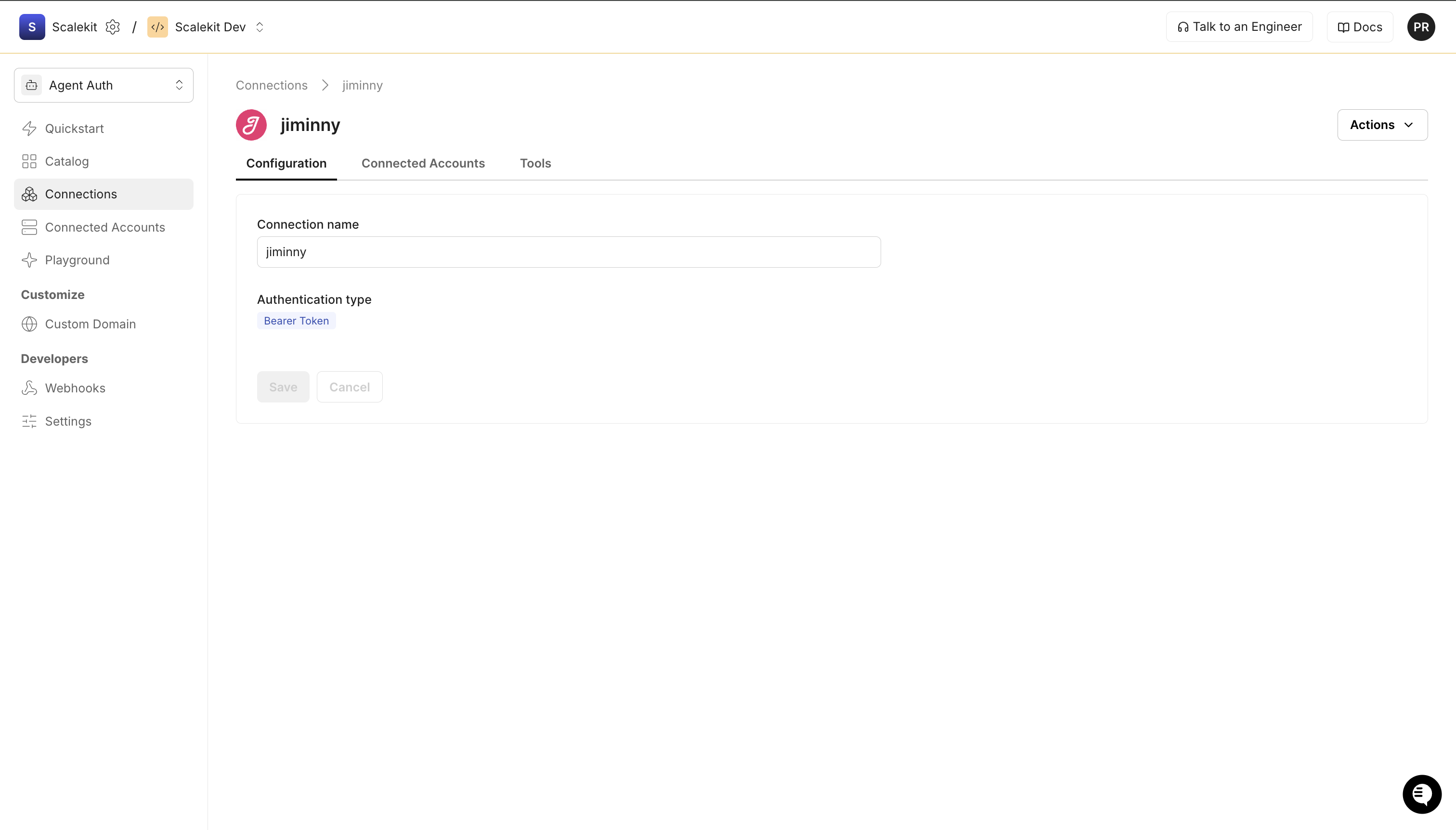
In Scalekit dashboard, go to AgentKit > Connections > Create Connection. Find Jiminny and click Create.
-
Add a connected account
Open the connection you just created and click the Connected Accounts tab → Add account. Fill in the required fields:
- Your User’s ID — a unique identifier for the user in your system
- Bearer Token — the API key you copied in step 1
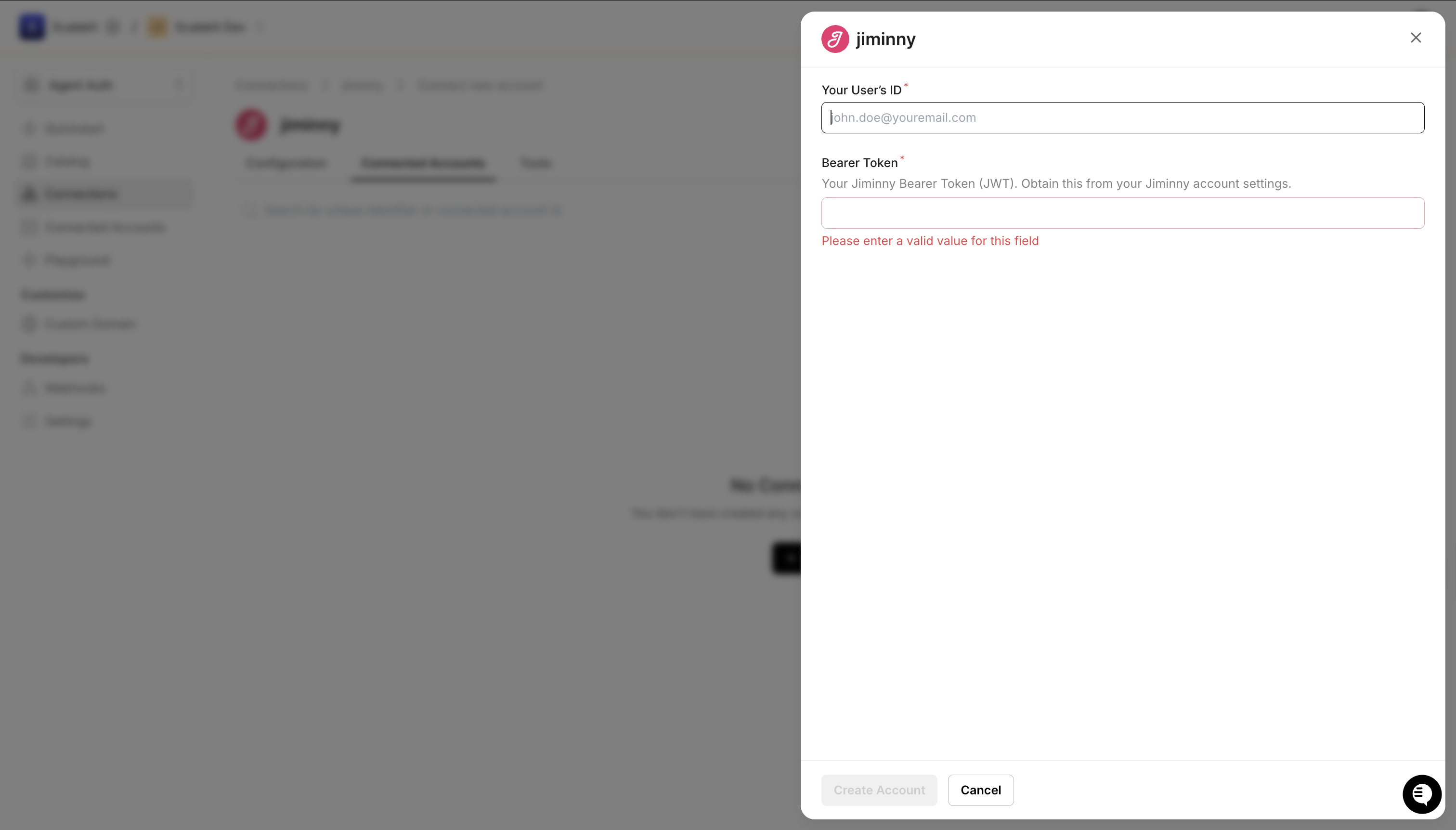
Click Save.
-
-
Make your first call
Section titled “Make your first call”quickstart.ts import { ScalekitClient } from '@scalekit-sdk/node'import 'dotenv/config'const scalekit = new ScalekitClient(process.env.SCALEKIT_ENV_URL,process.env.SCALEKIT_CLIENT_ID,process.env.SCALEKIT_CLIENT_SECRET,)const actions = scalekit.actionsconst connector = 'jiminny'const identifier = 'user_123'// Make your first callconst result = await actions.executeTool({connector,identifier,toolName: 'jiminny_activities_list',toolInput: {},})console.log(result)quickstart.py import osfrom scalekit.client import ScalekitClientfrom dotenv import load_dotenvload_dotenv()scalekit_client = ScalekitClient(env_url=os.getenv("SCALEKIT_ENV_URL"),client_id=os.getenv("SCALEKIT_CLIENT_ID"),client_secret=os.getenv("SCALEKIT_CLIENT_SECRET"),)actions = scalekit_client.actionsconnection_name = "jiminny"identifier = "user_123"# Make your first callresult = actions.execute_tool(tool_input={},tool_name="jiminny_activities_list",connection_name=connection_name,identifier=identifier,)print(result)
What you can do
Section titled “What you can do”Connect this agent connector to let your agent:
- Get webhook sample, questions, transcript — Retrieve a sample webhook payload for a given trigger event type to understand the data structure that will be sent
- Xyz test tool — Test
- Create webhook — Create a webhook subscription that sends event payloads to a destination URL when a specified trigger occurs in Jiminny
- List comments, automated call scoring, users — Retrieve activity comment records with optional filters by user and date range, returning comment IDs, activity IDs, user IDs, and creation timestamps
- Upload activity — Upload a call or meeting recording file to Jiminny for transcription and analysis, returning the new activity ID on success
- Delete webhook — Delete an existing webhook subscription by its UUID
Tool list
Section titled “Tool list”Use the exact tool names from the Tool list below when you call execute_tool. If you’re not sure which name to use, list the tools available for the current user first.
jiminny_action_items_get#Retrieve the AI-generated action items for a given activity, returning a list of follow-up tasks identified from the conversation.1 param
Retrieve the AI-generated action items for a given activity, returning a list of follow-up tasks identified from the conversation.
activityIdstringrequiredThe UUID of the activity to retrieve action items for.jiminny_activities_list#Retrieve completed and processed call and meeting activities with optional date range, update date range, status, and page filters. The time range must be less than six months and you must provide either fromDate/toDate or updatedFrom.6 params
Retrieve completed and processed call and meeting activities with optional date range, update date range, status, and page filters. The time range must be less than six months and you must provide either fromDate/toDate or updatedFrom.
fromDatestringoptionalFilter activities that occurred after this UTC date-time (e.g. 2021-10-01 00:00:00). Must be before toDate.pageintegeroptionalPage number to return (page size is 500 activities). Default is 1.statusstringoptionalFilter activities by status: in-progress, completed (for calls/meetings), received, sent, delivered (for SMS/Voice dialer).toDatestringoptionalFilter activities that occurred before this UTC date-time (e.g. 2021-11-01 00:00:00). Cannot be a future date.updatedFromstringoptionalFilter activities updated after this UTC date-time (e.g. 2021-11-01 00:00:00). Must be before updatedTo.updatedTostringoptionalFilter activities updated before this UTC date-time. Cannot be a future date. Defaults to current time.jiminny_activity_upload#Upload a call or meeting recording file to Jiminny for transcription and analysis, returning the new activity ID on success.10 params
Upload a call or meeting recording file to Jiminny for transcription and analysis, returning the new activity ID on success.
hostUserEmailstringrequiredThe email address of the host user. Must belong to the authenticated team.languagestringrequiredThe language locale of the activity (e.g. en_GB, en_US, fr_FR).titlestringrequiredThe title of the activity (max 250 characters).accountIdstringoptionalAn optional CRM Account ID to associate with this activity (max 100 characters).completedAtstringoptionalThe date the activity was completed (format: YYYY-MM-DD).externalIdstringoptionalAn optional external identifier for this activity (max 191 characters). Must be unique per host user.leadIdstringoptionalAn optional CRM Lead ID to associate with this activity (max 180 characters).notifyForUploadCompletionByEmailbooleanoptionalWhether to notify the host user via email when the upload and processing is complete.opportunityIdstringoptionalAn optional CRM Opportunity ID to associate with this activity (max 100 characters).skipFullAnalysisbooleanoptionalWhether to skip the full AI analysis of the uploaded activity.jiminny_automated_call_scoring_list#Retrieve automated call scoring records with optional filters by user and date range, returning scores, activity types, and user details.3 params
Retrieve automated call scoring records with optional filters by user and date range, returning scores, activity types, and user details.
fromDatestringoptionalFilter scoring records created after this UTC date-time (e.g. 2021-10-01 00:00:00).toDatestringoptionalFilter scoring records created before this UTC date-time (e.g. 2021-11-01 00:00:00). Cannot be a future date.userIdstringoptionalOptional UUID of the user to filter automated call scoring results by.jiminny_coaching_feedback_list#Retrieve bulk coaching feedback records within a required date range, optionally filtered by coach or coachee, returning scores, activity IDs, and timestamps.4 params
Retrieve bulk coaching feedback records within a required date range, optionally filtered by coach or coachee, returning scores, activity IDs, and timestamps.
fromDatestringrequiredFilter coaching feedback records created after this UTC date-time (e.g. 2021-10-01 00:00:00). Must be before toDate.toDatestringrequiredFilter coaching feedback records created before this UTC date-time (e.g. 2021-11-01 00:00:00). Cannot be a future date.coacheeIdstringoptionalOptional UUID of the coachee (sales rep) to filter coaching feedback by.coachIdstringoptionalOptional UUID of the coach (manager) to filter coaching feedback by.jiminny_comments_list#Retrieve activity comment records with optional filters by user and date range, returning comment IDs, activity IDs, user IDs, and creation timestamps.3 params
Retrieve activity comment records with optional filters by user and date range, returning comment IDs, activity IDs, user IDs, and creation timestamps.
fromDatestringoptionalFilter comments created after this UTC date-time (e.g. 2021-10-01 00:00:00). Must be before toDate.toDatestringoptionalFilter comments created before this UTC date-time (e.g. 2021-11-01 00:00:00). Cannot be a future date.userIdstringoptionalOptional UUID of the user to filter comments by.jiminny_listens_list#Retrieve listened (played) activity records within a date range, optionally filtered by user, showing who listened to which activities and when.3 params
Retrieve listened (played) activity records within a date range, optionally filtered by user, showing who listened to which activities and when.
fromDatestringrequiredFilter listened activities that occurred after this UTC date-time (e.g. 2021-10-01 00:00:00). Must be before toDate.toDatestringrequiredFilter listened activities that occurred before this UTC date-time (e.g. 2021-11-01 00:00:00). Cannot be a future date.userIdstringoptionalOptional UUID of the user to filter listened activities by.jiminny_organization_get#Return the current authenticated Organization details including name, CRM integration, calendar type, and address.0 params
Return the current authenticated Organization details including name, CRM integration, calendar type, and address.
jiminny_questions_get#Retrieve questions detected in a specific activity, including their timestamps, speaker participant IDs, text, and whether they are engaging or insightful.1 param
Retrieve questions detected in a specific activity, including their timestamps, speaker participant IDs, text, and whether they are engaging or insightful.
activityIdstringrequiredThe UUID of the activity to retrieve detected questions for.jiminny_summary_get#Get the AI-generated conversation summary for a given activity, returning the summary content text.1 param
Get the AI-generated conversation summary for a given activity, returning the summary content text.
activityIdstringrequiredThe UUID of the activity to retrieve the summary for.jiminny_test_tool_xyz#Test.0 params
Test.
jiminny_topic_triggers_list#Retrieve all topic triggers configured for the authenticated team, returned as a hierarchy of themes, topics, and trigger keywords.0 params
Retrieve all topic triggers configured for the authenticated team, returned as a hierarchy of themes, topics, and trigger keywords.
jiminny_topic_triggers_matched_get#Retrieve all topic triggers that were matched within a specific activity, including the theme, topic, trigger keyword, timestamps, and matched text excerpt.1 param
Retrieve all topic triggers that were matched within a specific activity, including the theme, topic, trigger keyword, timestamps, and matched text excerpt.
activityIdstringrequiredThe UUID of the activity to retrieve matched topic triggers for.jiminny_transcript_get#Retrieve transcription segments for a given activity, returning an array of timed speech segments with speaker participant IDs.1 param
Retrieve transcription segments for a given activity, returning an array of timed speech segments with speaker participant IDs.
activityIdstringrequiredThe UUID of the activity to retrieve the transcription for.jiminny_users_list#Retrieve all users belonging to the authenticated team, including their IDs, names, emails, statuses, team names, CRM IDs, and roles.0 params
Retrieve all users belonging to the authenticated team, including their IDs, names, emails, statuses, team names, CRM IDs, and roles.
jiminny_webhook_create#Create a webhook subscription that sends event payloads to a destination URL when a specified trigger occurs in Jiminny.3 params
Create a webhook subscription that sends event payloads to a destination URL when a specified trigger occurs in Jiminny.
triggerstringrequiredThe event trigger for the webhook. One of: coaching_feedback_completed, conversation_shared, conversation_exported, conversation_processed, conversation_played.urlstringrequiredThe destination URL to receive the webhook payload (max 191 characters).external_idstringoptionalAn optional external identifier for the webhook (max 191 characters).jiminny_webhook_delete#Delete an existing webhook subscription by its UUID.1 param
Delete an existing webhook subscription by its UUID.
idstringrequiredUUID of the webhook to delete.jiminny_webhook_sample_get#Retrieve a sample webhook payload for a given trigger event type to understand the data structure that will be sent.1 param
Retrieve a sample webhook payload for a given trigger event type to understand the data structure that will be sent.
triggerstringrequiredThe webhook trigger event type to get a sample payload for.