


Notion connector
OAuth 2.0Project ManagementFiles & DocumentsCollaborationConnect to Notion workspace. Create, edit pages, manage databases, and collaborate on content
Notion connector
-
Install the SDK
Section titled “Install the SDK”Terminal window npm install @scalekit-sdk/nodeTerminal window pip install scalekit -
Set your credentials
Section titled “Set your credentials”Add your Scalekit credentials to your
.envfile. Find values in app.scalekit.com > Developers > API Credentials..env SCALEKIT_ENVIRONMENT_URL=<your-environment-url>SCALEKIT_CLIENT_ID=<your-client-id>SCALEKIT_CLIENT_SECRET=<your-client-secret> -
Set up the connector
Section titled “Set up the connector”Register your Notion credentials with Scalekit so it handles the token lifecycle. You do this once per environment.
Dashboard setup steps
Register your Scalekit environment with the Notion connector so Scalekit handles the authentication flow and token lifecycle for you. The connection name you create will be used to identify and invoke the connection programmatically. Then complete the configuration in your application as follows:
-
Set up auth redirects
-
In Scalekit dashboard, go to AgentKit > Connections > Create Connection. Find Notion and click Create. Copy the redirect URI. It looks like
https://<SCALEKIT_ENVIRONMENT_URL>/sso/v1/oauth/<CONNECTION_ID>/callback.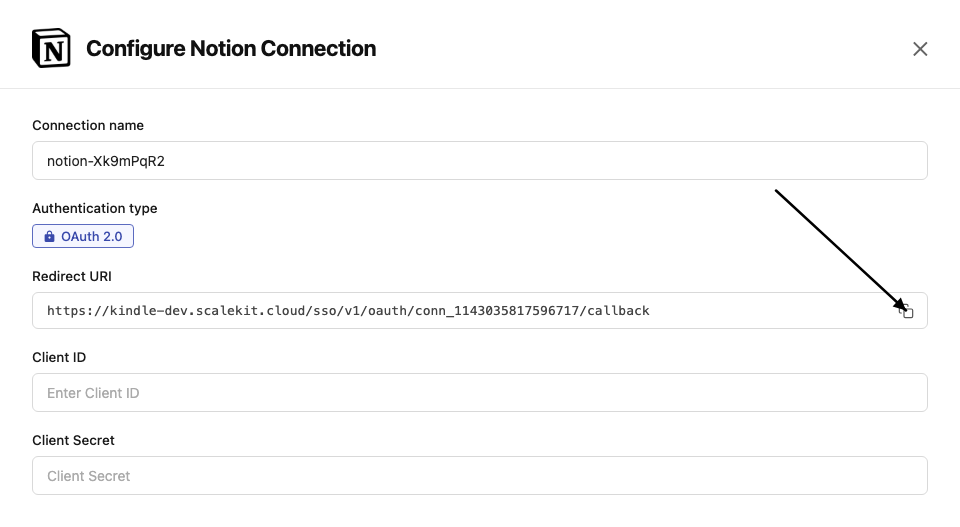
-
Go to Notion Integrations and click New integration.
-
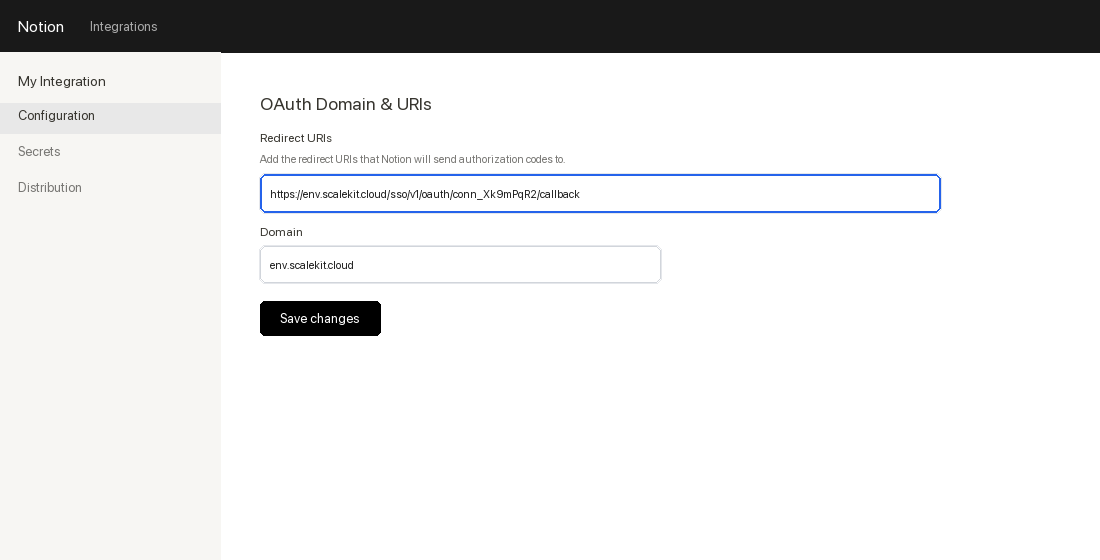
Fill in the integration name and select your workspace. In the OAuth Domain & URIs section, paste the redirect URI from Scalekit and click Submit.
-
-
Get client credentials
-
In your Notion integration settings, go to the Secrets tab.
-
Copy the OAuth client ID and OAuth client secret.
-
-
Add credentials in Scalekit
-
In Scalekit dashboard, go to AgentKit > Connections and open the connection you created.
-
Enter your credentials:
- Client ID (OAuth client ID from above)
- Client Secret (OAuth client secret from above)
- Permissions (capabilities — see Notion capabilities reference)
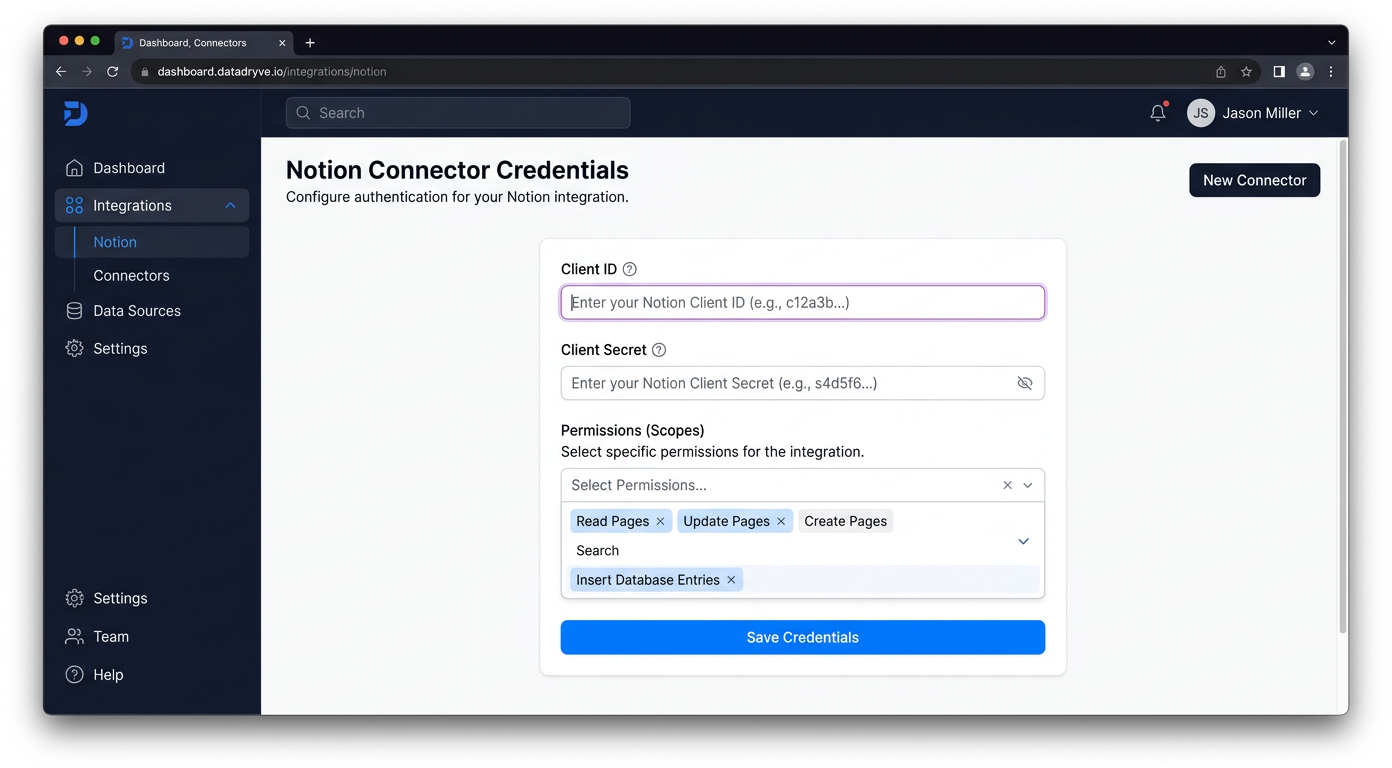
-
Click Save.
-
-
-
Authorize and make your first call
Section titled “Authorize and make your first call”quickstart.ts import { ScalekitClient } from '@scalekit-sdk/node'import 'dotenv/config'const scalekit = new ScalekitClient(process.env.SCALEKIT_ENV_URL,process.env.SCALEKIT_CLIENT_ID,process.env.SCALEKIT_CLIENT_SECRET,)const actions = scalekit.actionsconst connector = 'notion'const identifier = 'user_123'// Generate an authorization link for the userconst { link } = await actions.getAuthorizationLink({ connectionName: connector, identifier })console.log('Authorize Notion:', link)process.stdout.write('Press Enter after authorizing...')await new Promise(r => process.stdin.once('data', r))// Make your first callconst result = await actions.executeTool({connector,identifier,toolName: 'notion_data_fetch',toolInput: {},})console.log(result)quickstart.py import osfrom scalekit.client import ScalekitClientfrom dotenv import load_dotenvload_dotenv()scalekit_client = ScalekitClient(env_url=os.getenv("SCALEKIT_ENV_URL"),client_id=os.getenv("SCALEKIT_CLIENT_ID"),client_secret=os.getenv("SCALEKIT_CLIENT_SECRET"),)actions = scalekit_client.actionsconnection_name = "notion"identifier = "user_123"# Generate an authorization link for the userlink_response = actions.get_authorization_link(connection_name=connection_name,identifier=identifier,)print("Authorize Notion:", link_response.link)input("Press Enter after authorizing...")# Make your first callresult = actions.execute_tool(tool_input={},tool_name="notion_data_fetch",connection_name=connection_name,identifier=identifier,)print(result)
What you can do
Section titled “What you can do”Connect this agent connector to let your agent:
- Read pages and databases — retrieve page content and query database entries
- Create pages — add new pages and database rows with full content
- Update content — edit existing page blocks, properties, and database fields
- Search — find pages and databases across the user’s Notion workspace
Common workflows
Section titled “Common workflows”Proxy API call
const result = await actions.request({ connectionName: 'notion', identifier: 'user_123', path: '/v1/users/me', method: 'GET',});console.log(result);result = actions.request( connection_name='notion', identifier='user_123', path="/v1/users/me", method="GET")print(result)Execute a tool
const result = await actions.executeTool({ connector: 'notion', identifier: 'user_123', toolName: 'notion_user_list', toolInput: {},});console.log(result);result = actions.execute_tool( connection_name='notion', identifier='user_123', tool_name='notion_user_list', tool_input={},)print(result)Tool list
Section titled “Tool list”Use the exact tool names from the Tool list below when you call execute_tool. If you’re not sure which name to use, list the tools available for the current user first.
notion_block_delete#Delete (archive) a Notion block by its ID. This also deletes all child blocks within it.1 param
Delete (archive) a Notion block by its ID. This also deletes all child blocks within it.
block_idstringrequiredThe ID of the block to deletenotion_block_update#Update the text content of an existing Notion block. Supports paragraph, heading, list item, quote, callout, and code blocks.4 params
Update the text content of an existing Notion block. Supports paragraph, heading, list item, quote, callout, and code blocks.
block_idstringrequiredThe ID of the block to updatetextstringrequiredNew text content for the blocktypestringrequiredThe block type (must match the existing block type)languagestringoptionalProgramming language for code blocksnotion_comment_create#Create a comment in Notion. Provide a comment object with rich_text content and either a parent object (with page_id) for a page-level comment or a discussion_id to reply in an existing thread.6 params
Create a comment in Notion. Provide a comment object with rich_text content and either a parent object (with page_id) for a page-level comment or a discussion_id to reply in an existing thread.
commentobjectrequiredComment object containing a rich_text array. Example: {"rich_text":[{"type":"text","text":{"content":"Hello"}}]}discussion_idstringoptionalExisting discussion thread ID to reply to.notion_versionstringoptionalOptional override for the Notion-Version header (e.g., 2022-06-28).parentobjectoptionalParent object for a new top-level comment. Shape: {"page_id":"<uuid>"}.schema_versionstringoptionalInternal override for schema version.tool_versionstringoptionalInternal override for tool implementation version.notion_comment_retrieve#Retrieve a single Notion comment by its `comment_id`. LLM tip: you typically obtain `comment_id` from the response of creating a comment or by first listing comments for a page/block and selecting the desired item’s `id`.4 params
Retrieve a single Notion comment by its `comment_id`. LLM tip: you typically obtain `comment_id` from the response of creating a comment or by first listing comments for a page/block and selecting the desired item’s `id`.
comment_idstringrequiredThe identifier of the comment to retrieve (hyphenated UUID). Obtain it from Create-Comment responses or from a prior List-Comments call.notion_versionstringoptionalOptional Notion-Version header override (e.g., 2022-06-28).schema_versionstringoptionalInternal override for schema version.tool_versionstringoptionalInternal override for tool implementation version.notion_comments_fetch#Fetch comments for a given Notion block. Provide a `block_id` (the target page/block ID, hyphenated UUID). Supports pagination via `start_cursor` and `page_size` (1–100). LLM tip: extract `block_id` from a Notion URL’s trailing 32-char id, then insert hyphens (8-4-4-4-12).6 params
Fetch comments for a given Notion block. Provide a `block_id` (the target page/block ID, hyphenated UUID). Supports pagination via `start_cursor` and `page_size` (1–100). LLM tip: extract `block_id` from a Notion URL’s trailing 32-char id, then insert hyphens (8-4-4-4-12).
block_idstringrequiredTarget Notion block (or page) ID to fetch comments for. Use a hyphenated UUID.notion_versionstringoptionalOptional Notion-Version header override (e.g., 2022-06-28).page_sizeintegeroptionalMaximum number of comments to return (1–100).schema_versionstringoptionalInternal override for schema version.start_cursorstringoptionalCursor to fetch the next page of results.tool_versionstringoptionalInternal override for tool implementation version.notion_data_fetch#Fetch data from Notion using the workspace search API (/search). Supports pagination via start_cursor.5 params
Fetch data from Notion using the workspace search API (/search). Supports pagination via start_cursor.
page_sizeintegeroptionalMax number of results to return (1–100)querystringoptionalText query used by /searchschema_versionstringoptionalOptional schema version to use for tool executionstart_cursorstringoptionalCursor for pagination; pass the previous response's next_cursortool_versionstringoptionalOptional tool version to use for executionnotion_data_source_fetch#Retrieve a Notion database's schema, title, and properties using the Notion 2025-09-03 API. Unlike notion_database_fetch, this returns a data_sources array — each entry contains a data_source_id required by notion_data_source_query and notion_data_source_insert_row. Use this as the first step when working with merged, synced, or multi-source databases. For standard single-source databases, notion_database_fetch is sufficient. LLM guidance: extract data_sources[0].id (or the relevant source) from the response and pass it to the query or insert tools.1 param
Retrieve a Notion database's schema, title, and properties using the Notion 2025-09-03 API. Unlike notion_database_fetch, this returns a data_sources array — each entry contains a data_source_id required by notion_data_source_query and notion_data_source_insert_row. Use this as the first step when working with merged, synced, or multi-source databases. For standard single-source databases, notion_database_fetch is sufficient. LLM guidance: extract data_sources[0].id (or the relevant source) from the response and pass it to the query or insert tools.
database_idstringrequiredThe target database ID in UUID format with hyphens.notion_data_source_insert_row#Create a new row (page) in a Notion data source using the 2025-09-03 API. Required for merged, synced, or multi-source databases — these require parent.data_source_id instead of parent.database_id which the older notion_database_insert_row uses. Provide the data_source_id from notion_data_source_fetch (data_sources[].id) and a properties object mapping column names to Notion property value shapes. Optionally attach child blocks (page content), an icon, or a cover image. LLM guidance: step 1 — call notion_data_source_fetch to get the data_source_id; step 2 — build the properties object using exact column names from the schema (use 'title' key for title-type fields); step 3 — call this tool.5 params
Create a new row (page) in a Notion data source using the 2025-09-03 API. Required for merged, synced, or multi-source databases — these require parent.data_source_id instead of parent.database_id which the older notion_database_insert_row uses. Provide the data_source_id from notion_data_source_fetch (data_sources[].id) and a properties object mapping column names to Notion property value shapes. Optionally attach child blocks (page content), an icon, or a cover image. LLM guidance: step 1 — call notion_data_source_fetch to get the data_source_id; step 2 — build the properties object using exact column names from the schema (use 'title' key for title-type fields); step 3 — call this tool.
data_source_idstringrequiredThe ID of the data source to insert a row into. Retrieve from notion_database_fetch response under data_sources[].id.propertiesobjectrequiredObject mapping column names (or property ids) to property values. Example: {"title": {"title": [{"text": {"content": "Task A"}}]}, "Status": {"select": {"name": "Todo"}}}child_blocksarrayoptionalOptional array of Notion blocks to append as page content.coverobjectoptionalOptional page cover object. Example: {"type":"external","external":{"url":"https://example.com/cover.jpg"}}iconobjectoptionalOptional page icon object. Example: {"type":"emoji","emoji":"📝"}notion_data_source_query#Query rows (pages) from a Notion data source using the 2025-09-03 API. Required for merged, synced, or multi-source databases — these cannot be queried via notion_database_query as that tool uses the older /databases/{id}/query endpoint which does not support multiple data sources. Provide the data_source_id obtained from notion_data_source_fetch (data_sources[].id). Supports filtering by property values, sorting, and cursor-based pagination. LLM guidance: step 1 — call notion_data_source_fetch with the database_id to retrieve the data_source_id; step 2 — pass that id here along with an optional filter, sorts, and page_size.5 params
Query rows (pages) from a Notion data source using the 2025-09-03 API. Required for merged, synced, or multi-source databases — these cannot be queried via notion_database_query as that tool uses the older /databases/{id}/query endpoint which does not support multiple data sources. Provide the data_source_id obtained from notion_data_source_fetch (data_sources[].id). Supports filtering by property values, sorting, and cursor-based pagination. LLM guidance: step 1 — call notion_data_source_fetch with the database_id to retrieve the data_source_id; step 2 — pass that id here along with an optional filter, sorts, and page_size.
data_source_idstringrequiredThe ID of the data source to query. Retrieve from notion_database_fetch response under data_sources[].id.filterobjectoptionalNotion filter object to narrow results. Example: {"property": "Status", "select": {"equals": "Done"}}. Supports compound filters with 'and'/'or' arrays.page_sizeintegeroptionalMaximum number of rows to return (1-100).sortsarrayoptionalOrder the results. Each item must include either property or timestamp, plus direction.start_cursorstringoptionalCursor to fetch the next page of results.notion_database_create#Create a new database in Notion under a parent page. Provide a parent object with page_id, a database title (rich_text array), and a properties object that defines the database schema (columns).5 params
Create a new database in Notion under a parent page. Provide a parent object with page_id, a database title (rich_text array), and a properties object that defines the database schema (columns).
parentobjectrequiredParent object specifying the page under which the database is created. Example: {"page_id": "2561ab6c-418b-8072-beec-c4779fa811cf"}propertiesobjectrequiredDatabase schema object defining properties (columns). Example: {"Name": {"title": {}}, "Status": {"select": {"options": [{"name": "Todo"}, {"name": "Doing"}, {"name": "Done"}]}}}titlearrayrequiredDatabase title as a Notion rich_text array.schema_versionstringoptionalInternal override for schema version.tool_versionstringoptionalInternal override for tool implementation version.notion_database_fetch#Retrieve a Notion database's full definition, including title, properties, and schema. Required: database_id (hyphenated UUID). LLM tip: Extract the last 32 characters from a Notion database URL, then insert hyphens (8-4-4-4-12).1 param
Retrieve a Notion database's full definition, including title, properties, and schema. Required: database_id (hyphenated UUID). LLM tip: Extract the last 32 characters from a Notion database URL, then insert hyphens (8-4-4-4-12).
database_idstringrequiredThe target database ID in UUID format with hyphens.notion_database_insert_row#Insert a new row (page) into a Notion database. Required: `database_id` (hyphenated UUID) and `properties` (object mapping database column names to Notion **property values**). Optional: `child_blocks` (content blocks), `icon` (page icon object), and `cover` (page cover object).
LLM guidance:
- `properties` must use **property values** (not schema). Example:
{
"title": { "title": [ { "text": { "content": "Task A" } } ] },
"Status": { "select": { "name": "Todo" } },
"Due": { "date": { "start": "2025-09-01" } }
}
- Use the **exact property key** as defined in the database (case‑sensitive), or the property **id`.
- `icon` example (emoji): {"type":"emoji","emoji":"📝"}
- `cover` example (external): {"type":"external","external":{"url":"https://example.com/image.jpg"}}
- Runtime note: the executor/host should synthesize `parent = {"database_id": database_id}` before sending to Notion.8 params
Insert a new row (page) into a Notion database. Required: `database_id` (hyphenated UUID) and `properties` (object mapping database column names to Notion **property values**). Optional: `child_blocks` (content blocks), `icon` (page icon object), and `cover` (page cover object). LLM guidance: - `properties` must use **property values** (not schema). Example: { "title": { "title": [ { "text": { "content": "Task A" } } ] }, "Status": { "select": { "name": "Todo" } }, "Due": { "date": { "start": "2025-09-01" } } } - Use the **exact property key** as defined in the database (case‑sensitive), or the property **id`. - `icon` example (emoji): {"type":"emoji","emoji":"📝"} - `cover` example (external): {"type":"external","external":{"url":"https://example.com/image.jpg"}} - Runtime note: the executor/host should synthesize `parent = {"database_id": database_id}` before sending to Notion.
database_idstringrequiredTarget database ID (hyphenated UUID).propertiesobjectrequiredObject mapping **column names (or property ids)** to **property values**.
️ **CRITICAL: Property Identification Rules:**
- For title fields: ALWAYS use 'title' as the property key (not 'Name' or display names)
- For other properties: Use exact property names from database schema (case-sensitive)
- DO NOT use URL-encoded property IDs with special characters
**Recommended Workflow:**
1. Call fetch_database first to see exact property names
2. Use 'title' for title-type properties
3. Match other property names exactly as shown in schema
Example:
{
"title": { "title": [ { "text": { "content": "Task A" } } ] },
"Status": { "select": { "name": "Todo" } },
"Due": { "date": { "start": "2025-09-01" } }
}_parentobjectoptionalComputed by host: `{ "database_id": "<database_id>" }`. Do not supply manually.child_blocksarrayoptionalOptional array of Notion blocks to append as page content (paragraph, heading, to_do, etc.).coverobjectoptionalOptional page cover object. Example external: {"type":"external","external":{"url":"https://example.com/cover.jpg"}}.iconobjectoptionalOptional page icon object. Examples: {"type":"emoji","emoji":"📝"} or {"type":"external","external":{"url":"https://..."}}.schema_versionstringoptionalOptional schema version override.tool_versionstringoptionalOptional tool version override.notion_database_property_retrieve#Query a Notion database and return only specific properties by supplying one or more property IDs. Use when you need page rows but want to limit the returned properties to reduce payload. Provide the database_id and an array of filter_properties (each item is a property id like "title")4 params
Query a Notion database and return only specific properties by supplying one or more property IDs. Use when you need page rows but want to limit the returned properties to reduce payload. Provide the database_id and an array of filter_properties (each item is a property id like "title")
database_idstringrequiredTarget database ID (hyphenated UUID).property_idstringoptionalproperty ID to filter results by a specific property. get the property id by querying database.schema_versionstringoptionalOptional schema version override.tool_versionstringoptionalOptional tool version override.notion_database_query#Query a Notion database for rows (pages) using the 2022-06-28 API. Works for standard single-source databases. NOTE: If you encounter an 'Invalid request URL' error or are working with a merged, synced, or multi-source database, use the newer data source tools instead — call notion_data_source_fetch with the database_id to get the data_source_id, then call notion_data_source_query with that id. Provide database_id (hyphenated UUID). Optional: filter (Notion filter object), page_size (default 10), start_cursor for pagination, and sorts. LLM guidance: extract the last 32 characters from a Notion database URL and insert hyphens (8-4-4-4-12) to form database_id. Sort rules: each sort item MUST include either property OR timestamp (last_edited_time/created_time), not both.7 params
Query a Notion database for rows (pages) using the 2022-06-28 API. Works for standard single-source databases. NOTE: If you encounter an 'Invalid request URL' error or are working with a merged, synced, or multi-source database, use the newer data source tools instead — call notion_data_source_fetch with the database_id to get the data_source_id, then call notion_data_source_query with that id. Provide database_id (hyphenated UUID). Optional: filter (Notion filter object), page_size (default 10), start_cursor for pagination, and sorts. LLM guidance: extract the last 32 characters from a Notion database URL and insert hyphens (8-4-4-4-12) to form database_id. Sort rules: each sort item MUST include either property OR timestamp (last_edited_time/created_time), not both.
database_idstringrequiredTarget database ID (hyphenated UUID).filterobjectoptionalNotion filter object to narrow results. Example: {"property": "Status", "select": {"equals": "Done"}}. Supports compound filters with 'and'/'or' arrays.page_sizeintegeroptionalMaximum number of rows to return (1–100).schema_versionstringoptionalOptional schema version override.sortsarrayoptionalOrder the results. Each item must include either property or timestamp, plus direction.start_cursorstringoptionalCursor to fetch the next page of results.tool_versionstringoptionalOptional tool version override.notion_database_update#Update a Notion database's title, description, or property schema.4 params
Update a Notion database's title, description, or property schema.
database_idstringrequiredThe ID of the database to updatedescriptionstringoptionalNew description for the databasepropertiesobjectoptionalProperty schema updates (add, rename, or reconfigure columns)titlestringoptionalNew title for the databasenotion_page_content_append#Append blocks to a Notion page or block. IMPORTANT: This tool uses a simplified block format — do NOT pass raw Notion API block objects. Each block takes a 'type' and a 'text' string (plain text only). The tool internally converts these into the Notion API format. Supported types: paragraph, heading_1, heading_2, heading_3, bulleted_list_item, numbered_list_item, code, quote, callout, divider. For code blocks, add a 'language' field. Dividers require only the 'type' field. Example: [{"type": "heading_1", "text": "My Title"}, {"type": "paragraph", "text": "Some content"}, {"type": "code", "text": "print('hi')", "language": "python"}, {"type": "divider"}].2 params
Append blocks to a Notion page or block. IMPORTANT: This tool uses a simplified block format — do NOT pass raw Notion API block objects. Each block takes a 'type' and a 'text' string (plain text only). The tool internally converts these into the Notion API format. Supported types: paragraph, heading_1, heading_2, heading_3, bulleted_list_item, numbered_list_item, code, quote, callout, divider. For code blocks, add a 'language' field. Dividers require only the 'type' field. Example: [{"type": "heading_1", "text": "My Title"}, {"type": "paragraph", "text": "Some content"}, {"type": "code", "text": "print('hi')", "language": "python"}, {"type": "divider"}].
block_idstringrequiredThe ID of the page or block to append content toblocksarrayrequiredArray of blocks to append. Each block uses a simplified format with 'type' and 'text' fields — NOT the raw Notion API format. Do not pass Notion block objects with rich_text arrays.notion_page_content_get#Retrieve the content (blocks) of a Notion page or block. Returns all child blocks with their type and text content.3 params
Retrieve the content (blocks) of a Notion page or block. Returns all child blocks with their type and text content.
block_idstringrequiredThe ID of the page or block whose children to retrievepage_sizenumberoptionalNumber of blocks to return (max 100)start_cursorstringoptionalCursor for pagination from a previous responsenotion_page_create#Create a page in Notion either inside a database (as a row) or as a child of a page. Use exactly one parent mode: provide database_id to create a database row (page with properties) OR provide parent_page_id to create a child page. When creating in a database, properties must use Notion property value shapes and the title property key must be "title" (not the display name). Children (content blocks), icon, and cover are optional. The executor should synthesize the Notion parent object from the chosen parent input.
Target rules:
- Use database_id OR parent_page_id (not both)
- If database_id is provided → properties are required
- If parent_page_id is provided → properties are optional10 params
Create a page in Notion either inside a database (as a row) or as a child of a page. Use exactly one parent mode: provide database_id to create a database row (page with properties) OR provide parent_page_id to create a child page. When creating in a database, properties must use Notion property value shapes and the title property key must be "title" (not the display name). Children (content blocks), icon, and cover are optional. The executor should synthesize the Notion parent object from the chosen parent input. Target rules: - Use database_id OR parent_page_id (not both) - If database_id is provided → properties are required - If parent_page_id is provided → properties are optional
_parentobjectoptionalComputed by the executor: {"database_id": "..."} OR {"page_id": "..."} derived from database_id/parent_page_id.child_blocksarrayoptionalOptional blocks to add as page content (children).coverobjectoptionalOptional page cover object.database_idstringoptionalCreate a page as a new row in this database (hyphenated UUID). Extract from the database URL (last 32 chars → hyphenate 8-4-4-4-12).iconobjectoptionalOptional page icon object.notion_versionstringoptionalOptional Notion-Version header override.parent_page_idstringoptionalCreate a child page under this page (hyphenated UUID). Extract from the parent page URL.propertiesobjectoptionalFor database rows, supply property values keyed by property name (or id). For title properties, the key must be "title".
Example (database row):
{
"title": { "title": [ { "text": { "content": "Task A" } } ] },
"Status": { "select": { "name": "Todo" } },
"Due": { "date": { "start": "2025-09-01" } }
}schema_versionstringoptionalOptional schema version override.tool_versionstringoptionalOptional tool version override.notion_page_get#Retrieve a Notion page by its ID. Returns the page properties, metadata, and parent information.1 param
Retrieve a Notion page by its ID. Returns the page properties, metadata, and parent information.
page_idstringrequiredThe ID of the Notion page to retrievenotion_page_search#Search Notion pages by text query. Returns matching pages with their titles, IDs, and metadata. Optionally sort by last_edited_time or created_time, and paginate with start_cursor.5 params
Search Notion pages by text query. Returns matching pages with their titles, IDs, and metadata. Optionally sort by last_edited_time or created_time, and paginate with start_cursor.
page_sizeintegeroptionalMaximum number of pages to return (1–100).querystringoptionalText to search for across Notion pages.sort_directionstringoptionalDirection to sort results.sort_timestampstringoptionalTimestamp field to sort results by.start_cursorstringoptionalCursor to fetch the next page of results.notion_page_update#Update a Notion page's properties, archive/unarchive it, or change its icon and cover.5 params
Update a Notion page's properties, archive/unarchive it, or change its icon and cover.
page_idstringrequiredThe ID of the Notion page to updatearchivedbooleanoptionalSet to true to archive (delete) the page, false to unarchive itcoverobjectoptionalPage cover image to seticonobjectoptionalPage icon to setpropertiesobjectoptionalPage properties to update using Notion property value shapesnotion_user_list#List all users in the Notion workspace including people and bots.2 params
List all users in the Notion workspace including people and bots.
page_sizenumberoptionalNumber of users to return (max 100)start_cursorstringoptionalCursor for pagination from a previous response