


Asana MCP connector
OAuth 2.1Project ManagementProductivityConnect to Asana MCP server to manage tasks, projects, and teams directly from your AI workflows.
Asana MCP connector
-
Install the SDK
Section titled “Install the SDK”Terminal window npm install @scalekit-sdk/nodeTerminal window pip install scalekit -
Set your credentials
Section titled “Set your credentials”Add your Scalekit credentials to your
.envfile. Find values in app.scalekit.com > Developers > API Credentials..env SCALEKIT_ENVIRONMENT_URL=<your-environment-url>SCALEKIT_CLIENT_ID=<your-client-id>SCALEKIT_CLIENT_SECRET=<your-client-secret> -
Set up the connector
Section titled “Set up the connector”Register your Asana MCP credentials with Scalekit so it handles the token lifecycle. You do this once per environment.
Dashboard setup steps
Register your Scalekit environment with the Asana MCP connector so Scalekit handles the OAuth flow and token lifecycle for your users. Asana MCP requires a dedicated MCP app — not an API app or a personal access token.
-
Copy the redirect URI from Scalekit
- In Scalekit dashboard, go to AgentKit > Connections > Create Connection.
- Search for Asana MCP and click Create.
- Copy the Redirect URI from the connection details panel. It looks like:
https://<YOUR_ENV>.scalekit.cloud/sso/v1/oauth/conn_<ID>/callback
-
Create an MCP app in Asana
- Go to app.asana.com/-/developer_console and sign in.
- Click Create new app.
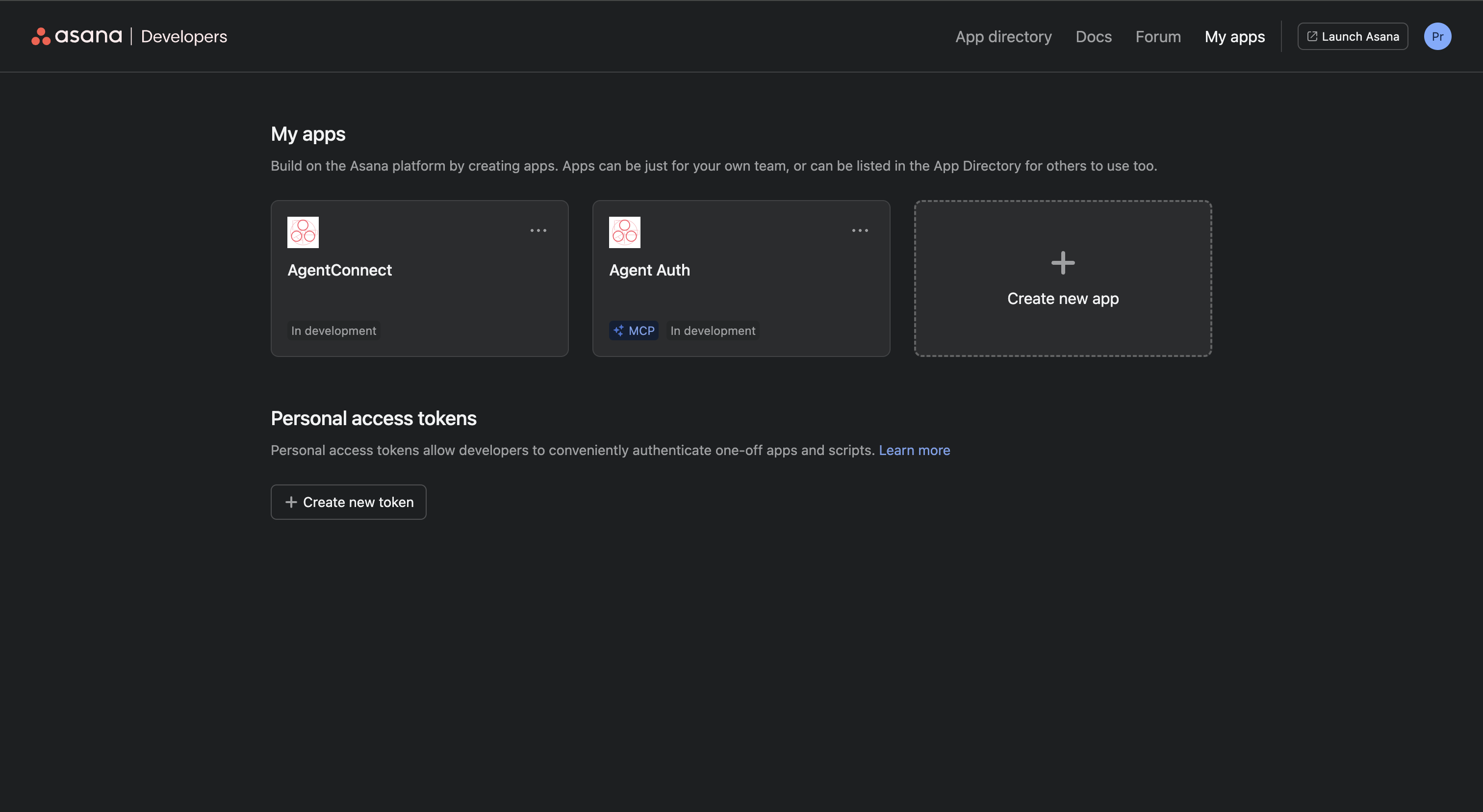
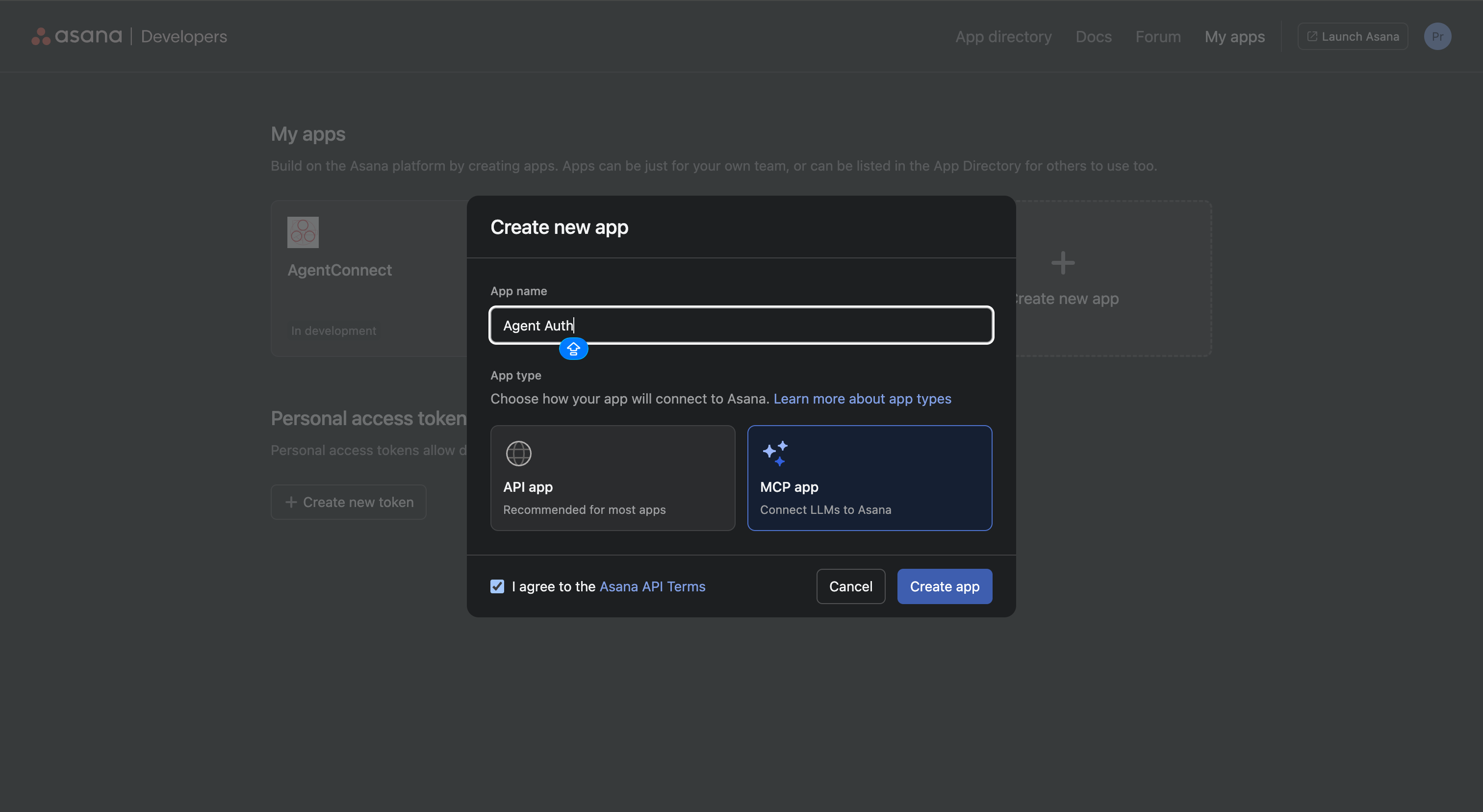
- In the Create new app dialog:
- Enter an App name, for example
Agent Auth. - Under App type, select MCP app (“Connect LLMs to Asana”). Do not select API app.
- Check I agree to the Asana API Terms.
- Click Create app.
- Enter an App name, for example
-
Add the redirect URI to your app
- Inside your new MCP app, open the left menu and click OAuth.
- Under Redirect URLs, click Add redirect URL, paste the redirect URI from Scalekit, and click Add.
-
Copy your app credentials
- In the same OAuth section, copy your Client ID and Client Secret.
-
Add credentials in Scalekit
- In Scalekit dashboard, go to AgentKit > Connections and open the Asana MCP connection you created.
- Enter:
- Client ID — from your Asana MCP app
- Client Secret — from your Asana MCP app
- Click Save.
-
-
Authorize and make your first call
Section titled “Authorize and make your first call”quickstart.ts import { ScalekitClient } from '@scalekit-sdk/node'import 'dotenv/config'const scalekit = new ScalekitClient(process.env.SCALEKIT_ENV_URL,process.env.SCALEKIT_CLIENT_ID,process.env.SCALEKIT_CLIENT_SECRET,)const actions = scalekit.actionsconst connector = 'asanamcp'const identifier = 'user_123'// Generate an authorization link for the userconst { link } = await actions.getAuthorizationLink({ connectionName: connector, identifier })console.log('Authorize Asana MCP:', link)process.stdout.write('Press Enter after authorizing...')await new Promise(r => process.stdin.once('data', r))// Make your first callconst result = await actions.executeTool({connector,identifier,toolName: 'asanamcp_get_me',toolInput: {},})console.log(result)quickstart.py import osfrom scalekit.client import ScalekitClientfrom dotenv import load_dotenvload_dotenv()scalekit_client = ScalekitClient(env_url=os.getenv("SCALEKIT_ENV_URL"),client_id=os.getenv("SCALEKIT_CLIENT_ID"),client_secret=os.getenv("SCALEKIT_CLIENT_SECRET"),)actions = scalekit_client.actionsconnection_name = "asanamcp"identifier = "user_123"# Generate an authorization link for the userlink_response = actions.get_authorization_link(connection_name=connection_name,identifier=identifier,)print("Authorize Asana MCP:", link_response.link)input("Press Enter after authorizing...")# Make your first callresult = actions.execute_tool(tool_input={},tool_name="asanamcp_get_me",connection_name=connection_name,identifier=identifier,)print(result)
What you can do
Section titled “What you can do”Connect this agent connector to let your agent:
- Update tasks — Modify one or more Asana tasks in a single operation
- Search tasks preview, tasks, objects — Display interactive search results for Asana tasks matching the given filters, before committing to any action
- Get workspace agents, users, user — Return a list of all AI Teammate agents configured in the Asana workspace
- Delete task — Permanently delete an Asana task and all of its dependent subtasks
- Create tasks, task preview, project status update — Create one or more Asana tasks immediately, without a confirmation step
- Comment add — Post a comment (discussion entry) to a specific Asana task
Tool list
Section titled “Tool list”Use the exact tool names from the Tool list below when you call execute_tool. If you’re not sure which name to use, list the tools available for the current user first.
asanamcp_add_comment#Post a comment (discussion entry) to a specific Asana task. Supports plain text or HTML formatting.3 params
Post a comment (discussion entry) to a specific Asana task. Supports plain text or HTML formatting.
task_idstringrequiredGID of the task to post a comment on. Find the GID in the Asana task URL. Example: '1234567890123456'htmlstringoptionalHTML-formatted content of the comment. Use for rich text formatting with bold, links, etc. Example: '<body>This looks <strong>good</strong>!</body>'textstringoptionalPlain text content of the comment. Use this for simple text comments without formatting. Example: 'This looks good, approved!'asanamcp_create_project#Create a new Asana project with optional sections and tasks pre-populated.5 params
Create a new Asana project with optional sections and tasks pre-populated.
namestringrequiredName of the project to create. This is the primary label shown in Asana's project list. Example: 'Q4 Product Launch'descriptionstringoptionalDescription of the project, explaining its purpose or scope. Example: 'Track all Q4 product launch tasks.'sectionsarrayoptionalNames of sections to pre-create in the project. Sections help organize tasks into groups. Example: ["Planning", "In Progress", "Done"]teamstringoptionalGID of the team to associate the project with. Team projects are visible to all team members. Example: '1234567890123456'workspace_gidstringoptionalGID of the workspace where the project should be created. Required if no team is specified. Example: '1234567890123456'asanamcp_create_project_preview#Present a structured project plan for confirmation before creating the project in Asana.5 params
Present a structured project plan for confirmation before creating the project in Asana.
project_namestringrequiredName of the project to preview. This is the primary label shown in Asana's project list. Example: 'Q4 Product Launch'descriptionstringoptionalDescription of the project, explaining its purpose or scope. Example: 'Track all Q4 product launch tasks.'sectionsarrayoptionalSections to pre-create in the project. Each section has a name and an optional list of tasks. Example: [{"sectionName": "Planning", "tasks": [{"taskName": "Define scope"}]}]teamstringoptionalGID of the team to associate the project with. Team projects are visible to all team members. Example: '1234567890123456'workspace_gidstringoptionalGID of the workspace where the project should be created. Required if no team is specified. Example: '1234567890123456'asanamcp_create_project_status_update#Post a status update to an Asana project or portfolio, including a title, status color, and body text.4 params
Post a status update to an Asana project or portfolio, including a title, status color, and body text.
colorstringrequiredStatus color indicating project health. Valid values: 'green' (on track), 'yellow' (at risk), 'red' (off track), 'blue' (on hold), 'complete'.parentstringrequiredGID of the project or portfolio to post the status update to. Find the GID in the Asana project or portfolio URL. Example: '1234567890123456'titlestringrequiredTitle of the status update. Appears as the headline of the status entry. Example: 'On track for Q4 launch'textstringoptionalDetailed body text of the status update. Provides additional context, highlights, and notes. Example: 'All milestones are on track. Team velocity is good.'asanamcp_create_task_preview#Draft an Asana task for review before creation. Shows a preview to the user without immediately creating the task.6 params
Draft an Asana task for review before creation. Shows a preview to the user without immediately creating the task.
taskNamestringrequiredName (title) of the task to preview. This is the primary identifier that will be shown in Asana's task list. Example: 'Review Q4 report'assigneestringoptionalGID or 'me' of the user to assign the task to. Use 'me' to assign to the authenticated user. Example: 'me' or '1234567890123456'descriptionstringoptionalTask description in plain text or HTML. Provides additional context for the preview. Example: 'Please review the Q4 financial report.'due_datestringoptionalProposed due date in ISO 8601 format (YYYY-MM-DD). Example: '2024-12-31'projectstringoptionalGID of the project to add the task to. Example: '1234567890123456'sectionstringoptionalGID of the section within the project to place the task in. Requires project to also be specified. Example: '1234567890123456'asanamcp_create_tasks#Create one or more Asana tasks immediately, without a confirmation step. Supports creating up to 50 tasks in a single call.1 param
Create one or more Asana tasks immediately, without a confirmation step. Supports creating up to 50 tasks in a single call.
tasksarrayrequiredArray of tasks to create. Each element defines one task. Up to 50 tasks may be created per call.asanamcp_delete_task#Permanently delete an Asana task and all of its dependent subtasks. This action cannot be undone.1 param
Permanently delete an Asana task and all of its dependent subtasks. This action cannot be undone.
task_gidstringrequiredGID of the task to permanently delete. All subtasks will also be deleted. This action cannot be undone. Example: '1234567890123456'asanamcp_get_agent#Retrieve full details of a specific Asana AI Teammate agent record by its GID.1 param
Retrieve full details of a specific Asana AI Teammate agent record by its GID.
agent_gidstringrequiredThe GID of the AI Teammate agent to retrieve.asanamcp_get_attachments#Retrieve file attachments with download and view URLs for a task, project, or brief.2 params
Retrieve file attachments with download and view URLs for a task, project, or brief.
parentstringrequiredGID of the task, project, or project brief to get attachments for.parent_typestringoptionalType of the parent resource. Valid values: task, project, project_brief.asanamcp_get_items_for_portfolio#Return all projects and other items contained within a specific Asana portfolio.1 param
Return all projects and other items contained within a specific Asana portfolio.
portfolio_gidstringrequiredThe GID of the portfolio to retrieve items for.asanamcp_get_me#Return profile details for the currently authenticated Asana user, including name, email, and workspace memberships.0 params
Return profile details for the currently authenticated Asana user, including name, email, and workspace memberships.
asanamcp_get_my_tasks#Retrieve tasks assigned to the currently authenticated Asana user.1 param
Retrieve tasks assigned to the currently authenticated Asana user.
completion_statusstringoptionalFilter tasks by completion status. Valid values: 'incomplete' (default), 'completed', 'all'. Example: 'incomplete'asanamcp_get_portfolio#Retrieve details of a specific Asana portfolio including its associated projects and status.1 param
Retrieve details of a specific Asana portfolio including its associated projects and status.
portfolio_gidstringrequiredThe GID (global identifier) of the Asana portfolio to retrieve. Example: '1234567890123456'asanamcp_get_portfolios#List all portfolios owned by the currently authenticated Asana user.1 param
List all portfolios owned by the currently authenticated Asana user.
workspace_gidstringoptionalThe GID of the workspace to filter portfolios by. If omitted, returns portfolios across all workspaces. Example: '1234567890123456'asanamcp_get_project#Fetch details of a specific Asana project including its sections and member information.1 param
Fetch details of a specific Asana project including its sections and member information.
project_idstringrequiredThe GID (global identifier) of the Asana project to retrieve. Example: '1234567890123456'asanamcp_get_projects#List workspace projects, optionally filtered by team. Returns project names, GIDs, and status.3 params
List workspace projects, optionally filtered by team. Returns project names, GIDs, and status.
include_archivedbooleanoptionalWhether to include archived projects in the results. Defaults to false if omitted.teamstringoptionalFilter projects by team GID. Only projects belonging to the specified team will be returned. Example: '1234567890123456'workspace_gidstringoptionalThe GID of the workspace to list projects from. Example: '1234567890123456'asanamcp_get_status_overview#Returns an aggregated status report for one or more Asana projects or portfolios, including health indicators and progress updates.1 param
Returns an aggregated status report for one or more Asana projects or portfolios, including health indicators and progress updates.
keywordsstringrequiredName or keyword to search for the project or portfolio to get a status overview for. Example: 'Q4 Launch'asanamcp_get_task#Retrieve comprehensive details of a specific Asana task by its GID, including assignments, dates, custom fields, and comments.1 param
Retrieve comprehensive details of a specific Asana task by its GID, including assignments, dates, custom fields, and comments.
task_idstringrequiredThe GID (global identifier) of the Asana task to retrieve. Example: '1234567890123456'asanamcp_get_tasks#Returns a filtered list of tasks by context. At least one filter parameter (project, section, tag, user_task_list, or assignee) is required.6 params
Returns a filtered list of tasks by context. At least one filter parameter (project, section, tag, user_task_list, or assignee) is required.
assigneestringoptionalFilter tasks by assignee. Provide an assignee GID or the string 'me' for the current user. Example: 'me' or '1234567890123456'completedbooleanoptionalFilter tasks by completion status. Set to true to return only completed tasks, false for incomplete tasks. If omitted, returns all tasks.projectstringoptionalFilter tasks by project GID. Example: '1234567890123456'sectionstringoptionalFilter tasks by section GID. Returns tasks in the specified section. Example: '1234567890123456'tagstringoptionalFilter tasks by tag GID. Returns tasks associated with the specified tag. Example: '1234567890123456'user_task_liststringoptionalFilter tasks by user task list (My Tasks) GID. Example: '1234567890123456'asanamcp_get_teams#List teams in the workspace, optionally filtered to teams the specified user is a member of.2 params
List teams in the workspace, optionally filtered to teams the specified user is a member of.
userstringoptionalUser GID or 'me' to filter teams by the user's membership.workspace_gidstringoptionalWorkspace GID to list teams from.asanamcp_get_user#Retrieve details of an Asana user by their GID, email address, or 'me' for the current user.2 params
Retrieve details of an Asana user by their GID, email address, or 'me' for the current user.
emailstringoptionalEmail address of the user to look up.user_gidstringoptionalUser GID or 'me' to retrieve the authenticated user's details.asanamcp_get_users#List users in the workspace, optionally filtered to members of a specific team.2 params
List users in the workspace, optionally filtered to members of a specific team.
teamstringoptionalTeam GID to filter users by team membership.workspace_gidstringoptionalWorkspace GID to list users from.asanamcp_get_workspace_agents#Return a list of all AI Teammate agents configured in the Asana workspace.0 params
Return a list of all AI Teammate agents configured in the Asana workspace.
asanamcp_search_objects#Universal search across Asana resource types including tasks, projects, portfolios, goals, teams, users, tags, and custom fields.3 params
Universal search across Asana resource types including tasks, projects, portfolios, goals, teams, users, tags, and custom fields.
resource_typestringrequiredType of Asana resource to search. Valid values: task, project, portfolio, goal, team, user, tag, custom_field. Example: 'task'querystringoptionalSearch query text to match against resource names and descriptions. Example: 'Q4 planning'workspace_gidstringoptionalThe GID of the workspace to scope the search within. If omitted, searches across all accessible workspaces. Example: '1234567890123456'asanamcp_search_tasks#Advanced task searching with full-text and attribute-based filtering. Requires a Premium Asana account.10 params
Advanced task searching with full-text and attribute-based filtering. Requires a Premium Asana account.
assigneestringoptionalFilter tasks by assignee GID or 'me' for the current user. Example: 'me'completedbooleanoptionalFilter by completion status. Set to true to return only completed tasks, false for incomplete tasks.due_onstringoptionalFilter tasks with an exact due date (ISO 8601 format). Example: '2024-12-31'due_on_afterstringoptionalFilter tasks due after this date (ISO 8601 format, inclusive). Example: '2024-01-01'due_on_beforestringoptionalFilter tasks due before this date (ISO 8601 format, exclusive). Example: '2024-12-31'projectstringoptionalFilter tasks by project GID. Example: '1234567890123456'sectionstringoptionalFilter tasks by section GID. Example: '1234567890123456'tagstringoptionalFilter tasks by tag GID. Example: '1234567890123456'textstringoptionalFull-text search query to match against task names and descriptions. Example: 'website redesign'workspace_gidstringoptionalThe GID of the workspace to search within. Example: '1234567890123456'asanamcp_search_tasks_preview#Display interactive search results for Asana tasks matching the given filters, before committing to any action.5 params
Display interactive search results for Asana tasks matching the given filters, before committing to any action.
assigneestringoptionalFilter tasks by assignee GID or 'me' for the authenticated user. Example: 'me' or '1234567890123456'due_date_range_endstringoptionalEnd of the due date range filter in ISO 8601 format (YYYY-MM-DD). Returns tasks with due dates on or before this date. Example: '2024-12-31'due_date_range_startstringoptionalStart of the due date range filter in ISO 8601 format (YYYY-MM-DD). Returns tasks with due dates on or after this date. Example: '2024-01-01'statusstringoptionalFilter tasks by completion status. Valid values: 'incomplete', 'completed', 'all'. Example: 'incomplete'textstringoptionalFull-text search query for tasks. Matches against task name, description, and other text fields. Example: 'Q4 launch'asanamcp_update_tasks#Modify one or more Asana tasks in a single operation. Supports updating up to 50 tasks at once.1 param
Modify one or more Asana tasks in a single operation. Supports updating up to 50 tasks at once.
tasksarrayrequiredArray of task update objects. Each element must include a 'task' field (the task GID) plus whichever fields to update.